
Behind the formula: What the system calculates for you

Whether you’re building a new formulation, adding ingredients, or compounding at the workstation, Compound Direct is performing real-time calculations to ensure your product is accurate, efficient, and true to the prescribed dose. This blog will walk you through the key calculations taking place behind the scenes, starting from ingredient roles and adjustment factors, all the way to weighing variations during compounding.
Understanding how these calculations work is essential for confident formulation setup and seamless batch processing. You’ll learn how ingredient data, dosage forms, and batch properties influence the system’s calculations, and how Compound Direct dynamically adjusts to changes throughout the compounding process.
If you're new to these concepts or need a refresher, we recommend reviewing:
- Understanding adjustment factors in your lab
- Displacement Factors: The key to accurate molded dosage formulations
- Achieving precision in dosage forms
Let’s take a closer look at the foundation of accurate compounding, guided by the automated calculations built into Compound Direct.
Ingredients
Setting up the ingredients is the first and most important step, as it lays the foundation for all other compounding processes.
Ingredient roles
The role selected for each ingredient will affect how Compound Direct treats calculations within a formulation. There are 3 primary ingredient roles, but you can change the role within a formulation.
Actives
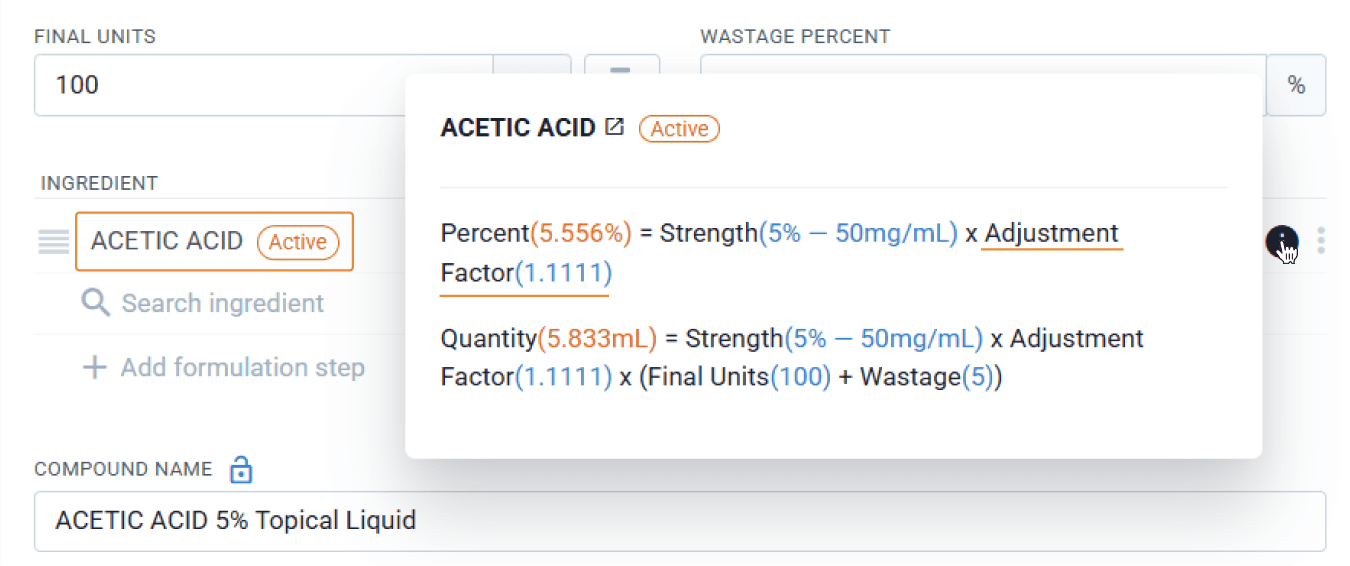
Compound Direct will use the adjustment factor to determine how much active needs to be used to achieve the prescribed dose
In this example, Acetic Acid has been entered into Compound Direct as an active with 90% elemental activity. This results in an adjustment factor of 1.111. When added to the formulation as an active, Compound Direct uses the adjustment factor to account for the inactive component.
From the formulations page
Excipients
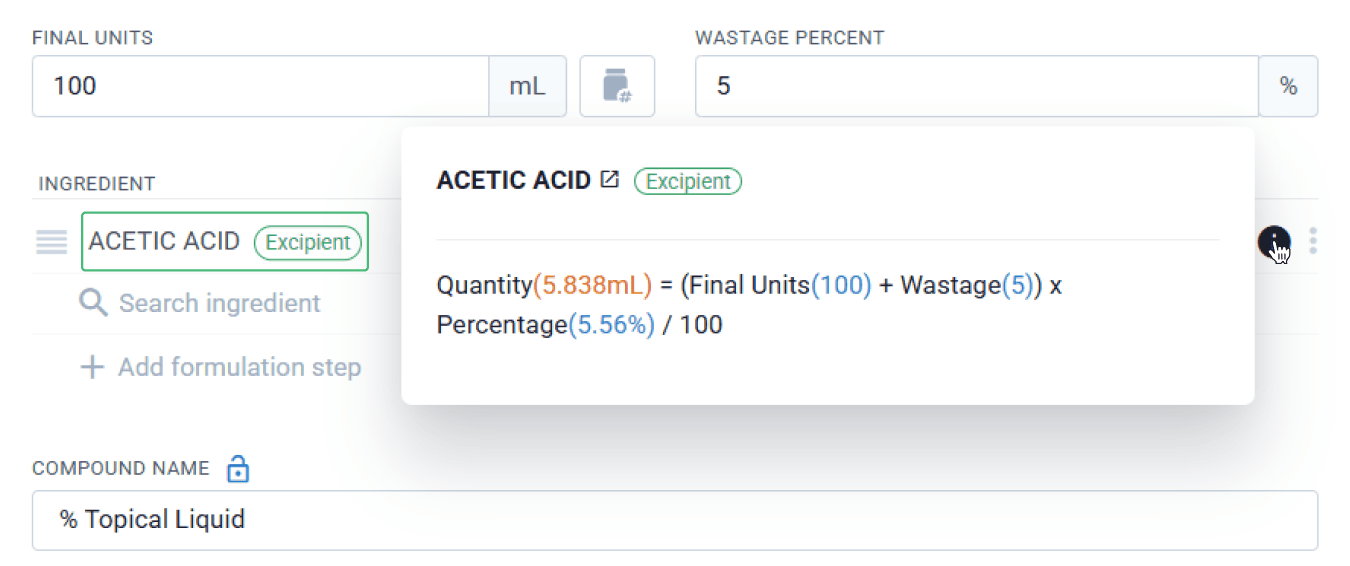
Compound Direct will ignore adjustment factors, even if the ingredient’s primary role is active in the settings.
If the role is changed to an excipient, Compound Direct will disregard the adjustment factor.
From the formulations page
Base
Compound Direct ignores adjustment factors, and the base is QS’d (filled to sufficient quantity) by default. When a formula is QS’d, the system calculates an estimated base amount that auto-adjusts to complete the formulation total as ingredients change. When not QS’d, it calculates the exact base required to ensure each unit delivers the correct therapeutic dose, and the amount stays fixed at what you enter.
Certificate of Analysis
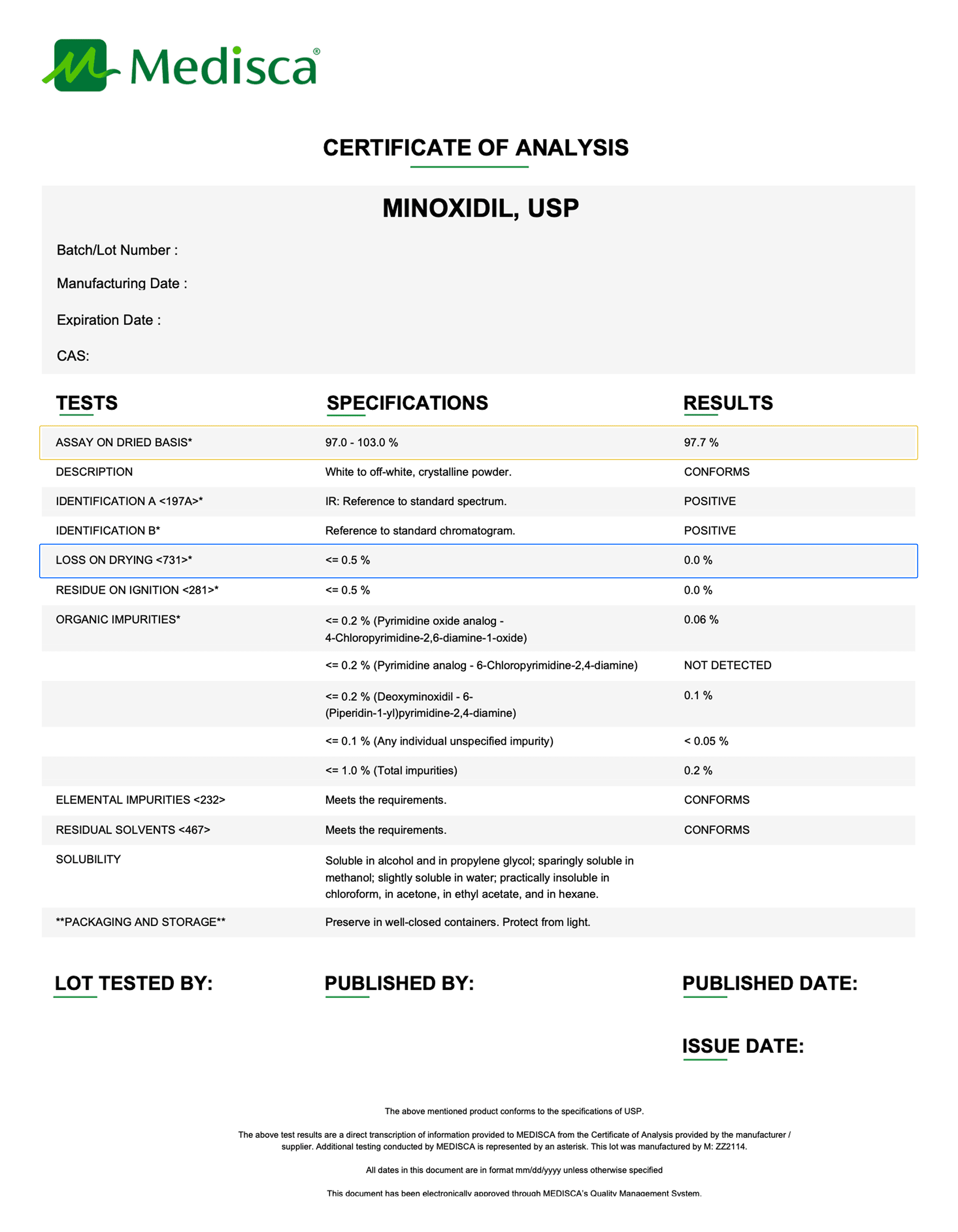
The Certificate of Analysis (CofA) plays a critical role when entering new ingredients into the system, unless you're manipulating a commercial ingredient, it’s the CofA that tells you how much of your ingredient may be lost due to impurities, salt forms, or water content. This document defines the purity of the product.
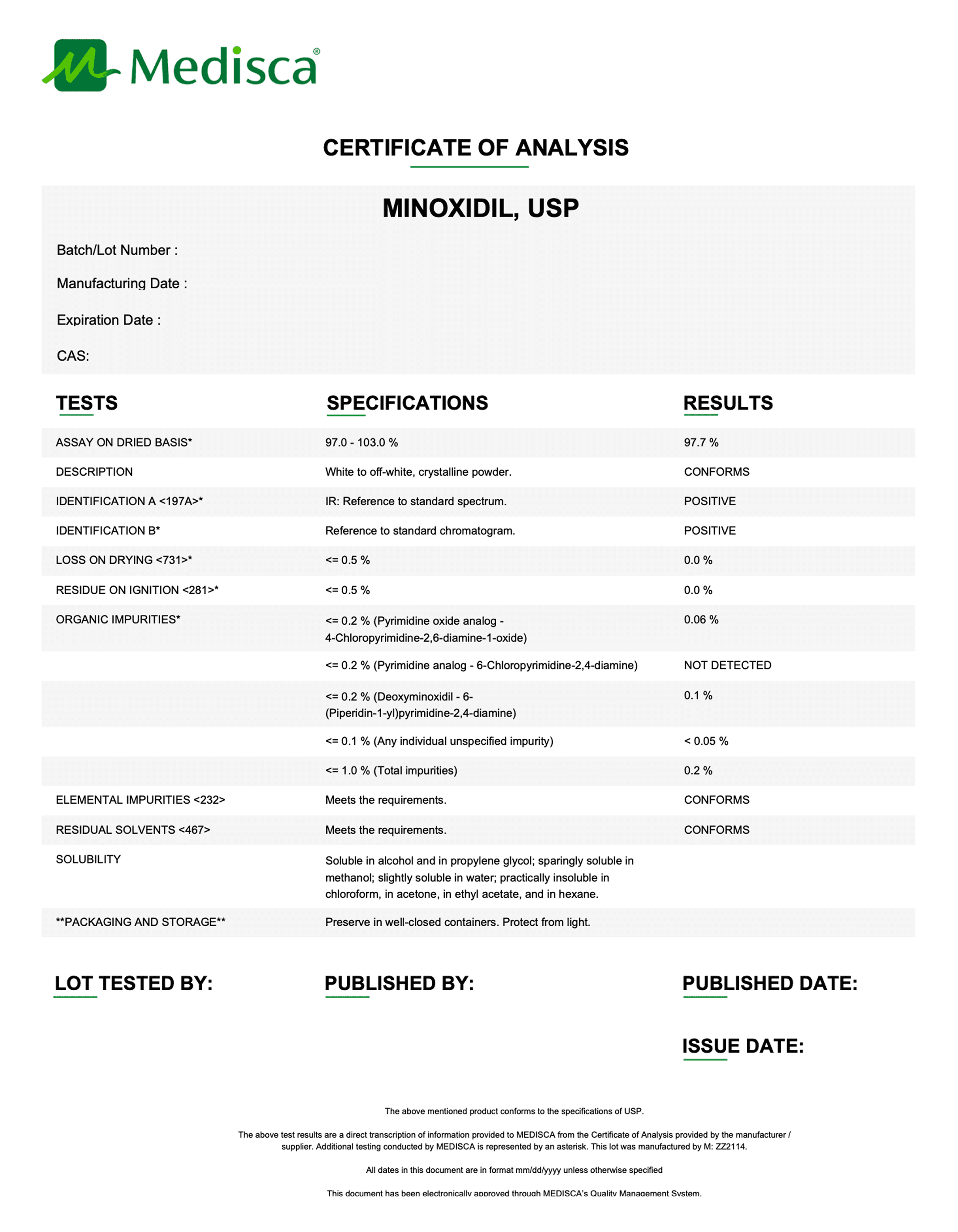
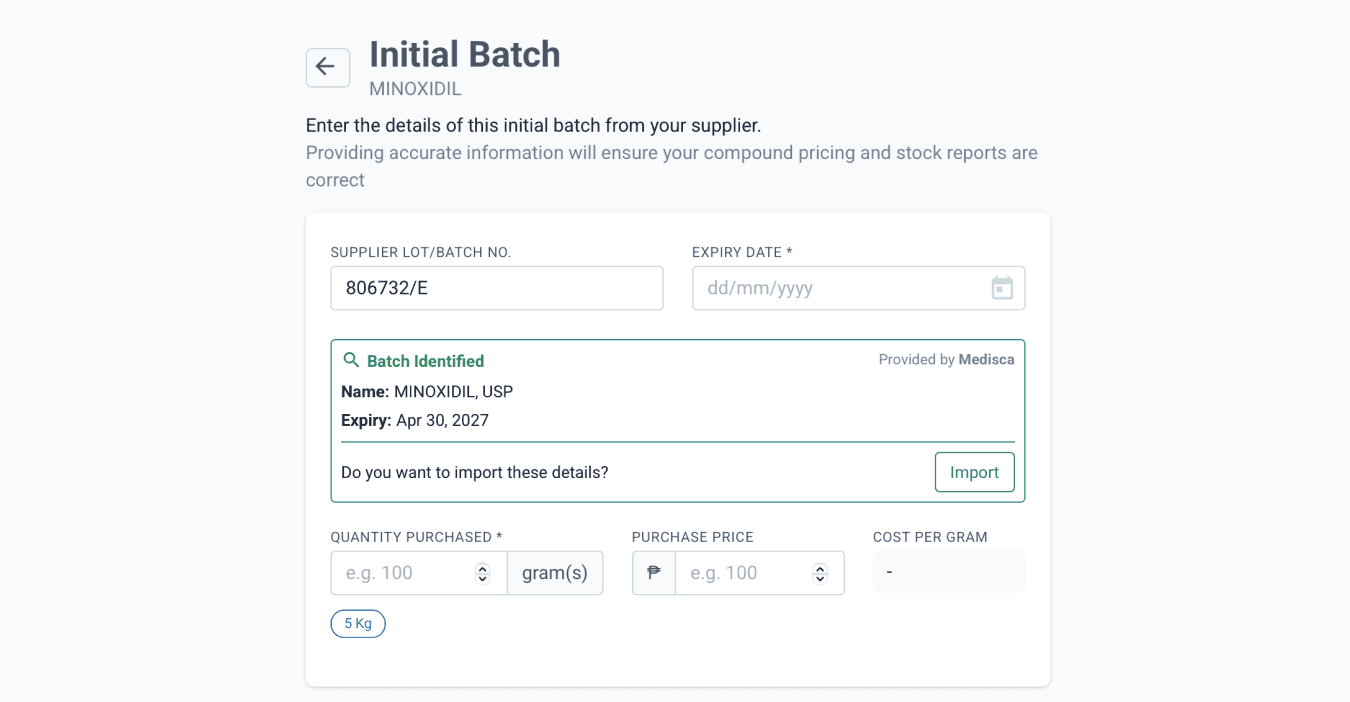
When you add a new ingredient, one of your first steps should be to input the relevant CofA data accurately. If you add a Medisca batch number to the ingredient, the CofA data is automatically populated in the system. However, we still recommend reviewing the CofA yourself to ensure all values have been entered correctly. Even with automation, it’s important to double-check this information to maintain accuracy in your formulation calculations.
From the ingredients page
Adjustment factor
The adjustment factor informs Compound Direct how much of an ingredient needs to be adjusted within a formulation to ensure the prescribed dose is accurately delivered. This is especially critical when working with triturates and dilutions, where even small miscalculations can lead to significant dosing errors. For these ingredient types, it’s essential that the adjustment factor is entered correctly to maintain accuracy and compliance.
There are several ways to calculate the adjustment factor, and since it’s a complex topic, we’ve covered it in more detail in Understanding adjustment factors in your lab blog.
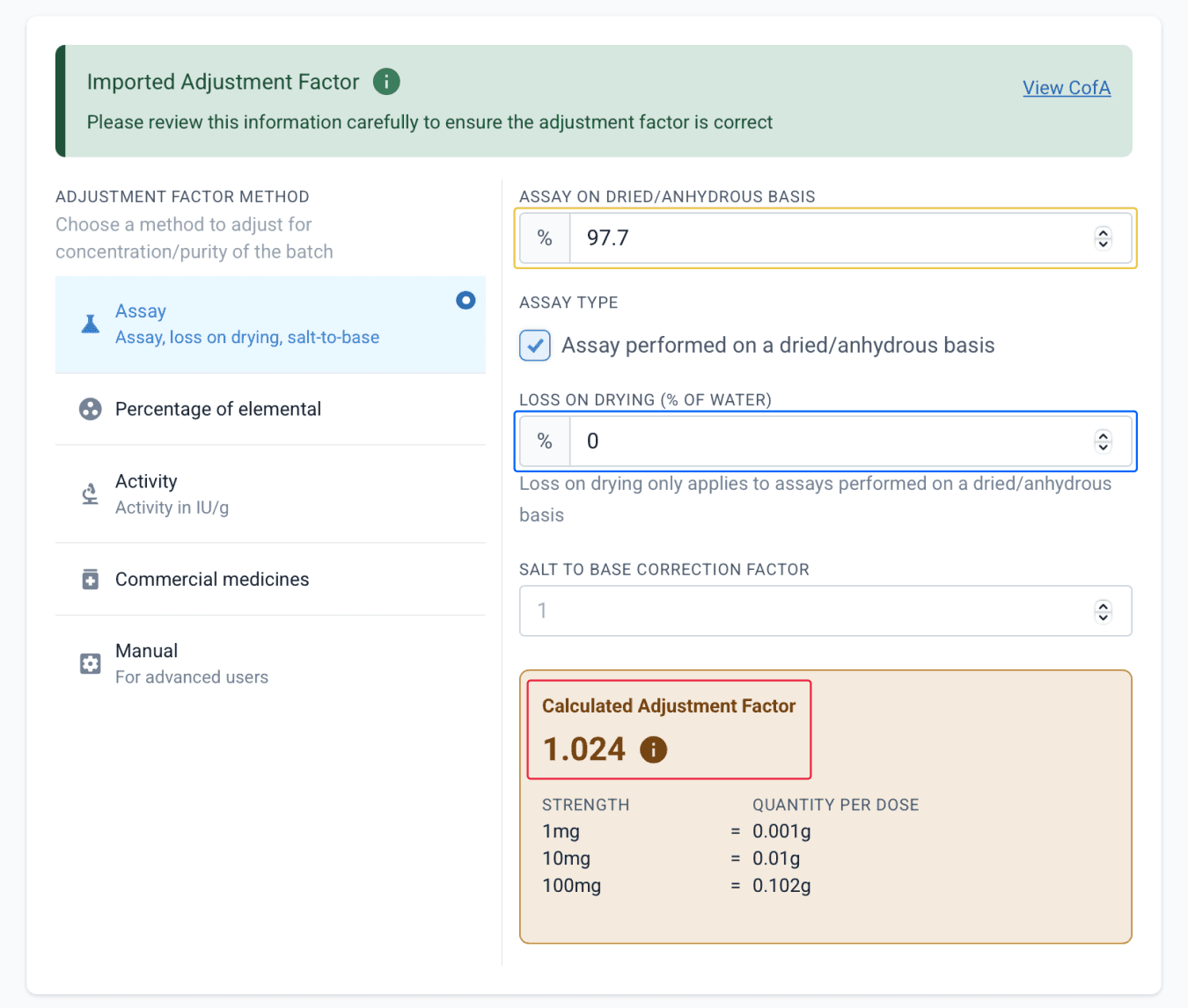
From the ingredients page
Pack stats
Packing statistics, or pack stats, show how much space a powder ingredient occupies inside a specific capsule size. They measure how densely a powder packs into a capsule, expressed in milligrams per capsule for a given batch. In Compound Direct, pack stats are used in capsule calculations to ensure ingredients fit correctly and the base fills the remaining space accurately, helping to prevent overfilling or underfilling.
Entering pack stats is necessary for capsule packing and is especially valuable when working with multiple powders in a single formulation, since each powder can vary in density from batch to batch. Once you’ve recorded a pack stat, you can carry it forward for future batches of the same ingredient. If needed, you can repeat the pack stat test and update the value for a specific batch, giving you greater control and accuracy over capsule sizing and dosing.
In Compound Direct, each pack stat is entered per batch and automatically carries over to future batches unless a new value is recorded.
If you enter a pack stat for a larger capsule size, the system can generate pack stat values for smaller capsule sizes, which you can review and adjust as needed.
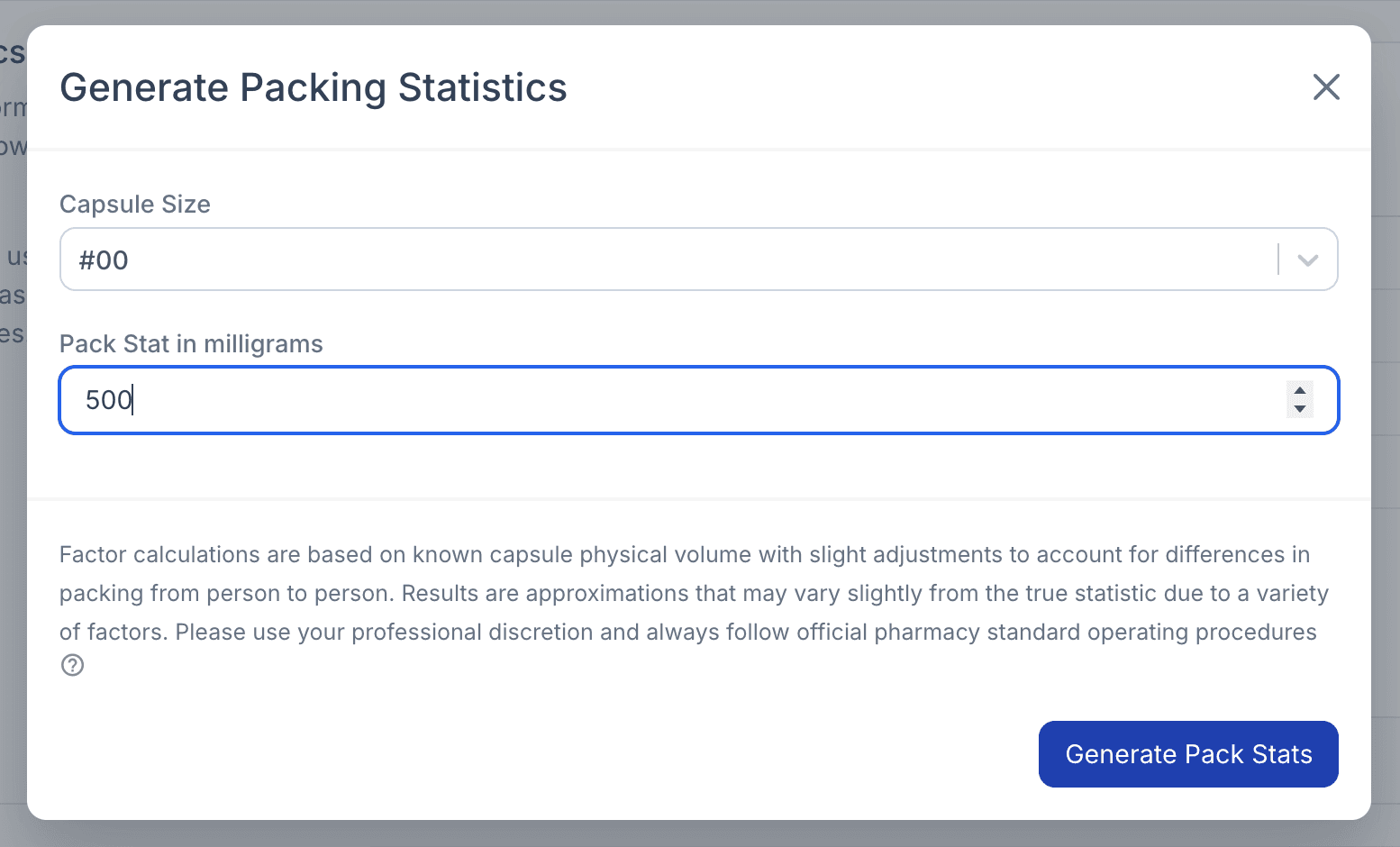
From the edit ingredient batch page
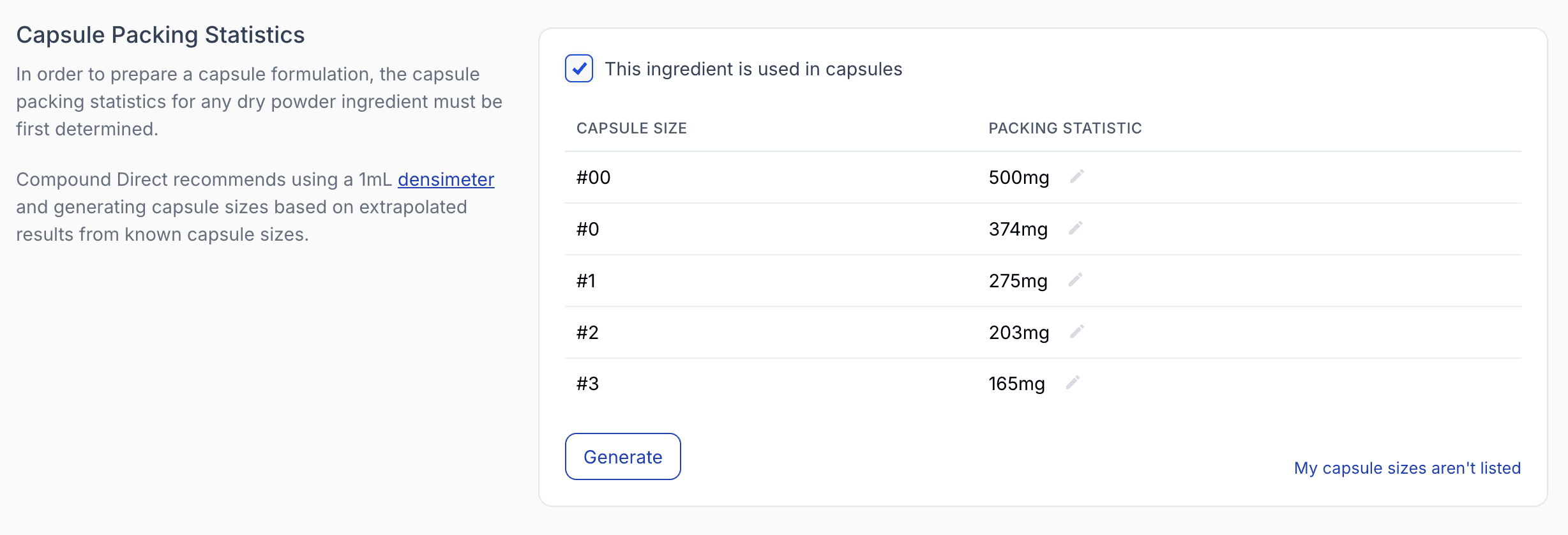
From the edit ingredient batch page
Powder density
When using powders in Portion or Powder dosage forms (such as scoops), enter the powder density to allow accurate conversion between weight and volume. Powder density is the weight of a loose, uncompacted powder that fits into 1 mL of space, measured in mg/mL. It reflects the natural volume a powder occupies without pressing or compressing it and is used to calculate how much base to add so each portion contains the correct amount of active ingredient.
Powder density is recorded per batch and automatically carries over to future batches of that ingredient. However, like pack stats, it can be updated at the batch level if needed. This ensures accurate portion measurements when powder characteristics vary between batches. Powder density is only applied when the Powder calculation method is selected.
Displacement factor
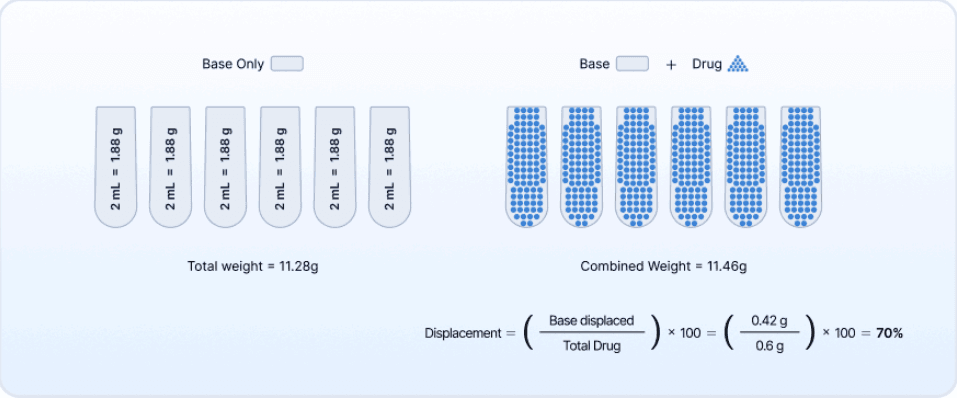
The displacement factor describes how much space an ingredient occupies in a semi-solid base relative to its weight. It is expressed as a value used to calculate how much base must be removed when preparing molded dosage forms such as suppositories, troches, or gummies. Using an incorrect displacement factor can cause uneven mold filling, leading to inaccurate dosing, poor texture, or wasted product.
Displacement varies by ingredient and even by batch, so using the correct value is essential for accuracy and consistency. In Compound Direct, powders inherit the dosage form’s default displacement factor (typically 70%). You can adjust these values for each ingredient and specify whether they apply to all bases or only particular ones, ensuring that real ingredient behavior is reflected in the calculation.
The system calculates displacement quantities automatically, adjusting base weight in real time. Values update instantly if units, wastage, or ingredient weights change. Accuracy depends on correct entries for mold size, blank weight, base density, and displacement factor. Practical testing or trusted formulas are recommended over estimates to ensure reliability.
Displacement factor works alongside other batch-based tools such as pack stats and powder density, to give the system a complete picture of how much space each ingredient occupies. Together, these inputs allow compounders to fine-tune formulations, avoid overfilling or underfilling, and maintain consistency across batches.
To learn more about adjustment factors, see our blog: Displacement Factors: The key to accurate molded dosage formulations
Liquid density
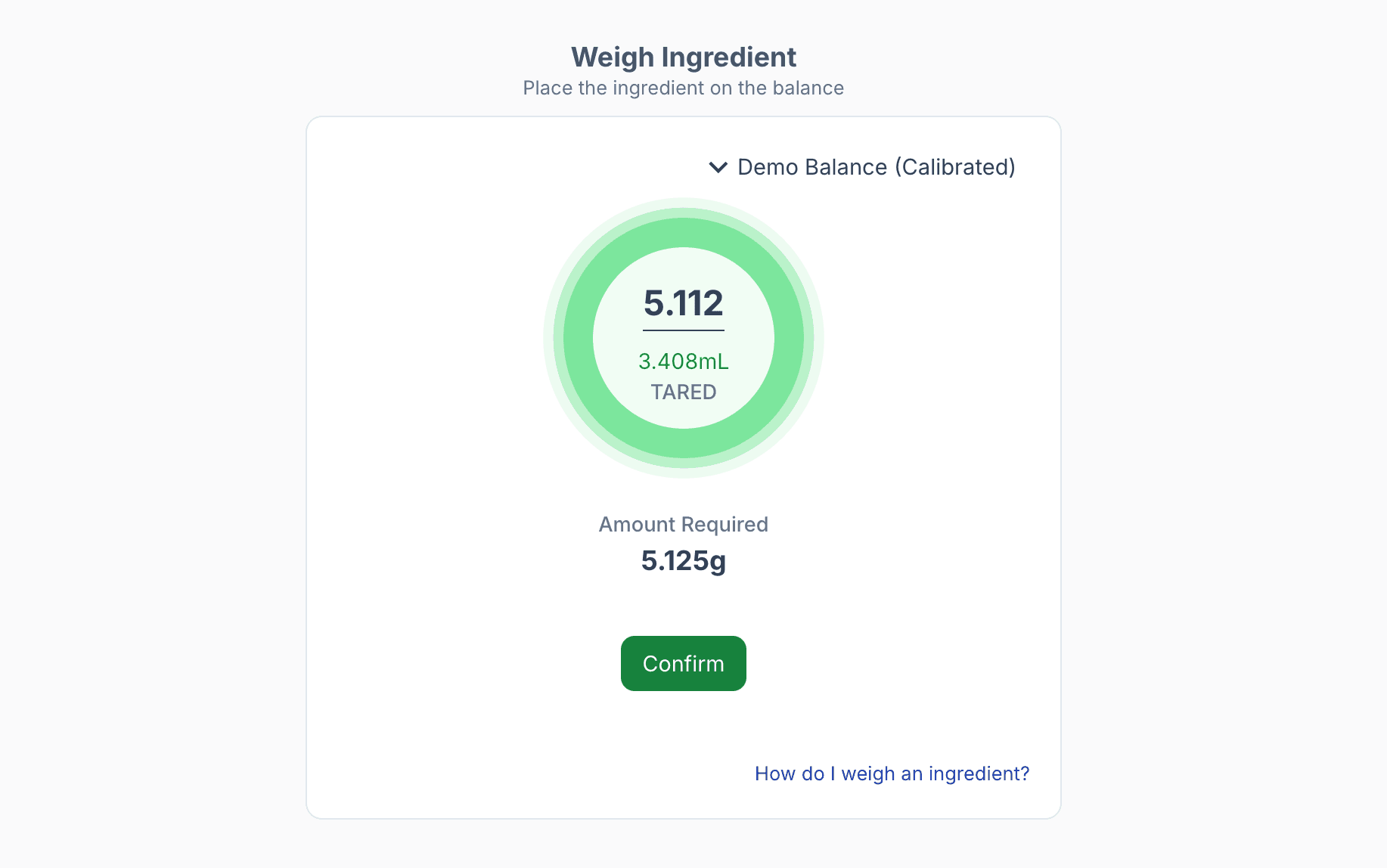
Liquid density is used to convert between weight (grams) and volume (millilitres) so formulations remain accurate no matter how the ingredient is measured. This is especially important in w/w formulas that include liquids but cannot be QS’d by volume, such as making a cream without topping up to a final weight or producing troches where volume adjustments aren’t possible. In these cases, liquids are weighed in grams rather than measured in millilitres.
From the edit ingredient batch page
By entering the density of a liquid ingredient, Compound Direct can automatically calculate how much volume is needed to meet the required weight, or vice versa. This ensures the correct quantity is added, prevents errors that occur when liquids are measured only by volume, and integrates with balances so quantities can be confirmed without manual checks.

From the edit ingredient batch page
Once a density is recorded for a batch, it is inherited by future batches but can be updated at any time if the liquid’s properties change. This gives compounders greater flexibility, accuracy, and control when working with liquids across different calculation methods.
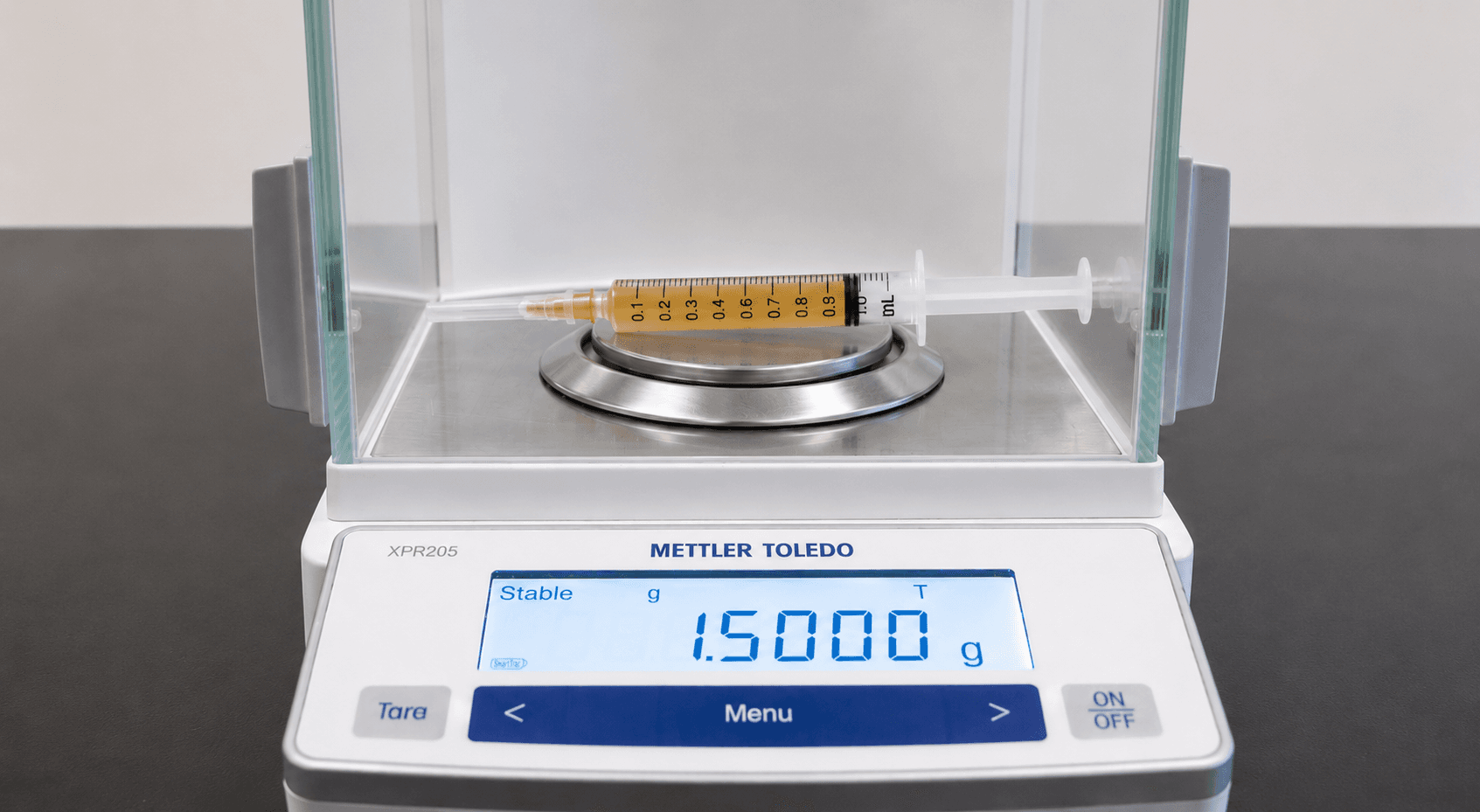
Liquid density can be determined by weighing a syringe before and after drawing a known volume of liquid, then dividing the difference in mass by the volume.
Dosage forms
Compound Direct uses specific values from the selected dosage form to ensure every ingredient is calculated accurately and that the final product matches the prescribed dose.
Calculation Type
Each formulation uses a calculation type, and the one selected depends on the nature of the preparation. The key factors to consider include:
- Whether the final product is a liquid or solid
- Whether the active ingredients are in solid or liquid form
How the final product is delivered (e.g. per unit, scooped powder, or capsule)
The calculation type determines how ingredients are handled within the formulation. Choosing the correct type ensures each component is added appropriately and that the system performs accurate calculations for that preparation.
Molded Dosage Forms
Technically, molded dosage forms are a subcategory of calculation types, but they involve additional important values that affect how ingredients are calculated:
- Default mold size – The volume of the mold being used
- Blank weight – The weight of a single final unit made of base only
- Displacement – The volume an active displaces in the mold (as discussed in the Displacement Factor section)
Molded dosage forms allow for a matrix of bases, mold sizes, blank weights, and displacement factors. Ensuring these values are correctly set up will ensure Compound Direct can calculate the formulation accurately at every level.
Formulations
Compound Direct handles formulation records differently from other software systems. The approach begins with strength first, meaning that formulations are built around the prescribed active strength rather than fixed quantities.
This method allows the system to instantly recalculate the formulation if one or more ingredient properties change, for example, if the active strength needs to be adjusted or if an excipient is substituted. The recalculation happens without needing to rebuild the formulation from scratch.
This design enables the use of one master formulation record, which holds the core calculation logic. Individual patient formulations are stored separately at the patient level, allowing customisation without affecting the original formulation. This structure keeps formulation records consistent, flexible, and easy to update as needed.
Formulation Basics
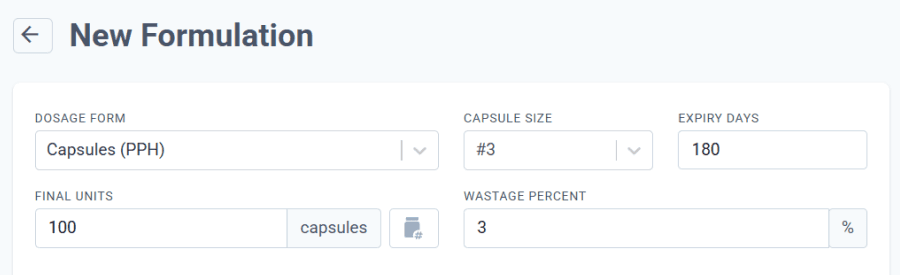
Compound Direct begins with a few key details to set the foundation for every formulation:
- Final units
- Waste percentage
- Mold, capsule, or scoop size (where applicable)
From the formulations page
These inputs determine how much of each active ingredient and excipient is required, and how much base is needed to Q.S. (fill up) to the correct number of final units. Accurate setup of these basic values ensures the system can perform precise calculations across all dosage forms.
Ideal Batch
When creating a new master formulation record, Compound Direct uses the values from the ideal batch of each ingredient.
- If there is only one batch available, it will be used by default.
- If there are multiple batches, the system will calculate based on the batch setting selected within the ingredient setup.
During the actual compounding process, Compound Direct recalculates values automatically based on the scanned batch. If multiple batches are used within a single preparation, the system will adjust per batch to ensure the final formulation remains accurate.
Initial Calculations
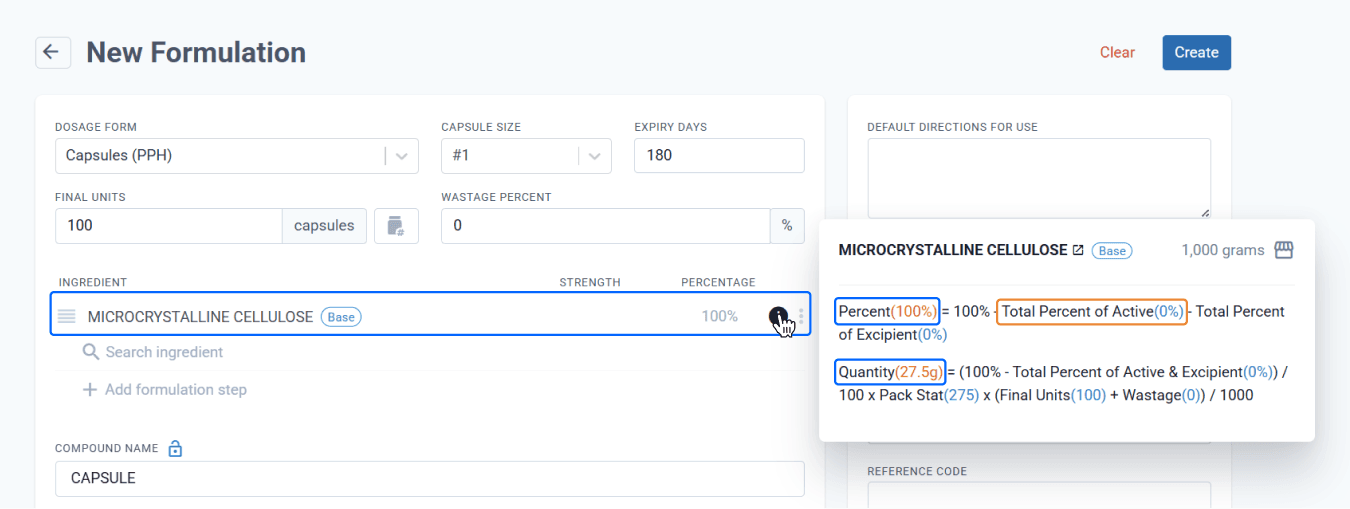
When you begin adding ingredients to a formulation, Compound Direct provides transparency into the calculation process. Simply hover over the ⓘ icon to view the background calculations in real time.
Before any actives or excipients are added, the system assigns 100% of the formulation to the base by default. This allows you to see how the required quantity is calculated even at the earliest stage.
The amount to weigh is calculated as:
Pack stat × % required × final units, plus any waste percentage.
With Compound Direct’s live feedback, every ingredient you add instantly updates the formulation to keep it accurate from the beginning.
From the formulations page
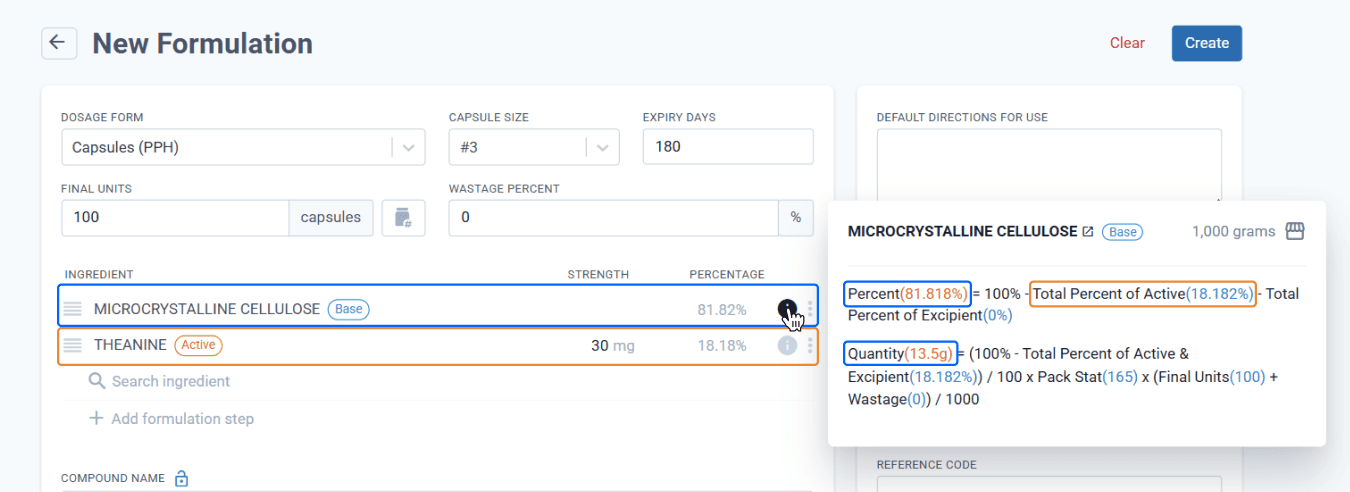
When an active is added, Compound Direct calculates its % fill and adjusts the base accordingly.
From the formulations page
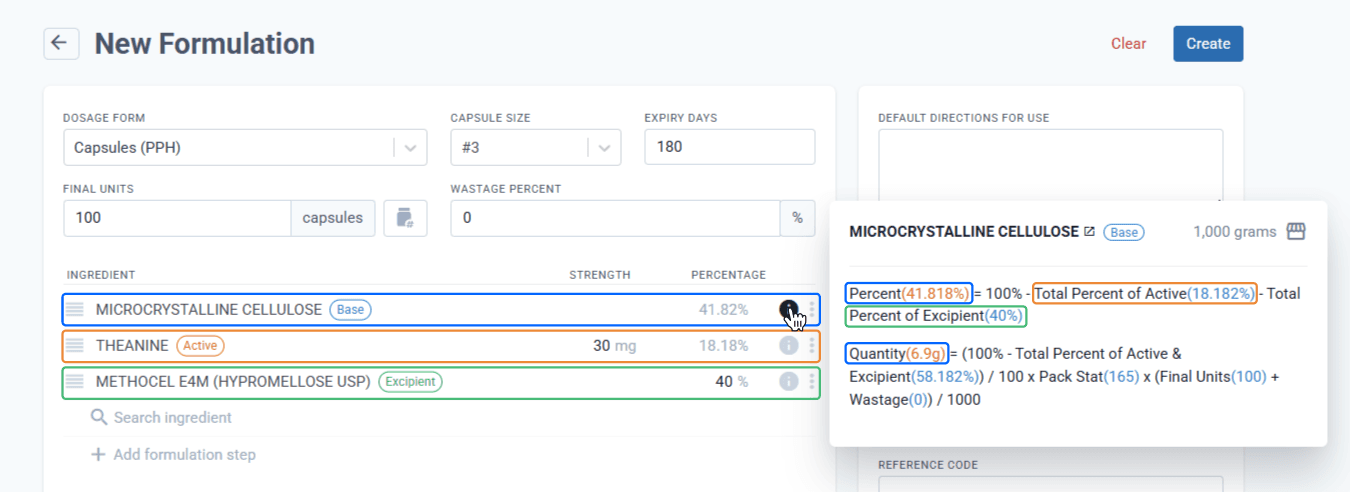
If an excipient is added, Compound Direct recalculates the combined pack stats of the active and excipient, further reducing the base accordingly.
From the formulations page
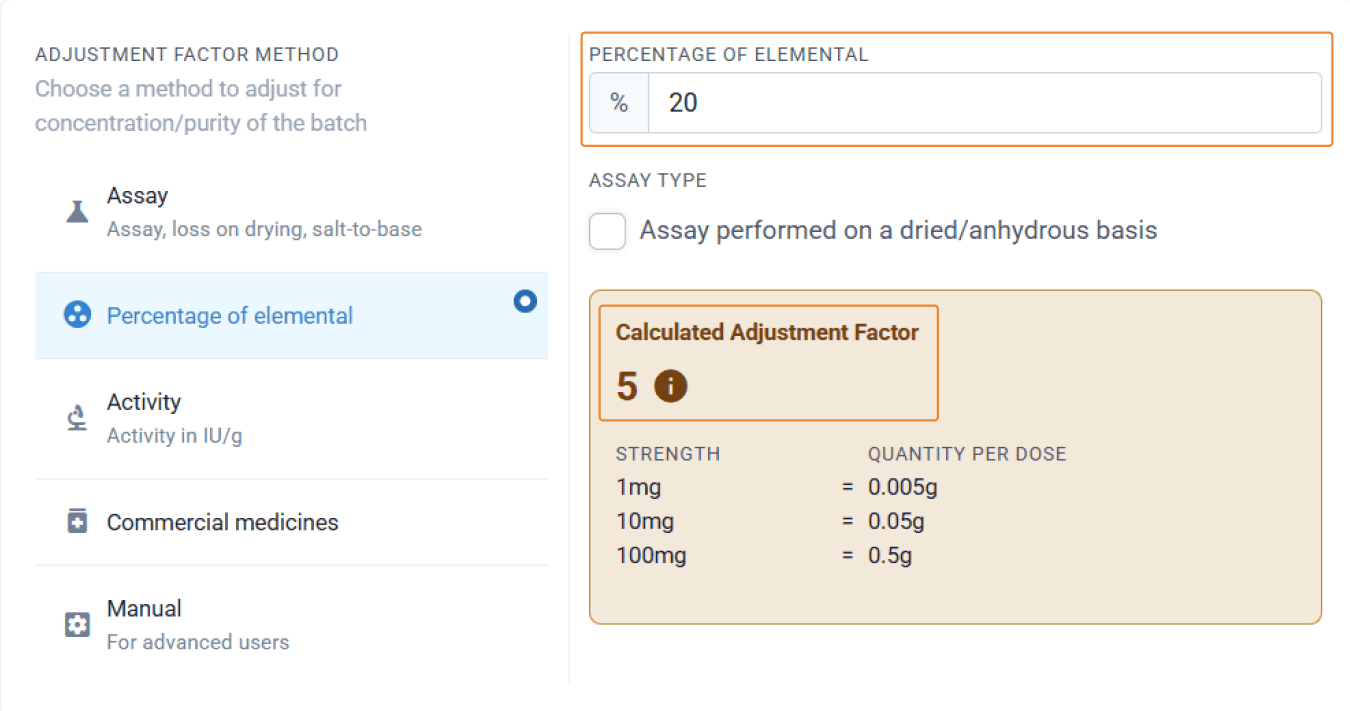
An example of when an adjustment factor is needed is with magnesium glycinate, which contains only around 20% active drug. When you enter the elemental strength of magnesium glycinate, Compound Direct automatically applies the adjustment factor and adjusts the ingredient weight to account for the inactive glycinate salt.
From the ingredients page
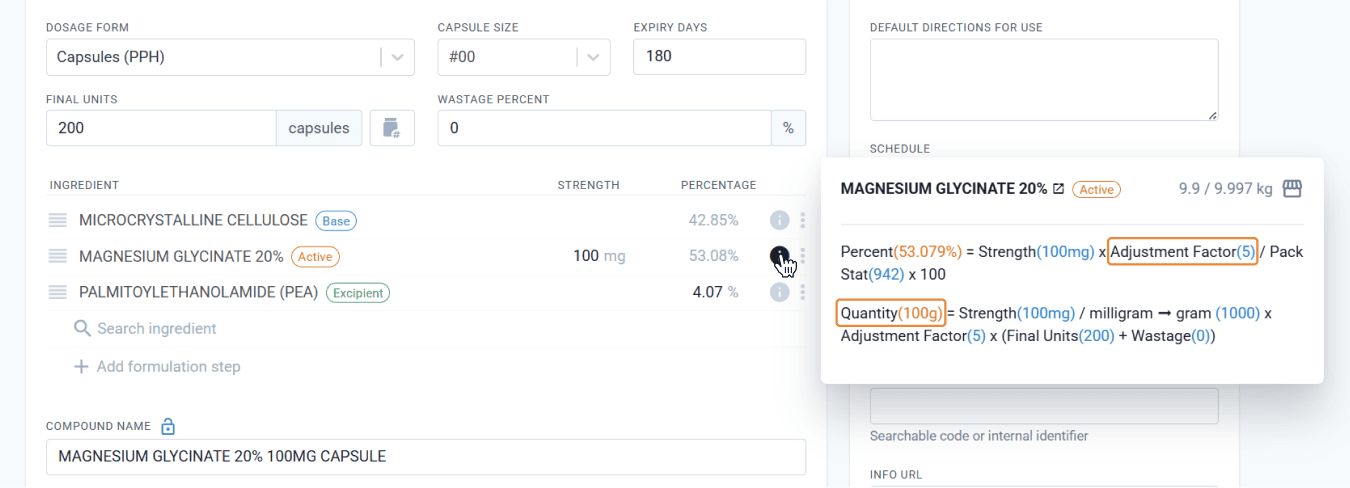
From the formulations page
If there are 2 batches in the system, the initial calculations will be based on the ideal batch, which in this case is the first to expire. A second batch exists in the database with a slightly different elemental value, but this is not applied to the master record until this batch is the ideal.
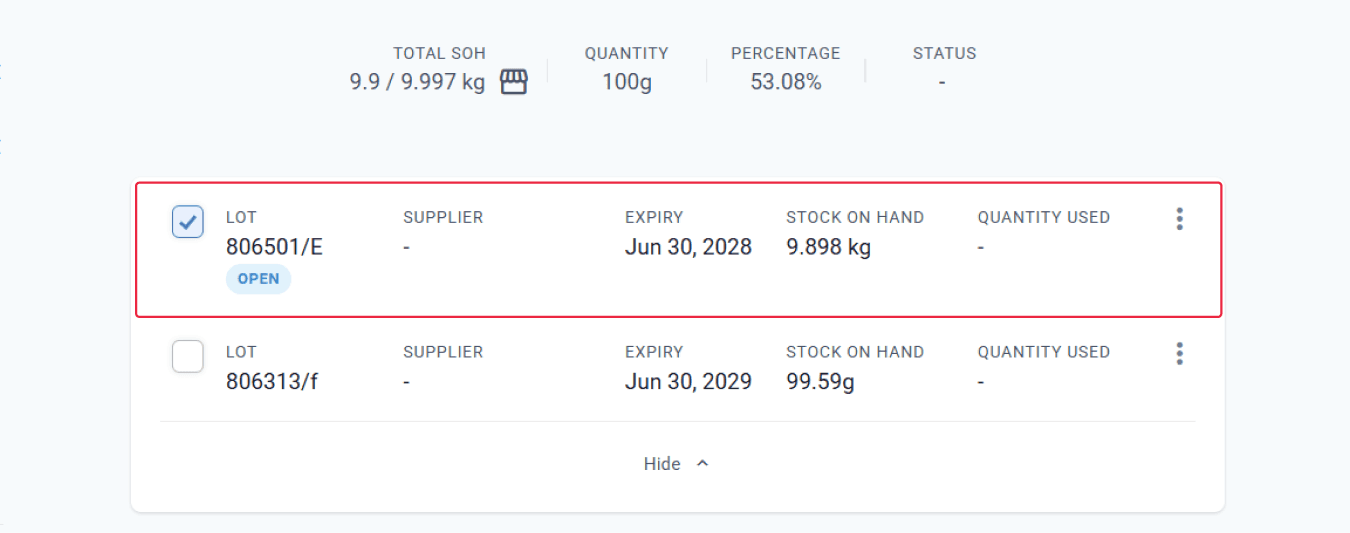
From the preparation page
Drafts
One of the most useful features of Compound Direct is the ability to make patient-specific changes to a master formulation record without needing to create a new permanent record. Instead of maintaining a separate formulation for every strength or variation of a compounded medicine, you can make adjustments within the draft to tailor it for an individual patient.
For example, you might have a standard neuropathic pain cream formulation. If the prescriber modifies the strengths of the active ingredients for a particular patient, you can simply select the appropriate master record and adjust the active components in the draft to match the prescribed doses.
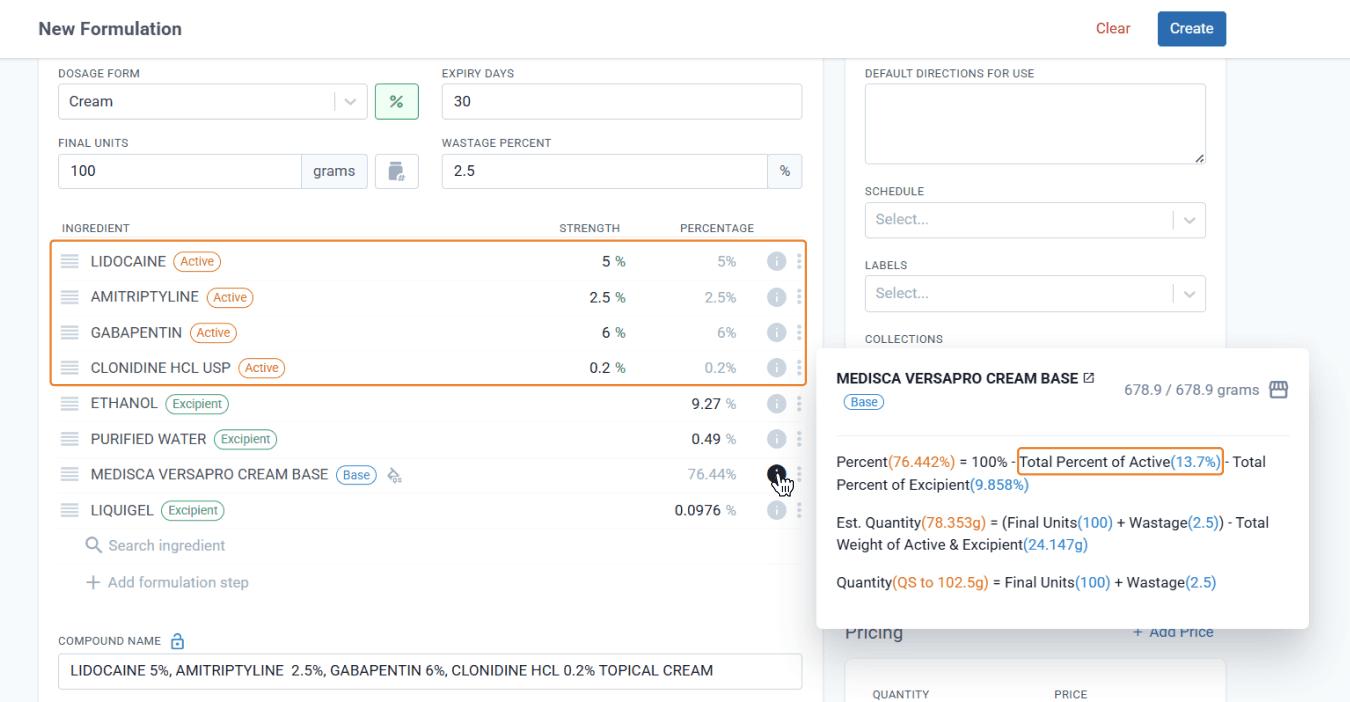
From the formulations page
As the % of actives change, Compound Direct automatically recalculates the base QS weight in real time.
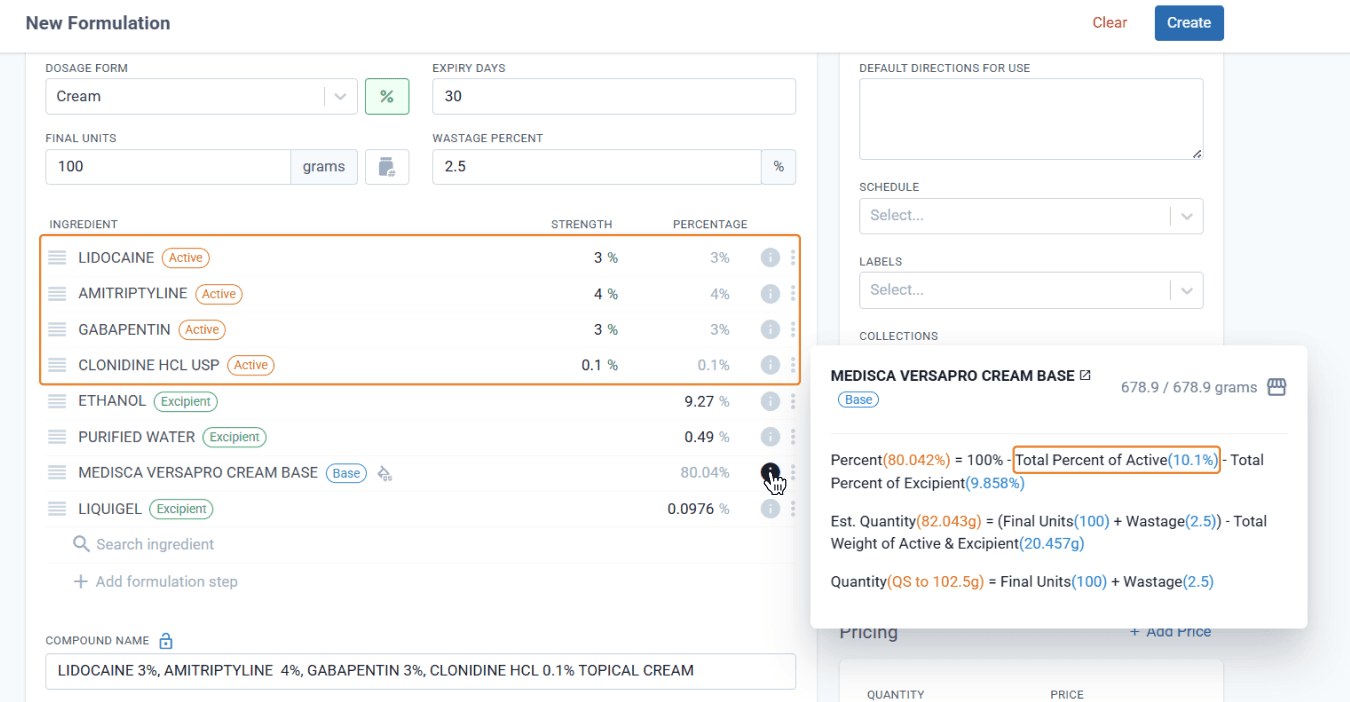
From the formulations page
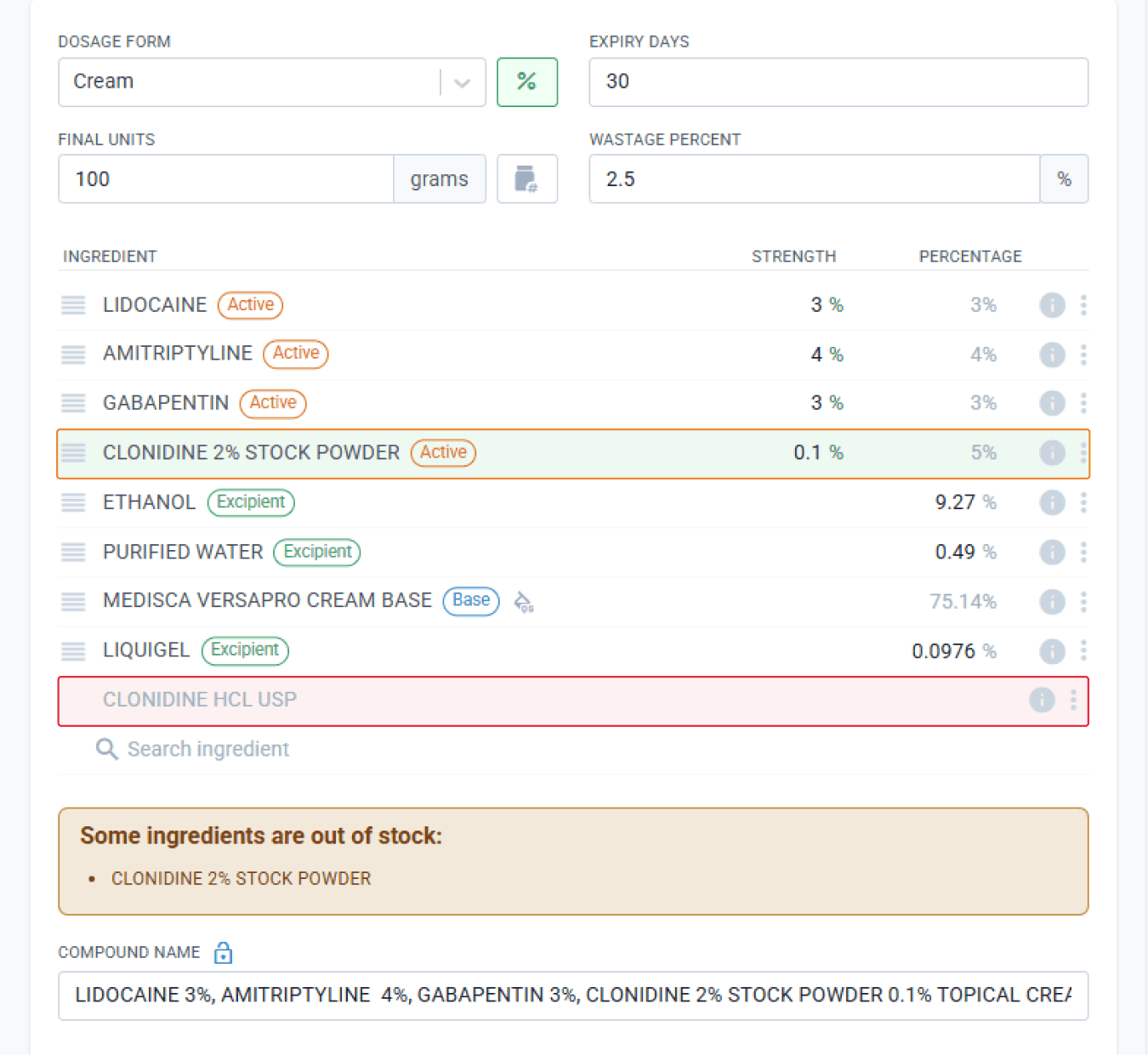
When clonidine is below the weighable limit, replace it with a triturate by removing the original ingredient and adding the triturate instead.
From the formulations page
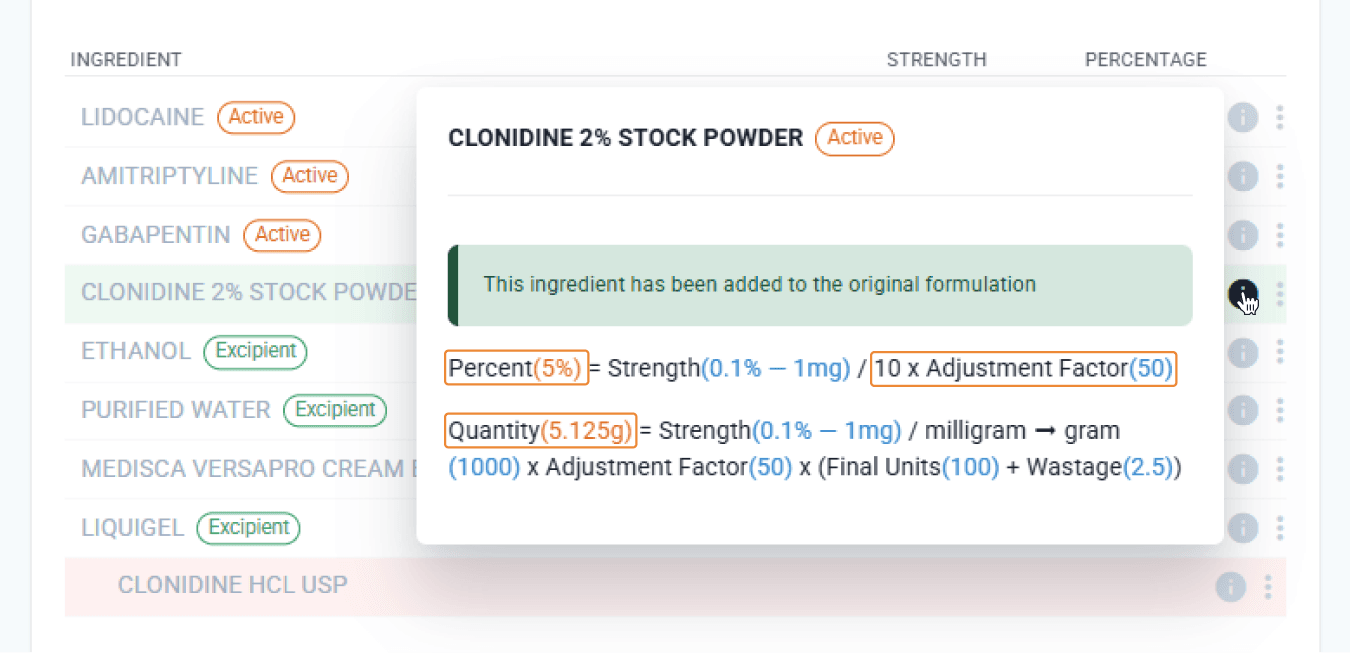
Compound Direct will adjust the amount of triturate to add based on the adjustment factor and then recalculate the QS amount for the cream.
From the formulations page
At the Balance
By this point, you might be wondering what all these calculations mean for the team member who will be scanning, weighing, and making the formulation. The good news is that Compound Direct continues to run background calculations in real time, automatically adjusting for even the slightest variations that may occur during the compounding process.
Batch to Batch
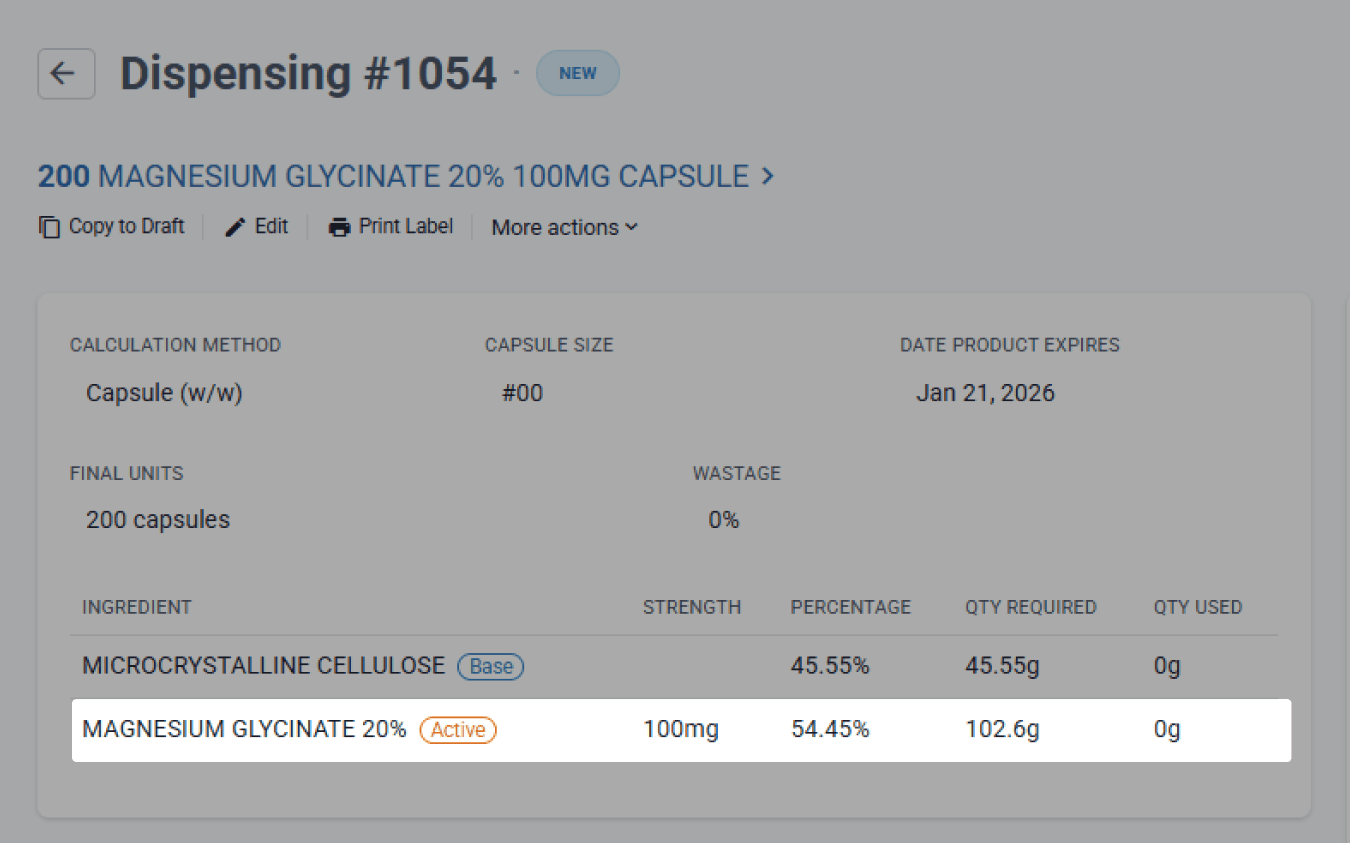
After you create your formulation, draft it, and dispense the prescription, one or more ingredients might change. For example, the ideal batch may have already been used, and the technician picks up a new batch with a different assay or pack stat, or you may have different batches distributed across multiple labs. Either way, Compound Direct automatically adjusts the calculations based on the batch that is scanned to ensure accuracy is maintained.
From the dispensing page
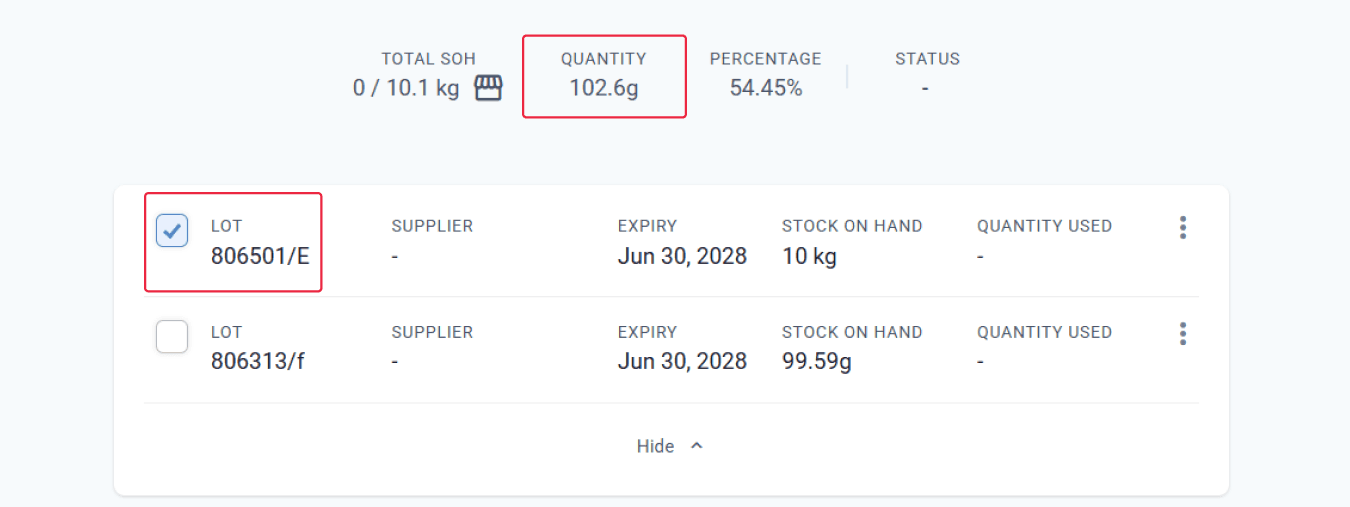
In the first example, the required amount of magnesium is 102.6 g, calculated using the values explained above.
From the preparation page
But if the compounder selects the second batch, which has a different elemental percentage, Compound Direct adjusts the required amount to 99.6 g.
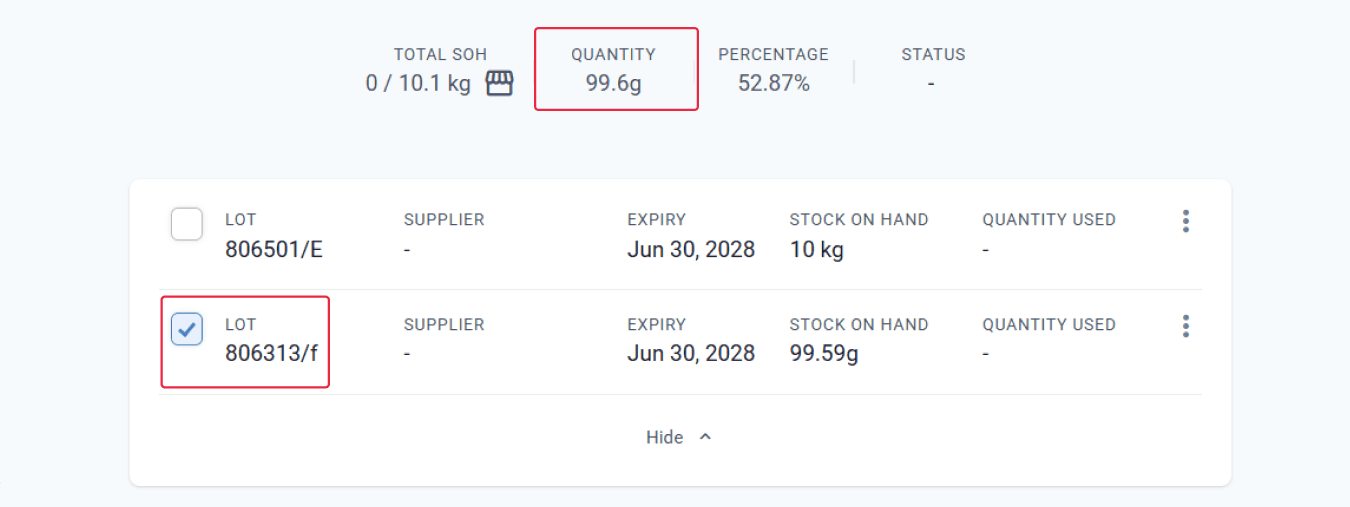
From the preparation page
Compound Direct can also handle situations where stock from both batches is used during compounding. If the technician scans ingredients from two different batches, each with a different assay or elemental percentage, Compound Direct tracks the quantities taken from each batch and recalculates the formulation accordingly. This ensures that the final product remains accurate even when the source material varies. The system continues to adjust in real time, maintaining precision throughout the compounding process.
Unders and Overs
While your team member is compounding, they will need to weigh out the powders one at a time. Compound Direct initially calculates the required amount of each ingredient based on the exact weight or volume. However, in practice, it is rare to achieve these exact values on the scale. As shown below, the ideal amounts are displayed before the process begins, providing a clear reference for the compounder.
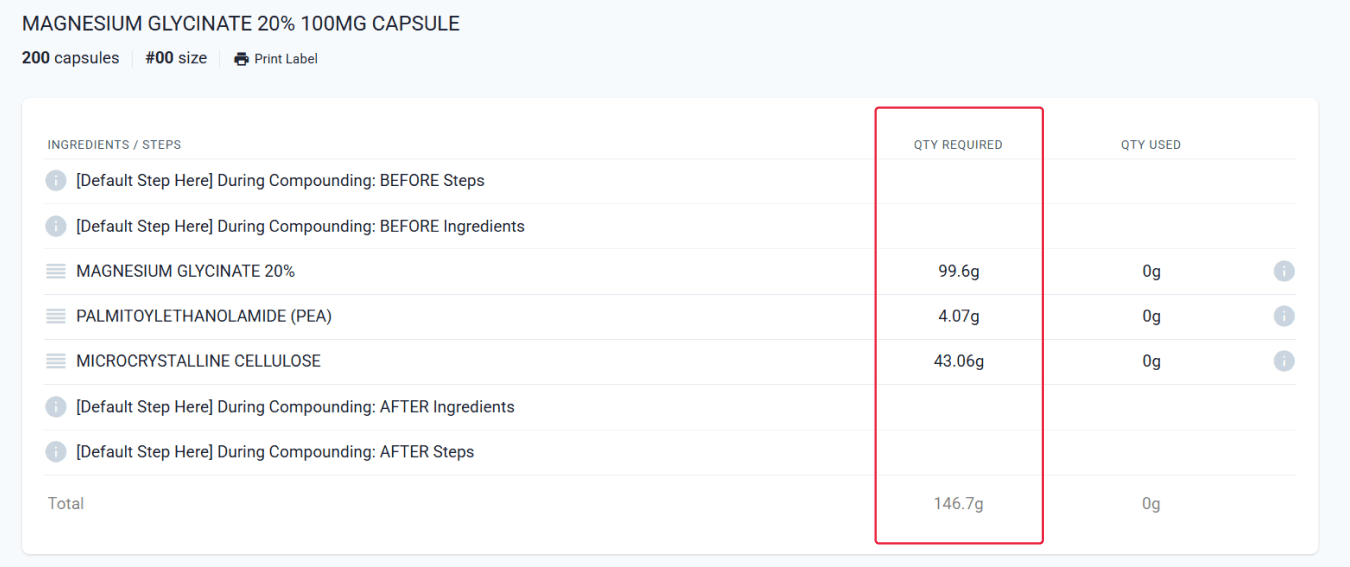
From the preparation page
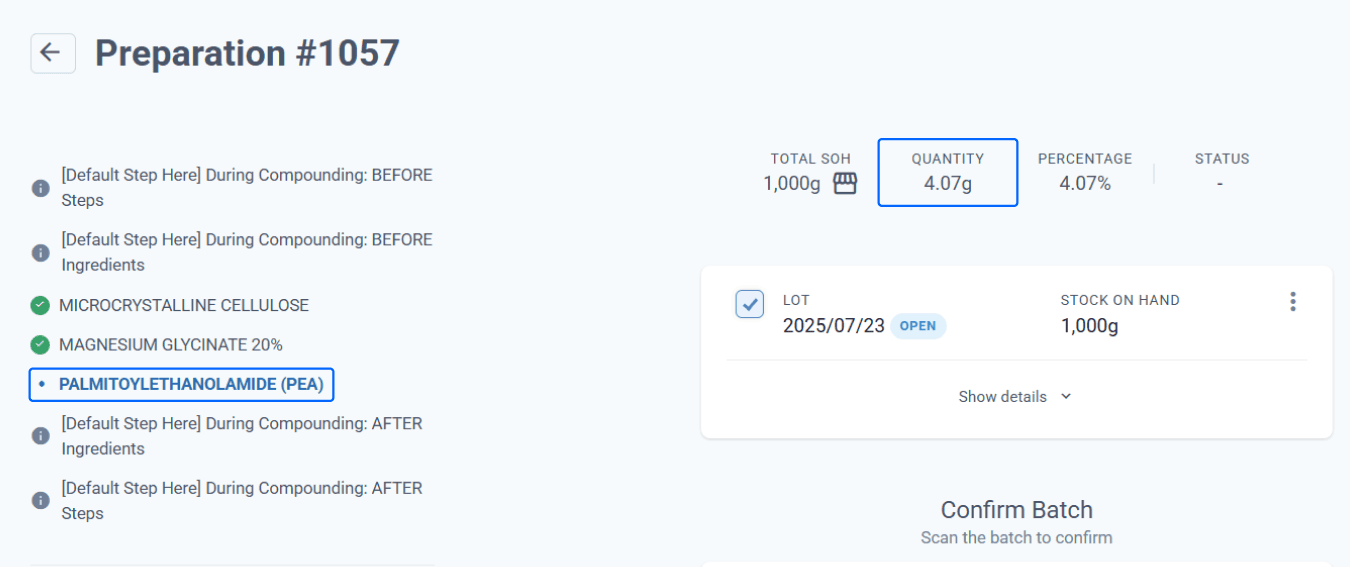
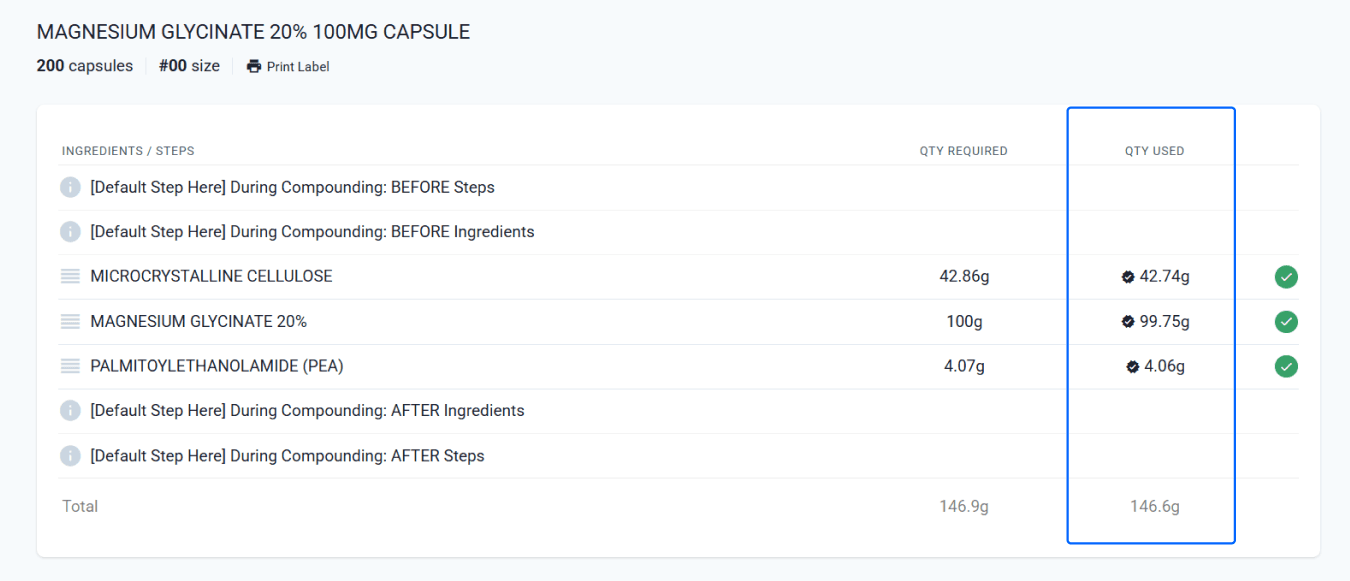
As the compounder weighs each ingredient, the actual values are recorded, and Compound Direct continues to calculate the required amount of base to account for small variations at the time of weighing. For this reason, we always recommend adding the base last.
From the preparation page
From the preparation page
The image above shows the actual quantities that have been weighed. These real values are what Compound Direct uses to complete the formulation with precision.
Summary
Compound Direct performs real time calculations throughout the compounding process to ensure every formulation remains accurate, consistent, and true to the prescribed dose. From the moment you set up a formulation, the system draws on key data such as ingredient roles, adjustment factors, pack stats, liquid or powder density, and certificate of analysis values to determine exactly how much of each component is needed.
As the compounder weighs each ingredient, the actual values are recorded, and the system instantly recalculates the required amount of base to compensate for any variation. The base is always added last to ensure precise final quantities. Whether a different batch is used, multiple batches are scanned, or the formulation is customised in a draft for a specific patient, Compound Direct dynamically adjusts all calculations in the background. This end to end automation gives your team full confidence that the product being prepared is accurate, efficient, and aligned with both the prescription and lab processes.
All names and medical data shown in software screenshots are fictional and for demonstration purposes only. These figures represent fictional persons; any resemblance to real individuals is purely coincidental. Use of existing fictional names is for illustrative purposes and does not imply affiliation or endorsement.