
Understanding adjustment factors in your lab

Learn about the various types of adjustment factors, how Compound Direct manages them, and strategies to minimize the risk of adjustment errors.
What is it and why do they exist?
An adjustment factor is a multiplier that accounts for the amount of active chemical in the ingredient you are using. Correctly setting the adjustment factor allows Compound Direct’s real-time calculations to simplify the creation of formulas and reduce the risk of calculation errors.
Introduction
In this tutorial we will describe the different types of adjustment factors, how to ensure you’re applying the correct method of calculation, how Compound Direct alerts you when these factors change, and how Compound Direct’s real-time calculations make the creation of new formulas a simple and safe process.
Methods of Calculation
1. Assay
2. Percentage of elemental
3. Activity
4. Commercial medications
5. Manual
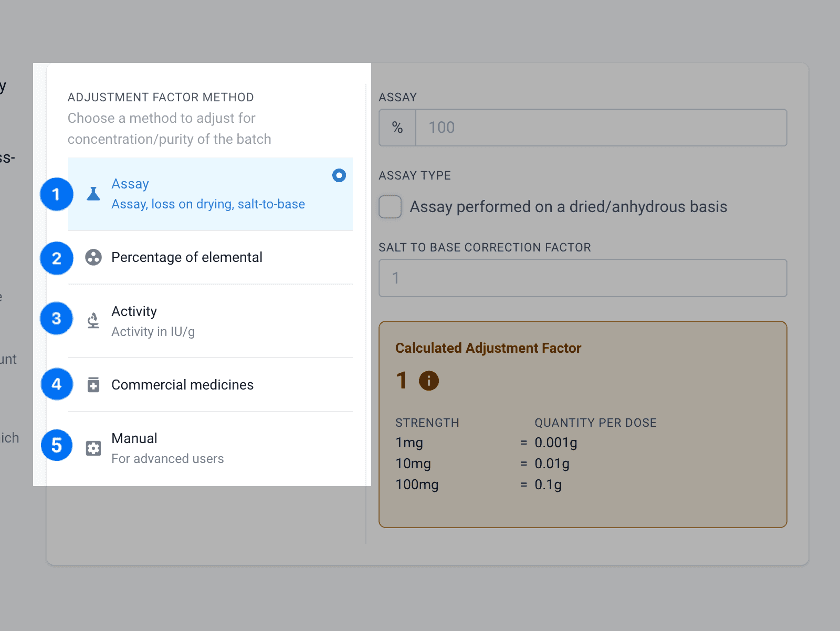
From the ingredients page
1. Assay
When you receive an active ingredient there will be a certificate of analysis (CofA) that details the potency of the active ingredient in the powder or liquid. To pass the quality assurance there will be an approved range. Such as 98% - 102%. Yes, they can be over 100%….
A) Solids
Assays will also refer to a loss on drying as the potency is usually performed after the powder has been dried. The loss on drying represents the percentage weight reduced when dried. This is generally less than 10% but should be accounted for as the powder you have will have this extra water content.
Salt to base correction may be required if the ingredient has a salt attached such as HCL or Cit. but the weight of this salt needs to be removed for the active ingredient activity. Examples include Fluoxetine HCL and Sildenafil Cit. The correction is not usually found on the CofA and may not always be required. You should check with the dosing documentation or with a formulation specialist to see if this is required.
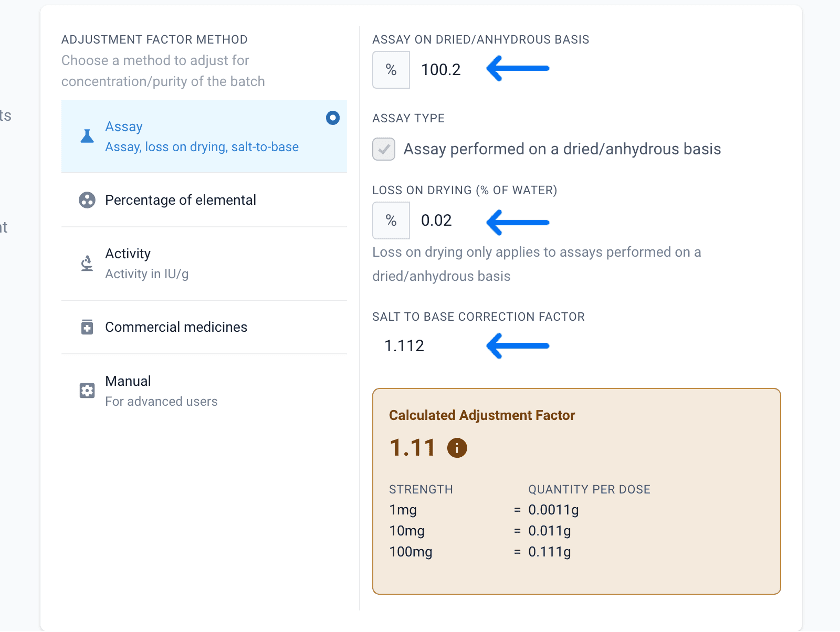
From the ingredients page
On a CofA these fields can be differently named. An example for Fluoxetine HCL shows that the loss on drying is termed Water Determination.
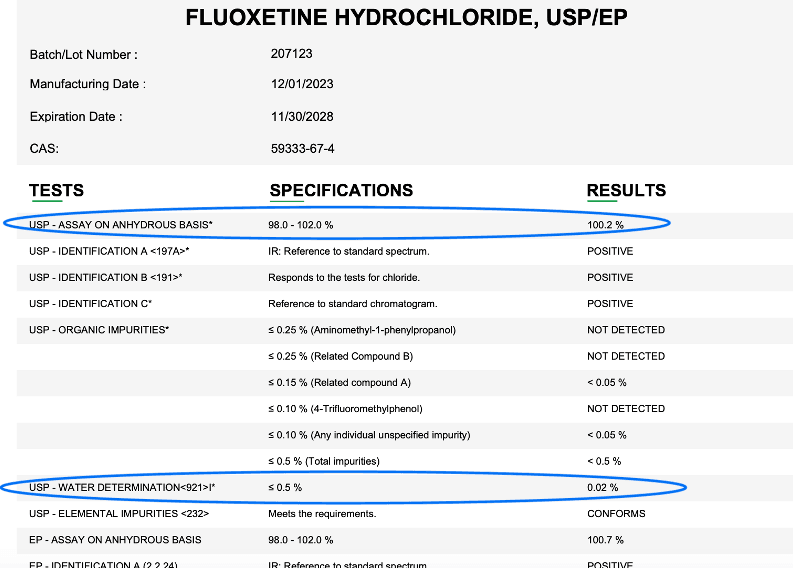
From Medisca
B) Liquids
As per above, the CofA will determine the amount of liquid that is active as a percentage of the total. The additional consideration is that the assay on the liquid is usually performed by weight, not volume. Compound Direct will alert you during the process of adding the ingredients adjustment. If you are unsure whether the assay was performed by weight you may need to contact the CofA supplier.
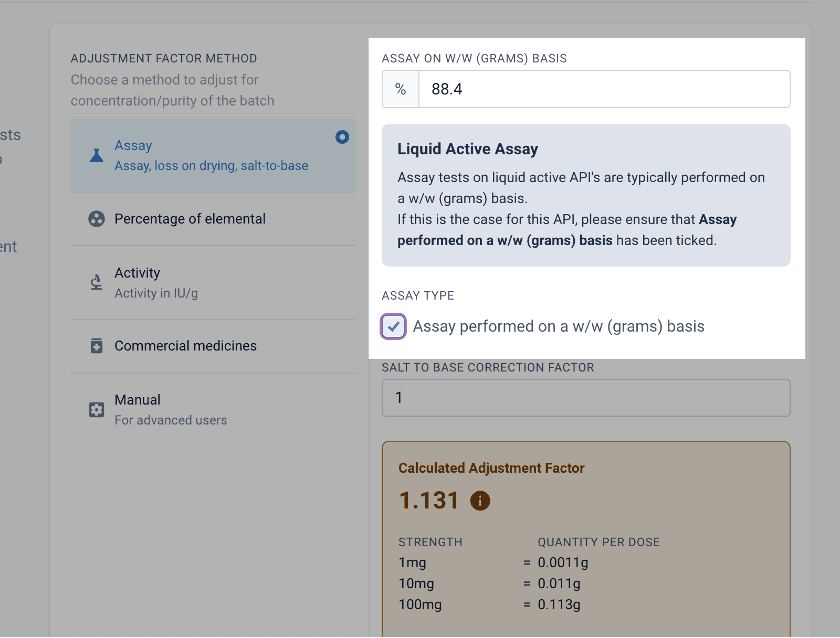
From the ingredients page
The additional step required is the entry of the liquid density to allow Compound Direct to calculate the amount of ingredient required if the formula calls for the ingredient to be added in mLs rather than g. This is not always available on the CofA and you may need to contact your ingredient supplier for this value.
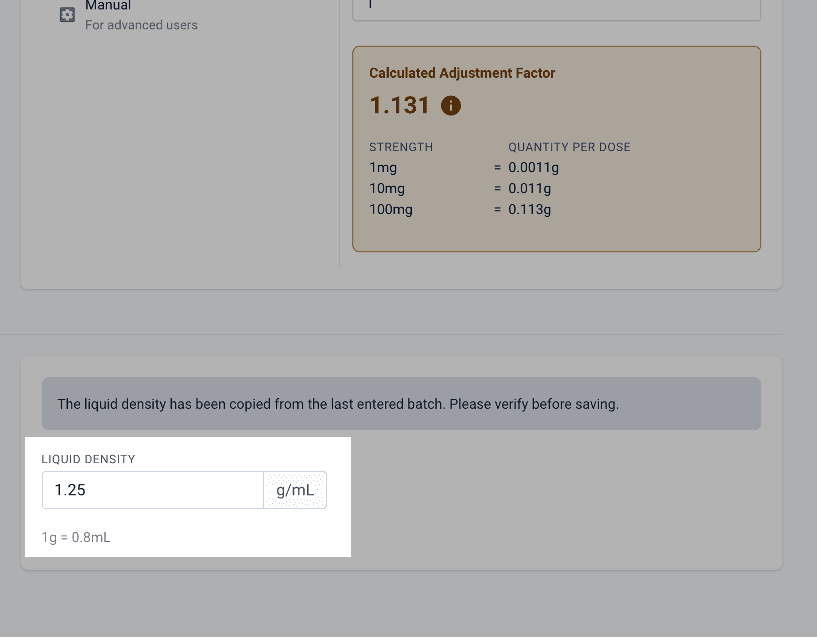
From the edit ingredients page
2. Percentage of elemental
Some ingredients will have inactive salts attached to them, such as Magnesium Glycinate. An adjustment needs to be made to the chemical to reflect the percentage of the active ingredient. This is different to the salt-to-base correction as the percentage of elemental acts as the assay, and it may or may not need to account for the water content, depending on how the assay was performed.
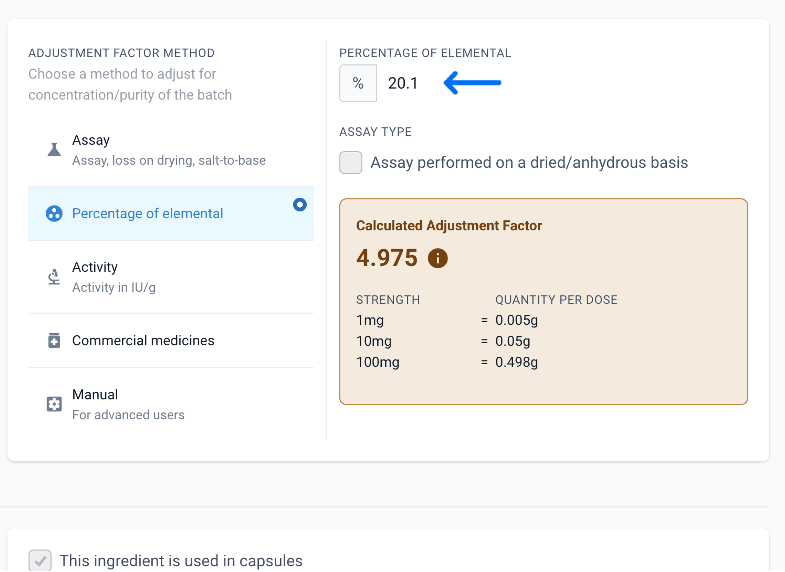
From the ingredients page
A certificate of analysis for this may show as Element content, but it may be labelled differently.
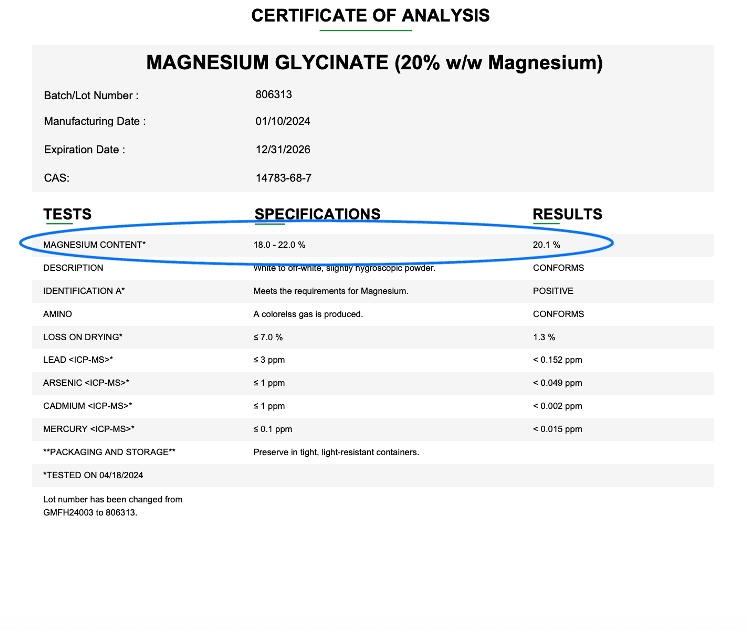
From Medisca
3. Activity
The activity of an ingredient usually refers to calculations where the ingredient is added in Units (IU) as this is the measure of its dose, rather than as a % or by weight. Examples may include Nystatin and Vitamin D3.
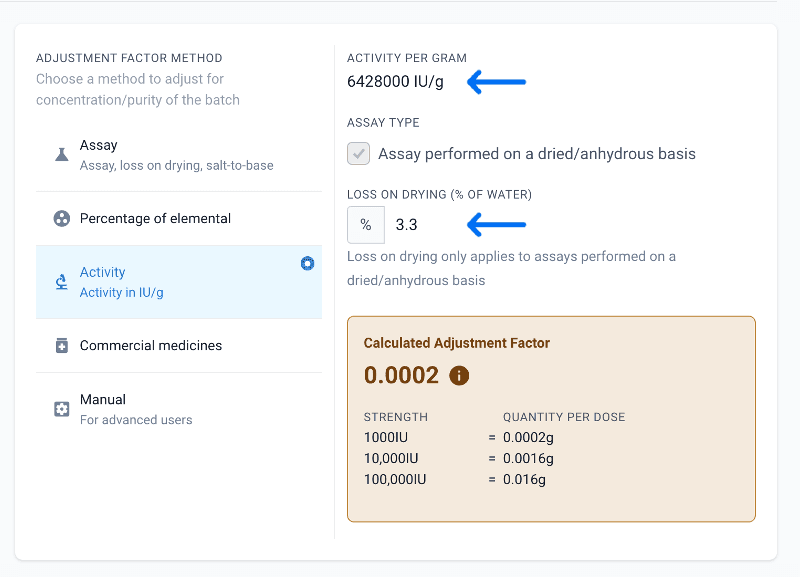
From the ingredients page
Careful attention should be paid to the units when entering information. Compound Direct asks for activity as IU per gram by default. CofA information may be in IU per milligram. You can change this by clicking the dropdown arrow next to the units.
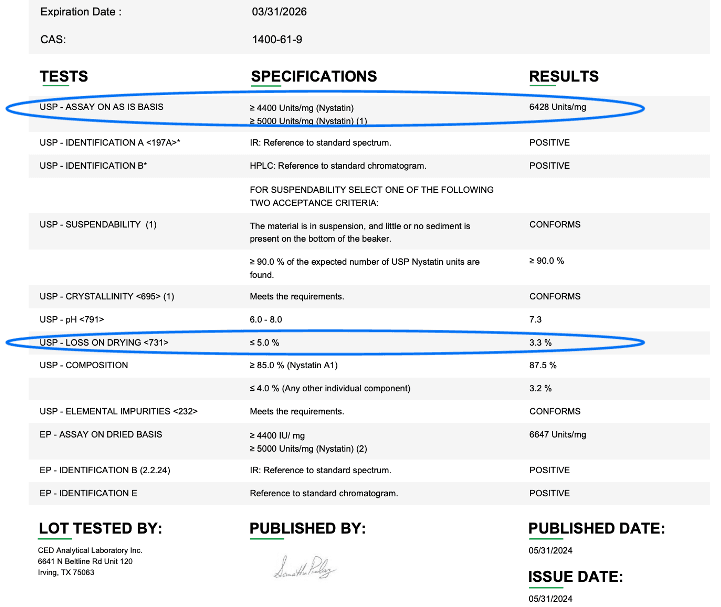
From Medisca
Compound Direct will alert you if you attempt to use the ‘Activity’ adjustment factor method for an ingredient entered as being prescribed by different units. In this case, review the ingredient and edit as required.
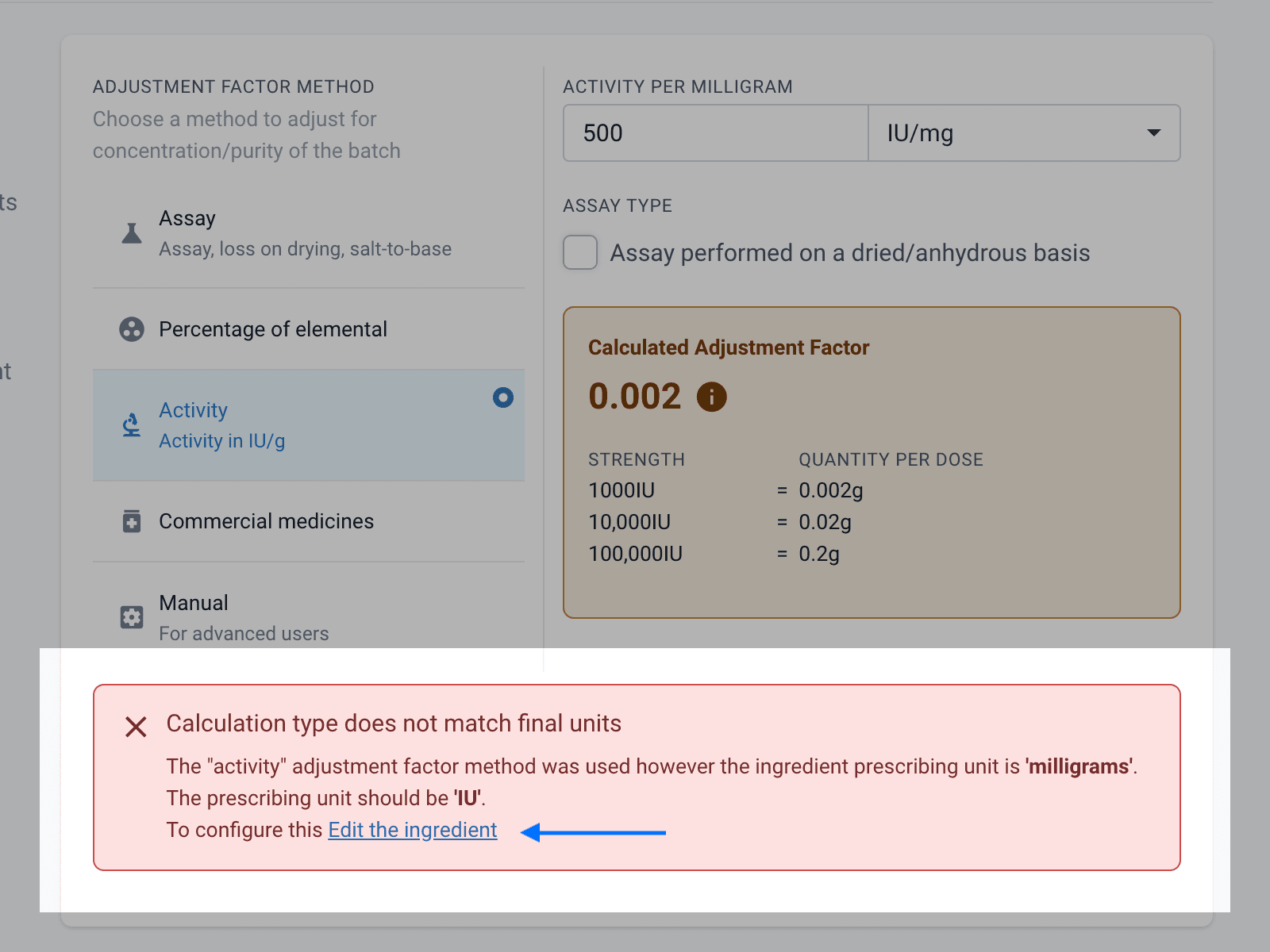
From the ingredients page
4. Commercial medicines
When dealing with commercial medications you will need to adjust for the weight of the inactive ingredients. This will allow you to weigh your commercial tablets for additional validation and risk mitigation. A comprehensive tutorial on all aspects to consider when adding a commercial medicine can be found here Using Commercial Medicines
A) Solid doses
If you have chosen to input the medication as a commercial preparation and to add it as the weight rather than the number of units, you will need to calculate the weight, in grams, of a set number of tablets/capsules. You can choose the number of units generally, the more you weigh the more accurate the adjustment will be.
You can account for any loss due to capsule casing or film coatings that are lost during the grinding or emptying process as a percentage. You will also need to enter the active ingredient dose per unit; this will be in milligrams.
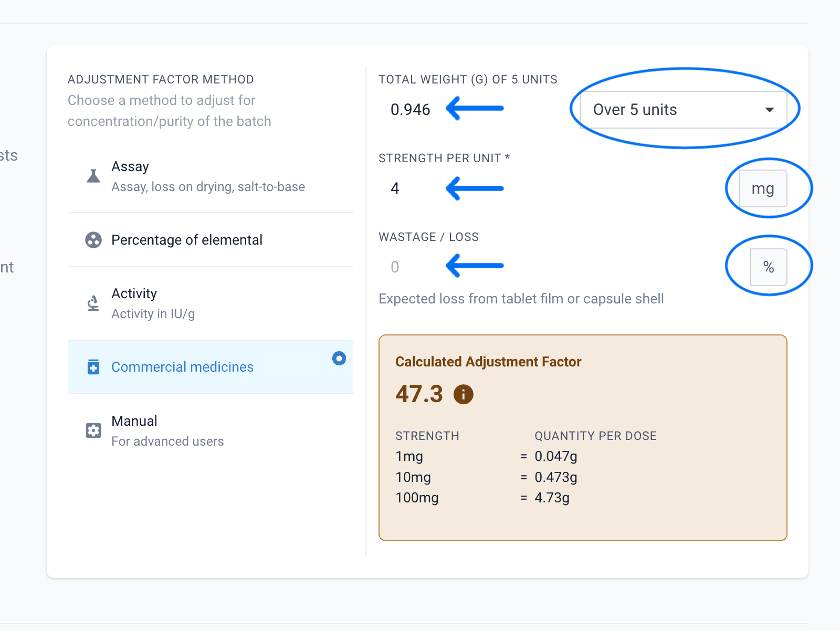
From the ingredients page
B) Creams and Liquids
If you need to add a commercial preparation that is in a non-solid dose you may wish to add it as a raw ingredient, but use the ‘Percentage of Elemental’ method and input the % of active in the cream. For example, when adding Aldara 5% cream you may add as below.
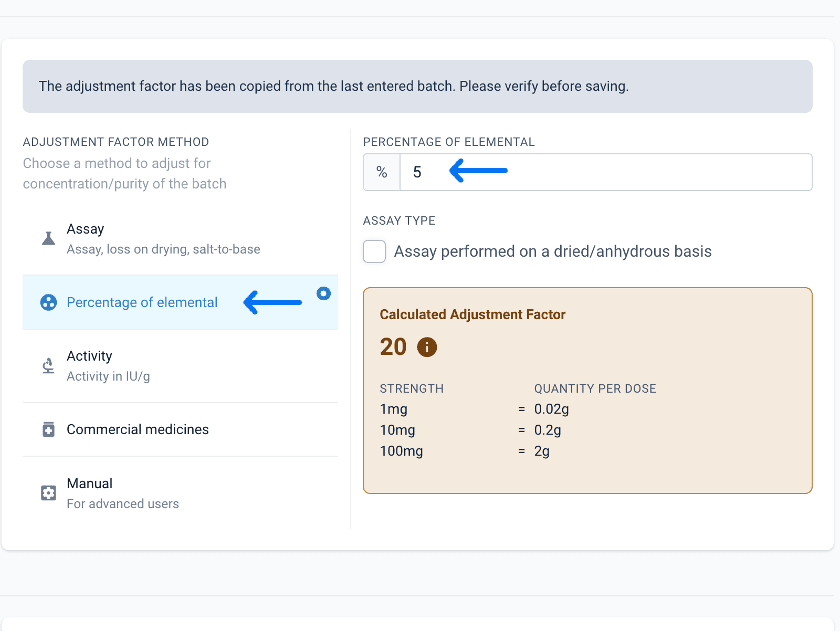
From the ingredients page
C) Triturates and Aliquots
Ingredients that are added as very small strengths may need to be diluted before addition to the formula. This is known as a triturate or aliquot. These are added as ingredients in Compound Direct slightly differently. There is a comprehensive guide to this here How to create ingredient dilutions to reduce risk when compounding
Start by adding the ingredient as an ‘Aliquot/Dilution’. It is recommended to name the ingredient by the % of the active, such as 1% or 0.1% and not 1:100 or 1:1000 as it makes the adjustment factor entry simpler.
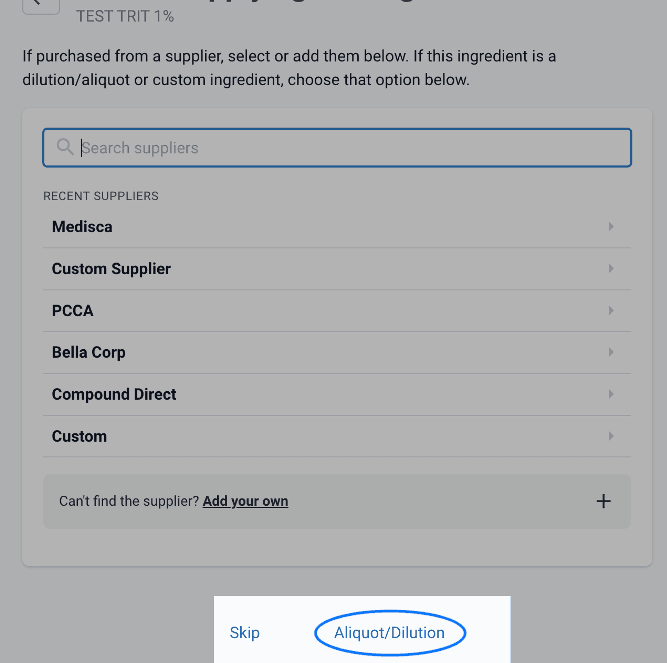
From the new ingredient page
Once added you can add the active and diluent at the appropriate % in the formulation window and then add the % elemental in the adjustment method. This is a critical step, ensuring extra care is taken when entering the data.
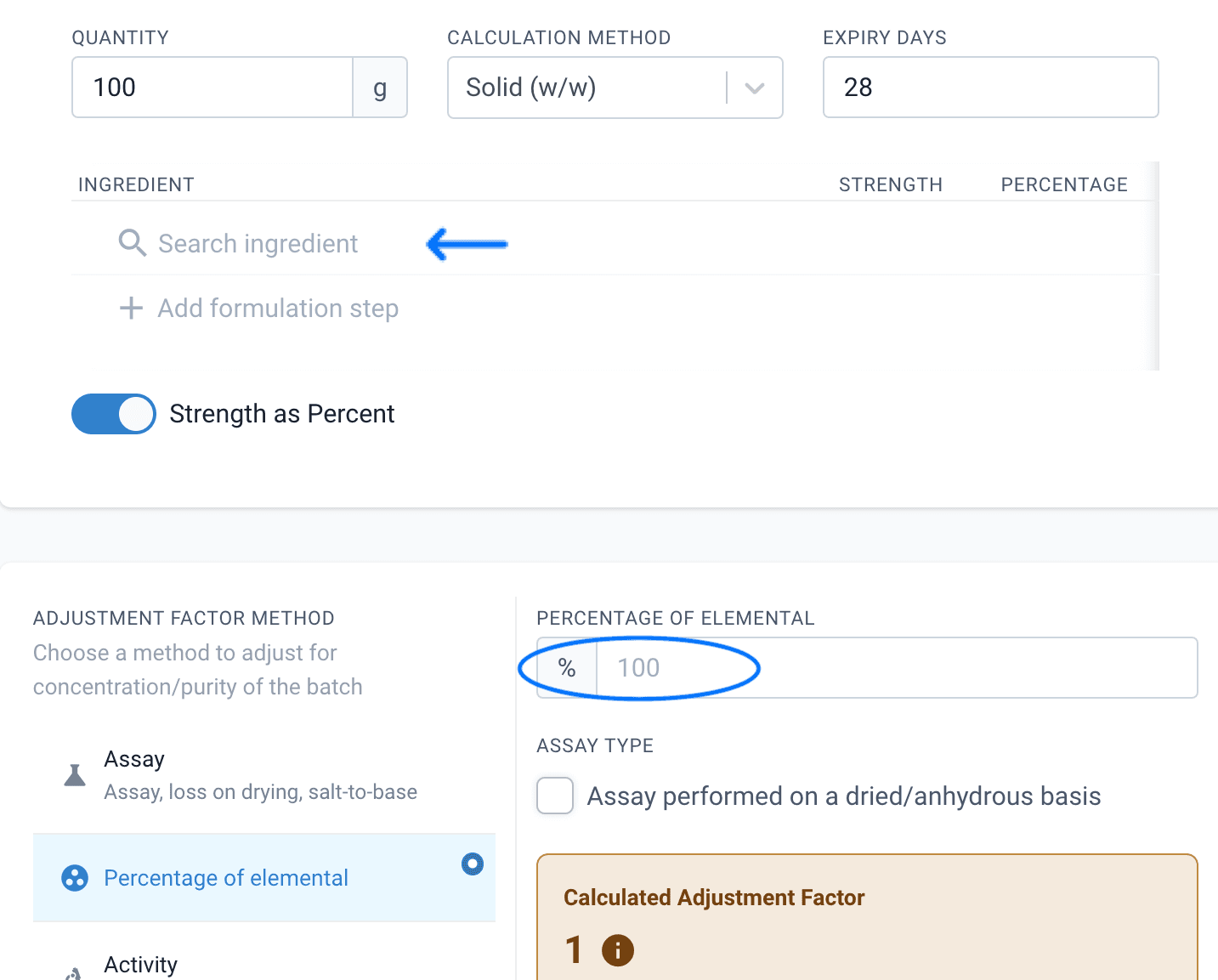
From the aliquot/dilution page
5. Manual adjustment factors
Manual adjustment factors are used when you require the active ingredient to be adjusted but the Compound Direct calculations are not sufficient in calculating the multiplication factor.
Inheritance and Alerts
Inheritance
Compound Direct will inherit certain aspects of the adjustment factor method based on previous entries. If you import your data from Medisca, it may override some entries according to the CofA. However, some values, such as salt-to-base correction are inherited at an ingredient level, not a batch and won’t be imported at a batch level.
It’s important to review all of the information in the CofA, even when it's imported, to ensure all the information is as accurate as possible.
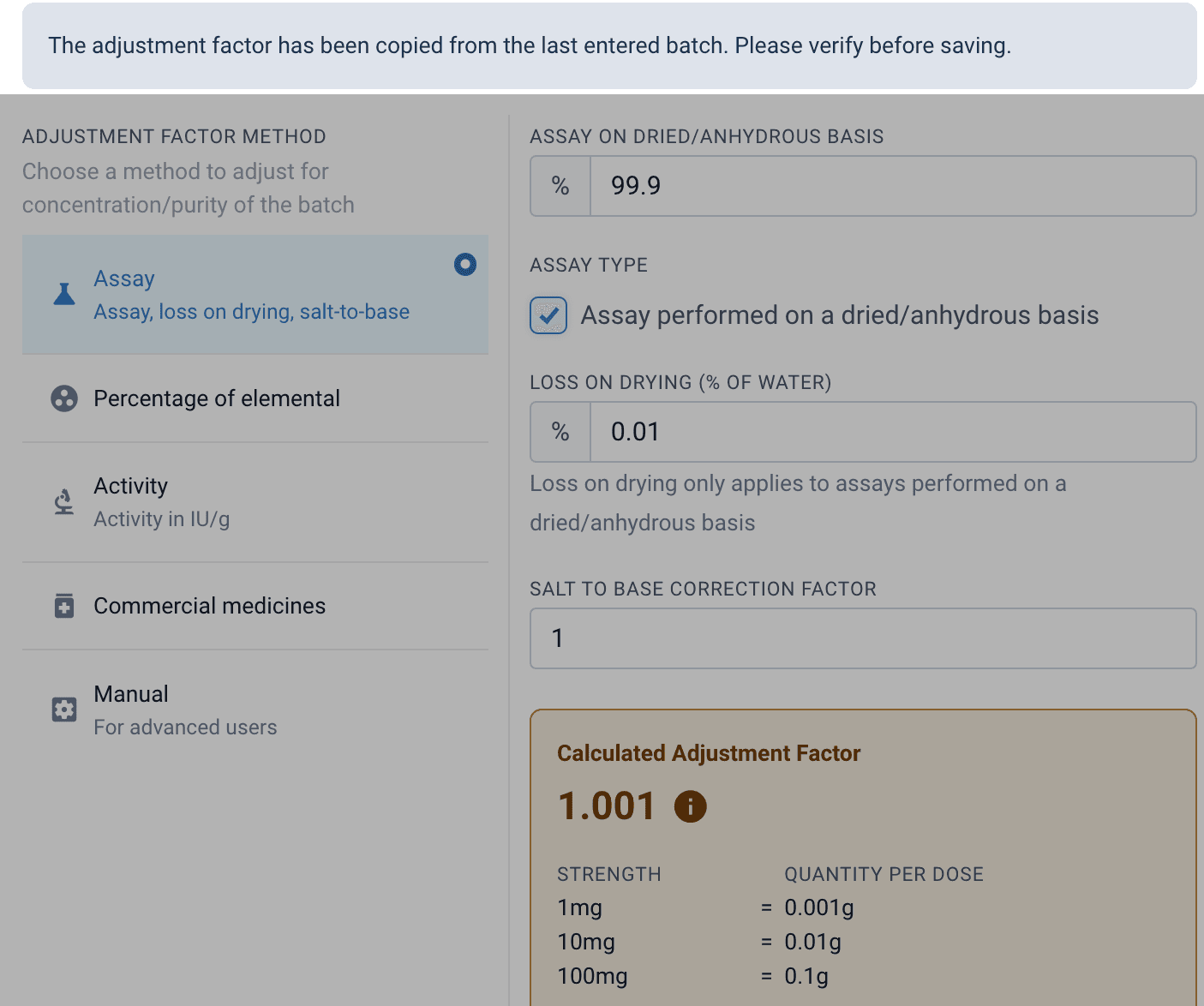
From the ingredients page
Alerts
Compound Direct will alert you if the adjustment factor has changed by more than 20%. This may occur if you edit an existing batch, or make changes to a new batch that results in a significant change to the adjustment factor. The most common causes of the alerts are:
- Incorrect activity IU/g unit error. e.g. units added in IU/mg, not IU/g
- Removal/addition of salt to base correction
- Triturate incorrect % of elemental
- Incorrect calculation of commercial medication adjustment, such as entered weight for incorrect number of units
If you have reviewed it carefully you can validate the adjustment by ticking the validation box.
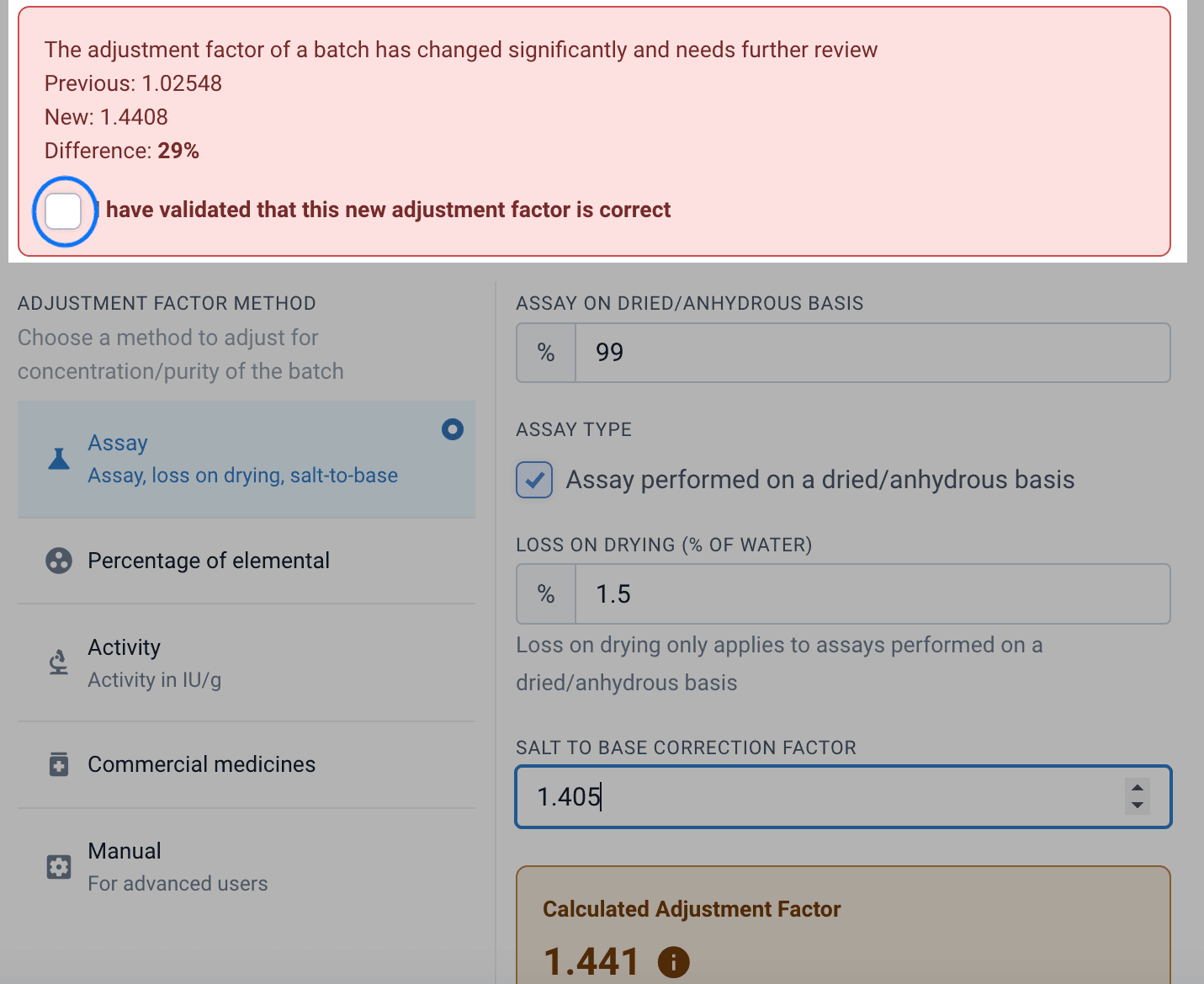
From the ingredients page
If you have created a dilution or an aliquot and have not selected the percentage of elemental to account for the dilution Compound Direct will alert you before you save the ingredient.
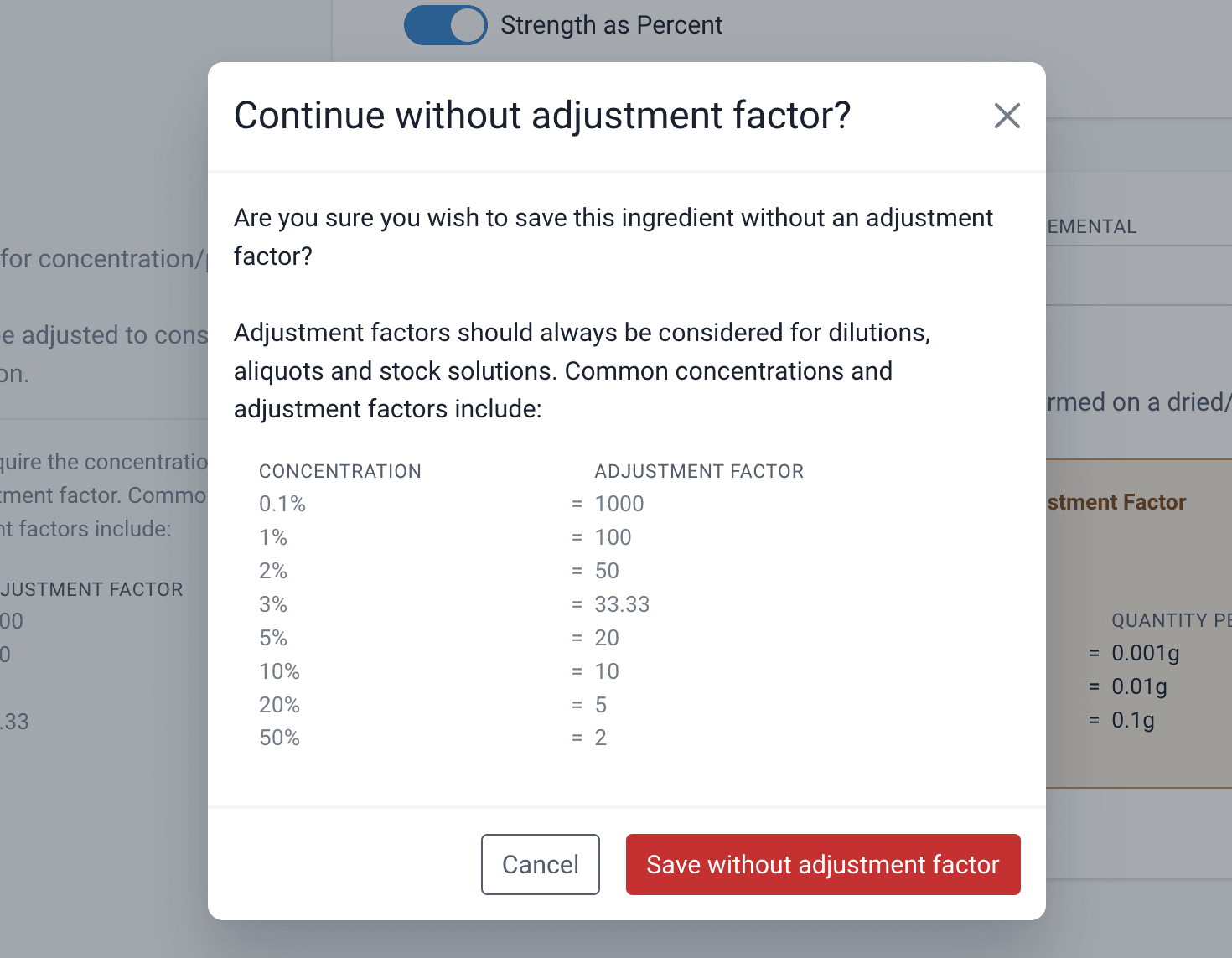
From the ingredients page
When an adjustment factor has significantly changed you may be presented with an additional error when dispensing the draft. This will outline the previous adjustment factors used for this ingredient.
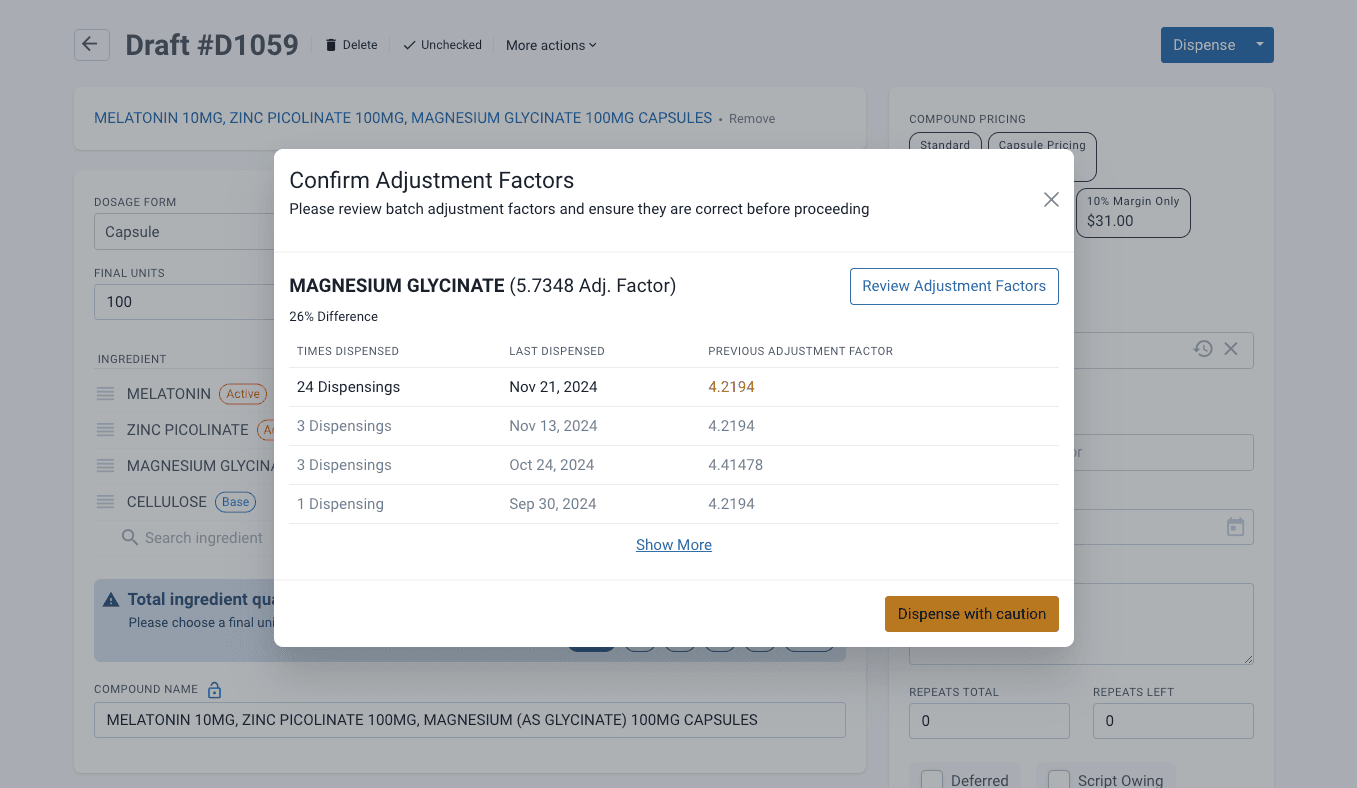
From the drafts page
Adjustment factors in formulations
The superpower of Compound Direct lies in the real-time calculations to determine the amount of ingredient needed so that the formulation has the correct dose of the active ingredient. As these adjustments are entered on a per batch basis, changes to which lots are used when weighing will be accounted for in real time. Multiple batches can be accurately used in combination within Compound Direct.
Strength-based formulas
When creating a formula Compound Direct allows you to simply enter the strength per unit in the formulation window. When making the formula Compound Direct will calculate the amount of ingredient needed based on the final quantity and the adjustment factor calculations. This is why correct calculations of the adjustment factor are key to safe formulations.
For example, when creating a Magnesium Glycinate capsule formula you can input the elemental dose and Compound Direct will take care of the ingredient quantity based on the adjustment factor per batch. If the elemental percentage changes the formula will re-calculate in real-time.
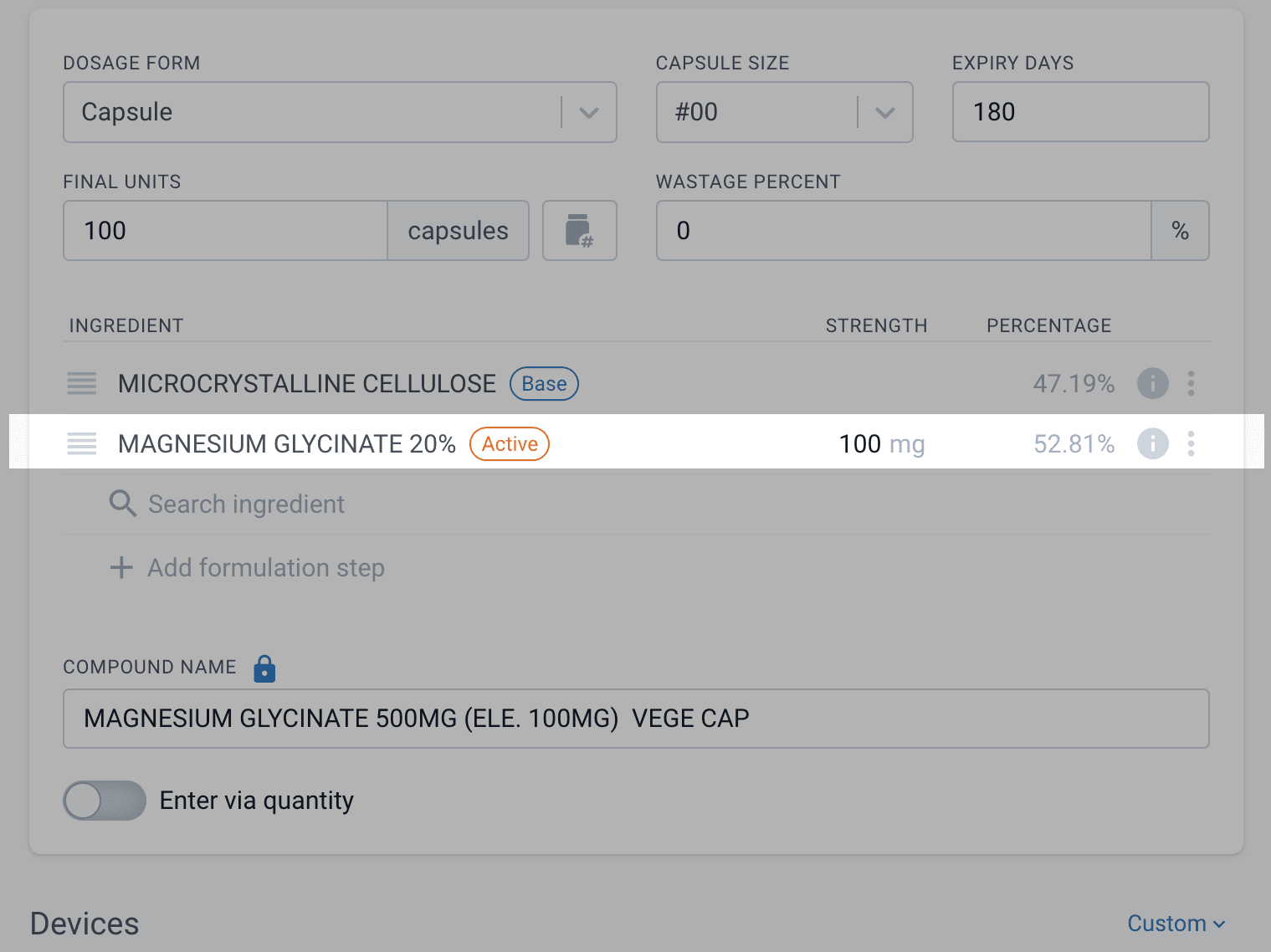
From the formulations page
Practical example
Let’s say you’re working in your pharmacy and you often make an ear gel emulsion for veterinarian patients. The emulsion asks for a small percentage of Dexamethasone at 0.1%. Due to the minimum weighable amounts, you may need to either use a crushed commercial tablet OR the raw powder. In Compound Direct you can handle this without having to re-create new formulas or re-calculate the quantities based on the final volume.
In the case where only 10g of final quantity is required Compound Direct calculates the weight of the crushed Dexamethasone 4mg needed and adjusts the base QS.
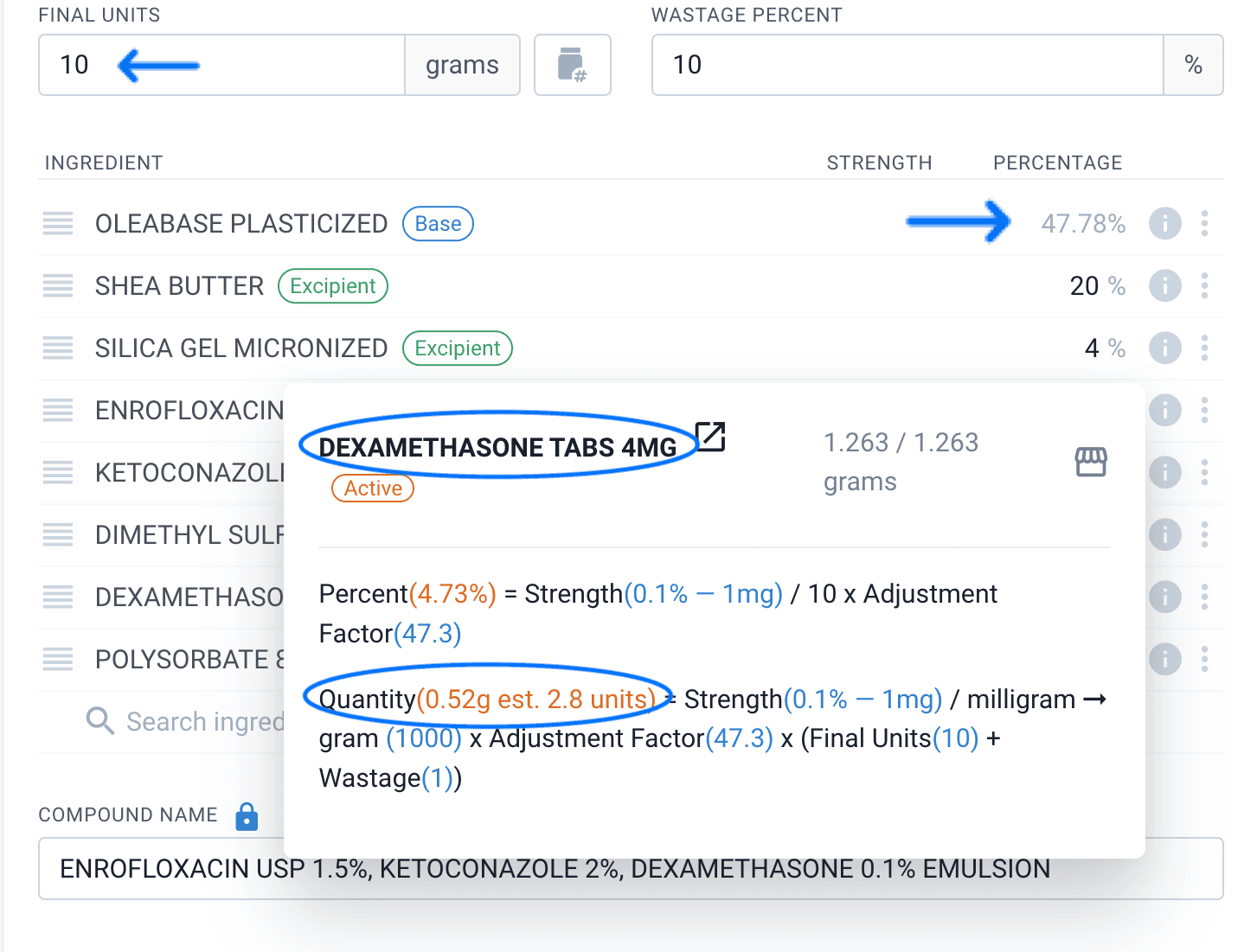
From the formulations page
In cases where a larger quantity, 100g is needed you can simply substitute the tablet ingredient for the powder and it will automatically adjust both the required amount and the base QS.
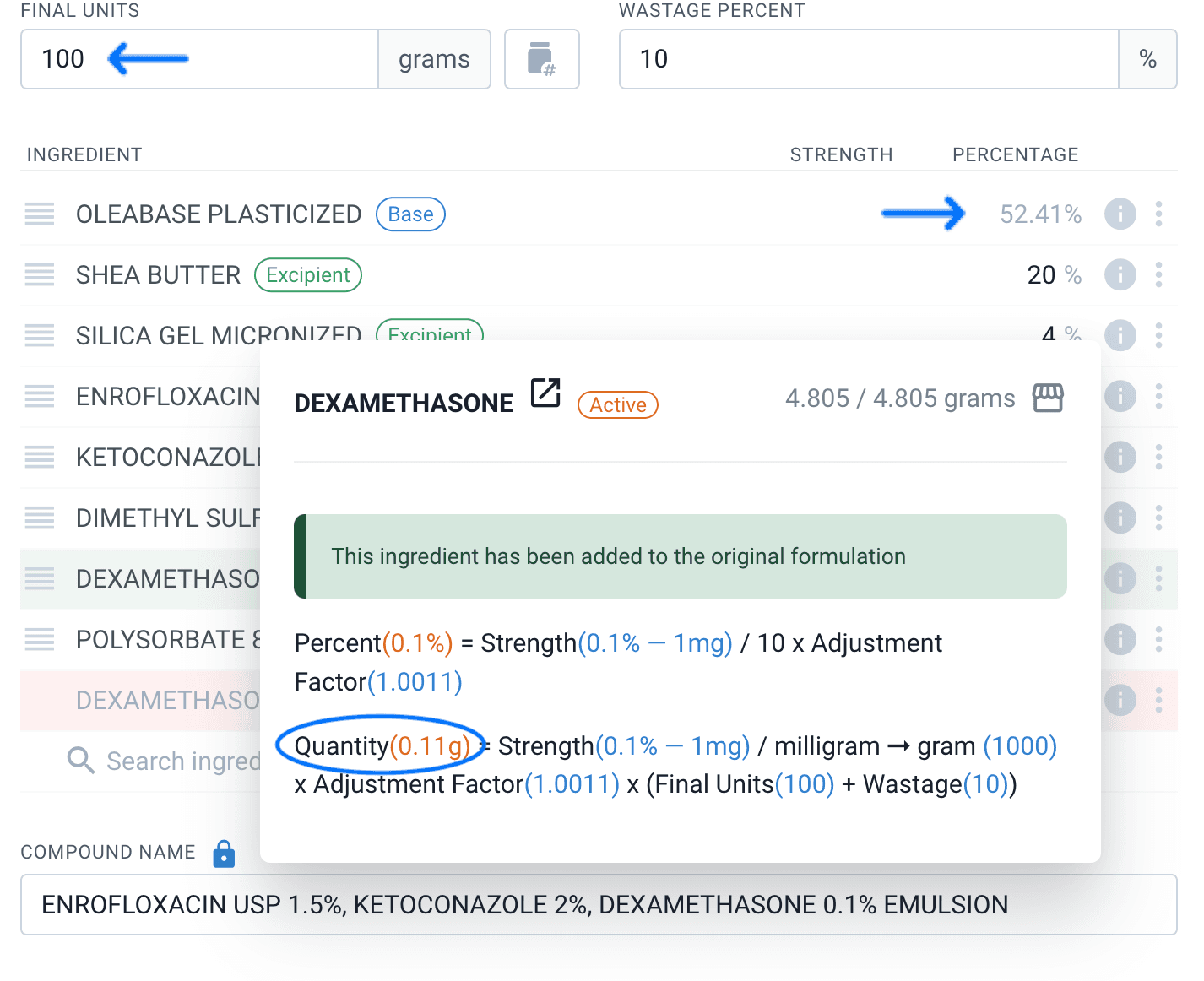
From the formulations page
Compound Direct’s real-time calculations and built-in adjustment factors mean that changing formulas like Vitamin D capsules, Nystatin gels or Minoxidil troches is a fast, accurate and simple process.
Summary
- Adjustment factors are multipliers that account for the active chemical amount in ingredients
- Types include assay and loss on drying, percentage of elemental, activity (IU), and adjustments for commercial medicines
- Correct application of adjustment factors is crucial for accurate formulations and dosing
- Compound Direct inherits certain aspects of adjustment factors and alerts users to significant changes
- Real-time calculations in Compound Direct simplify formula creation and reduce risks of errors
- Proper understanding and use of adjustment factors enable safe and efficient compounding practices
All names and medical data shown in software screenshots are fictional and for demonstration purposes only. These figures represent fictional persons; any resemblance to real individuals is purely coincidental. Use of existing fictional names is for illustrative purposes and does not imply affiliation or endorsement.