
Smarter Stock Control Starts Here: Auto tracking for minimum stock on hand in Compound Direct

Stock management is one of the most important, yet often overlooked, parts of running a compounding pharmacy. While setting a minimum stock on hand (SOH) helps flag when items are running low, these values are typically static and require manual updates over time.
But what happens when demand changes?
A product that once moved slowly may suddenly become high in demand. An ingredient you stocked heavily might no longer be used as frequently. In these situations, fixed minimum SOH levels can quickly become outdated, leading to either stock shortages or unnecessary overstocking.
That’s where Compound Direct’s Auto Tracking for Minimum Stock on Hand comes in, offering a smarter and more adaptive way to manage your inventory.
By automatically adjusting minimum SOH, you can:
- Stay ahead of stock shortages
- Reduce overstocking and waste
- Save time on manual inventory management
- Improve efficiency in purchase ordering decisions
This blog will help you understand how Auto Tracking works, how to choose the right preset, and how to optimise your inventory using real usage data.
What is Auto Tracking for minimum SOH?
Minimum stock on hand can be entered when setting up ingredients and other product types in the system. The value entered allows the system to automatically flag low stock items across ingredients and other product categories. These items are clearly marked with a low stock badge, making it easier to identify what needs attention at a glance.
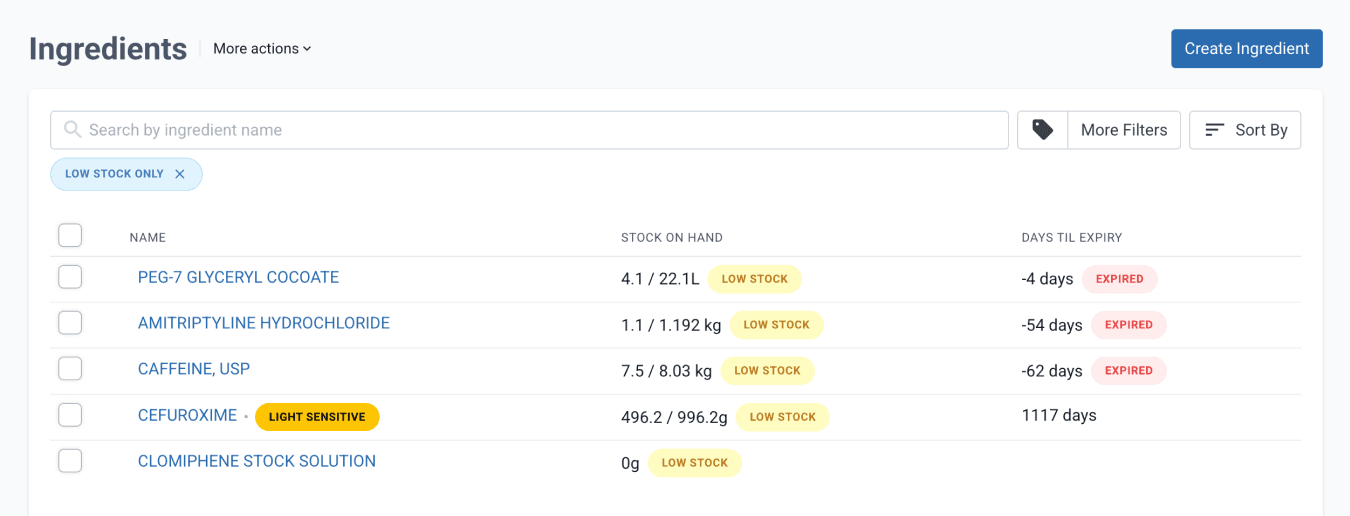
From the ingredients dashboard
Auto Tracking is a feature in Compound Direct that automatically adjusts your minimum stock levels based on how your inventory is actually used. When enabled, the system continuously monitors stock usage and updates your minimum SOH according to your selected preset. This ensures your inventory levels stay aligned with real dispensing patterns without the need for manual intervention.
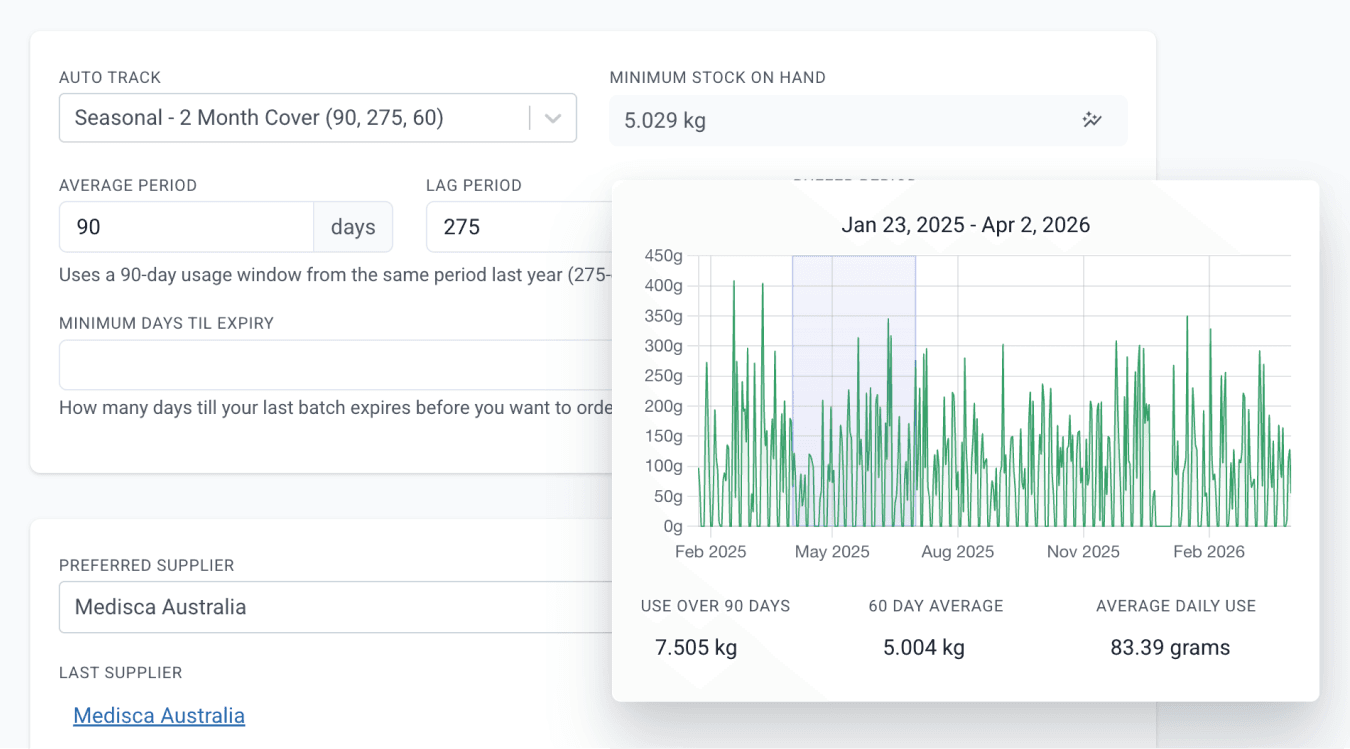
From the edit ingredient page
Choosing the right preset
Auto Tracking includes a range of preset options that determine how minimum stock on hand (SOH) is calculated based on historical usage and desired stock coverage.
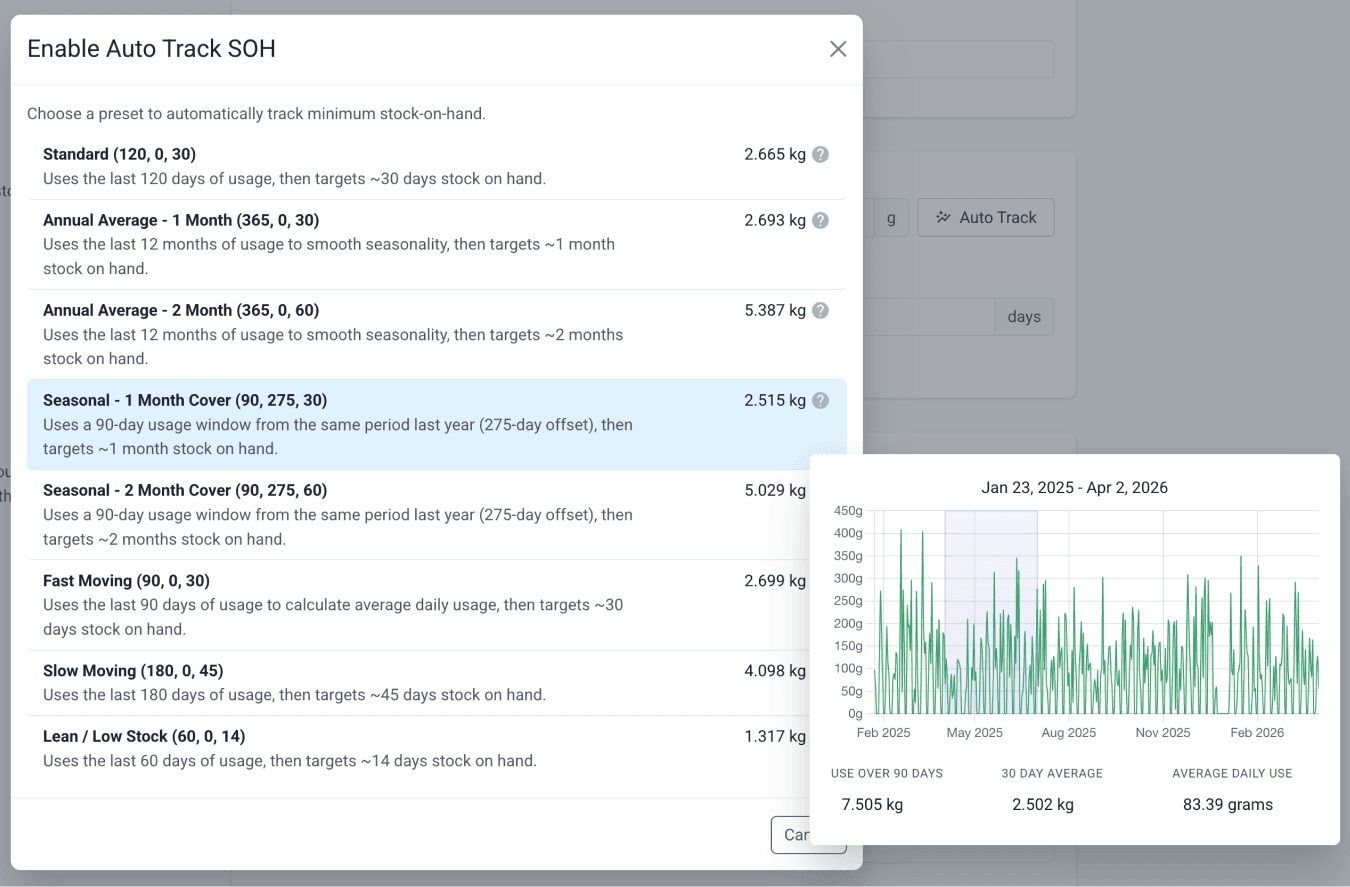
From the edit ingredient page
Each preset uses a defined usage window and target stock duration, allowing you to tailor how responsive or conservative your stock levels are.
Auto Tracking works through three key parameters:
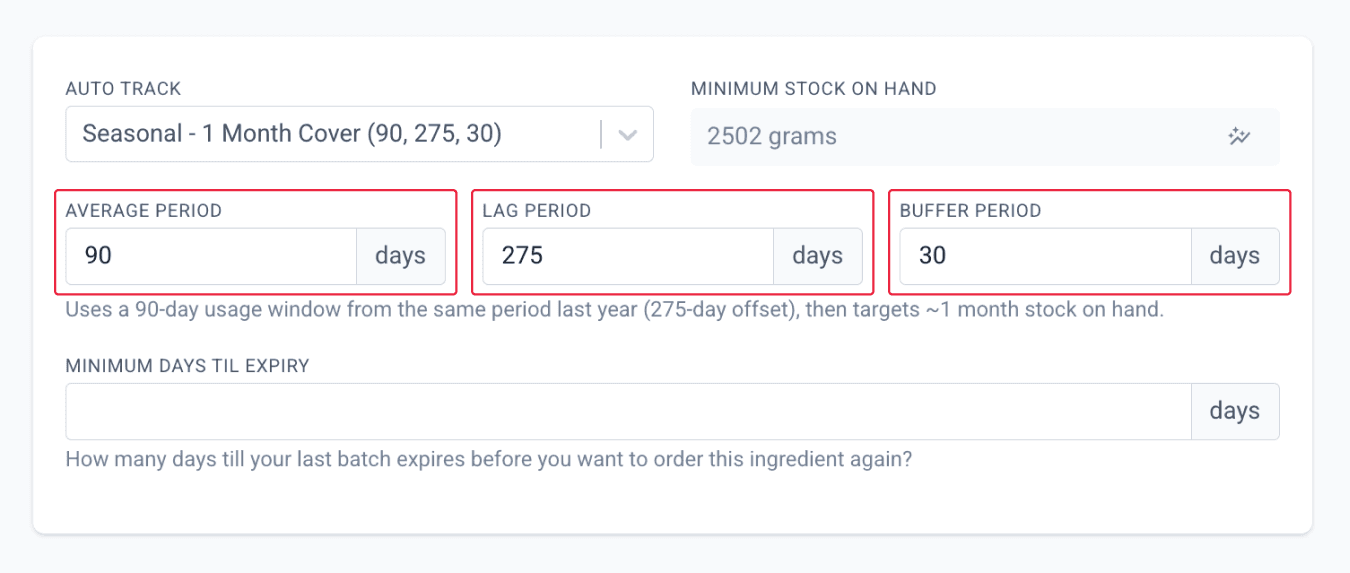
From the edit ingredient page
- Average Period – the number of days used to calculate average daily usage
- Lag Period – how far back the system goes before it starts calculating the average.
- For example, a 275-day lag shifts the starting point back, and when combined with a 90-day average period, it effectively looks at usage from around the same time last year (275 + 90 ≈ 365 days).
- Buffer Period – the number of days of stock to maintain based on usage
Together, these settings determine how your minimum SOH is automatically calculated. You can also customise each parameter to create your own Custom Auto Tracking setup tailored to your workflow.
Standard
The Standard preset uses the last 120 days of usage, then targets approximately 30 days of stock on hand.
A practical default for items with consistent usage patterns.
Annual Average
The Annual Average preset uses the last 12 months of usage to smooth out seasonal fluctuations.
- 1 Month Cover → Targets ~30 days of stock
- 2 Month Cover → Targets ~60 days of stock
Best suited for items with seasonal variation, where long-term trends provide a more stable baseline.
Seasonal
The Seasonal preset uses a 90-day usage window from the same period last year (via a 275-day offset), then applies a target stock duration.
- 1 Month Cover → Targets ~30 days of stock
- 2 Month Cover → Targets ~60 days of stock
Ideal for items with predictable seasonal demand, where last year’s patterns are more relevant than recent usage.
Fast Moving
The Fast Moving preset uses the last 90 days of usage to calculate average daily consumption, then targets approximately 30 days of stock on hand.
Designed for frequently used items, where recent trends are the most accurate indicator.
Slow Moving
The Slow Moving preset uses the last 180 days of usage, then targets approximately 45 days of stock on hand.
Suitable for items with lower or irregular usage, providing a broader buffer.
Lean / Low Stock
The Lean preset uses the last 60 days of usage, then targets approximately 14 days of stock on hand.
Best suited for high-cost or easily obtainable items that you do not want to hold in large quantities.
Instead of a one-size-fits-all minimum SOH, these presets allow you to match stock behaviour to how each item is actually used. Whether you're managing fast-moving ingredients, seasonal demand, or low-usage stock, Auto Tracking gives you the flexibility to apply the right strategy for each scenario.
Low stock items on purchase orders
While Auto Tracking helps identify when stock levels are low, it does not account for expiry dates. Expiry dates are flagged separately in the system and should be reviewed alongside minimum SOH alerts, especially for short shelf-life or temperature-sensitive items. This ensures you are restocking on time while minimising waste and maintaining product quality.
On the Purchase Orders page, you can create a filtered list of low stock items and view their days til expiry side by side, helping you prioritise what to reorder more effectively.
This allows you to translate low stock insights into clear purchasing actions, ensuring inventory decisions are based on real usage data.
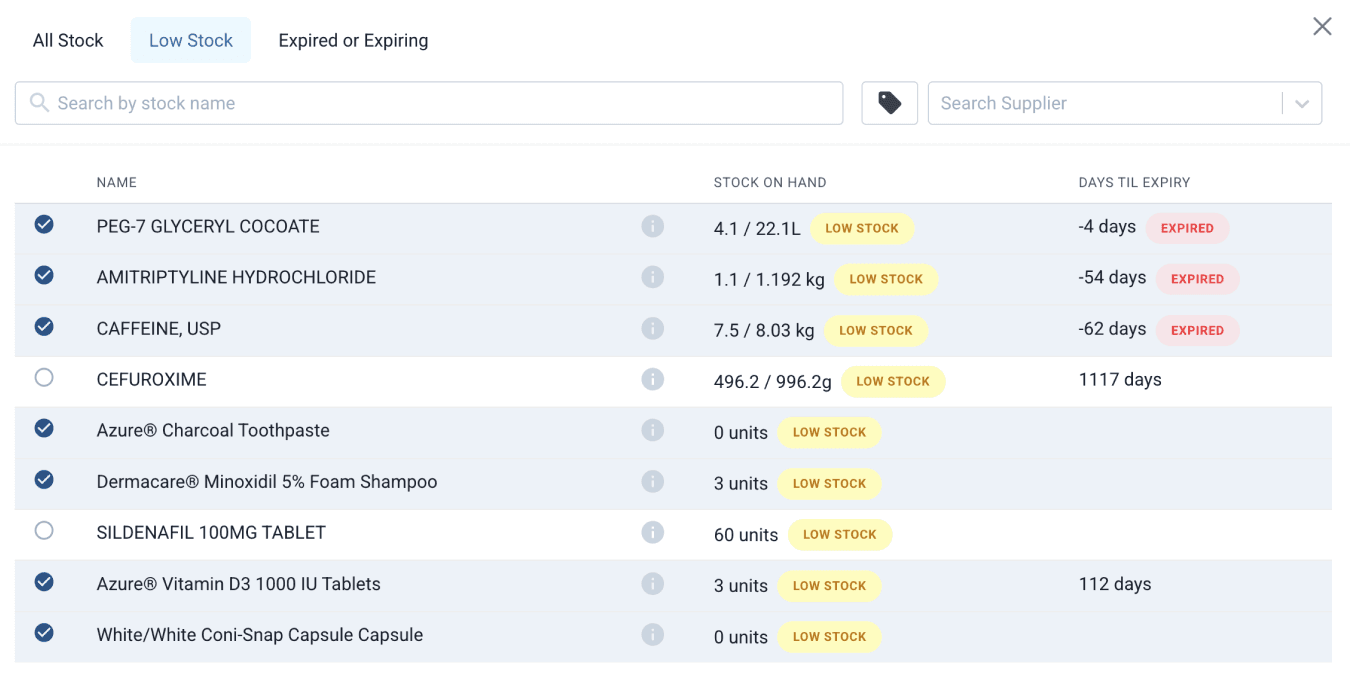
From the purchase orders page
Summary
Auto Tracking for Minimum Stock on Hand brings a smarter, more adaptive approach to inventory management in Compound Direct. Instead of relying on static minimum SOH values, the system continuously adjusts stock levels based on real usage, helping your pharmacy stay aligned with changing demand. With built-in preset options, you can tailor how stock is managed across different types of items, whether they are fast-moving, seasonal, or used less frequently. By combining automated tracking with existing tools like low stock alerts and purchase order filtering, Auto Tracking helps you maintain optimal stock levels with less manual effort, improved accuracy, and greater confidence in your inventory decisions.
All names and medical data shown in software screenshots are fictional and for demonstration purposes only. These figures represent fictional persons; any resemblance to real individuals is purely coincidental. Use of existing fictional names is for illustrative purposes and does not imply affiliation or endorsement.