
I've used PK Software, how does Compound Direct work?

You may have been using PK Software for your compounding for a while now. In this article, we want to leverage your understanding of how PK software works and explain how the concepts are translated from PK into Compound Direct.
Core differences
Strength First
Compound Direct uses a "strength-first" model of formulating. This means that you simply enter the elemental strength of an ingredient and the system will calculate the quantity in grams using the appropriate batch. This means that formulas never need to be adjusted once created as all changes to the batch will occur at a batch level.
Adjustment Factors
Compound Direct uses an adjustment factor for each ingredient to convert from the elemental strength to the weight in grams. This is unique for each batch. We offer tools to transform the assay, loss-on-drying, etc.. from the CofA into an adjustment factor. This also applies to ingredients such as commercial medicines or ingredients prescribed in IU.
Capsule Calculation
Compound Direct has built-in support for capsule calculation. During formulating, the packing statistics of all the batches used will alter how the ingredients fill the selected capsule size.
Batch Compounding
Compound Direct separates batch stock records from scripts. When you make a batch of stock you compound that separately and then allocate that batch to each script. You can allocate partial amounts from more than one batch.
Dilution/Aliquots/Triturations
Compound Direct separates dilutions into their own batch record, this can be compounded separately and used as an ingredient on other formulas. Each batch can have its own adjustment factor to represent the exact percent of 'active' in the batch accurately.
Separation of Concerns
Compound Direct keeps the formulation separate from the compounding process. Compound Direct uses a world-first Drafting system to create a safe place to formulate before dispensing. This means, a draft is first created and each of the strengths is entered or a known formula is chosen and tailored before it is confirmed by 'Dispensing' the draft. No changes to the ingredient strengths can be made once dispensed. This protects the pharmacist from any unwanted changes made by other users. Weights are automatically calculated for each strength using the appropriate ingredient batches.
Conversion
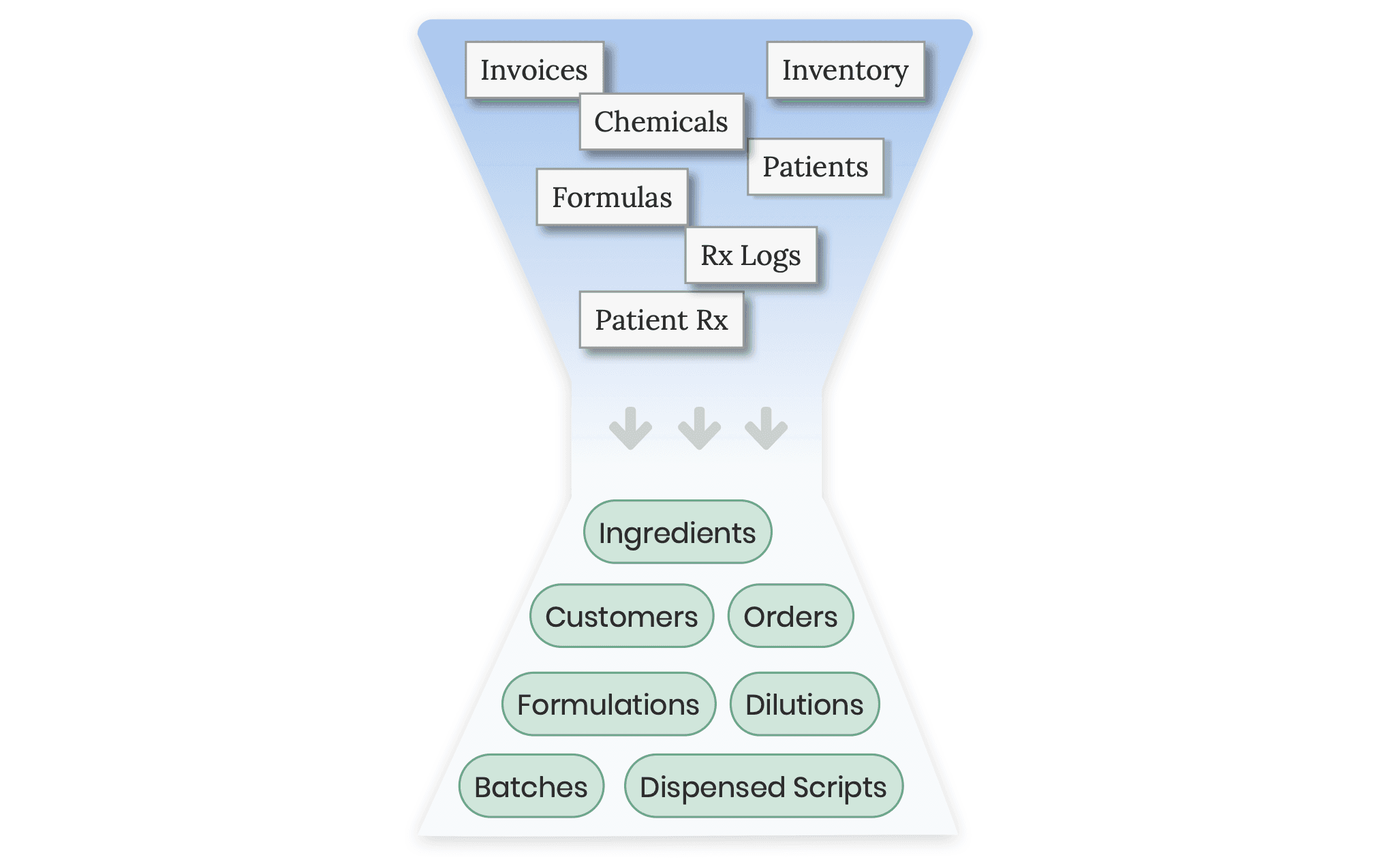
The Compound Direct conversion process converts all PK software data into your Compound Direct workspace. Most data will be simply translated, patients become customers, patient Rx becomes dispensed scripts, chemicals become ingredients and chemical inventory becomes ingredient batches.
- Patient > Customer
- Form > Dosage Form
- Patient Rx > Dispensed Script
- Log > Batch Manufacture
- Formula > Formulation
- Chemical > Ingredient
- Wholesalers > Supplier
- Chemical Inventory > Ingredient Batch
- Balance Calibration > Maintenance
- PCCA Order > Purchase Order
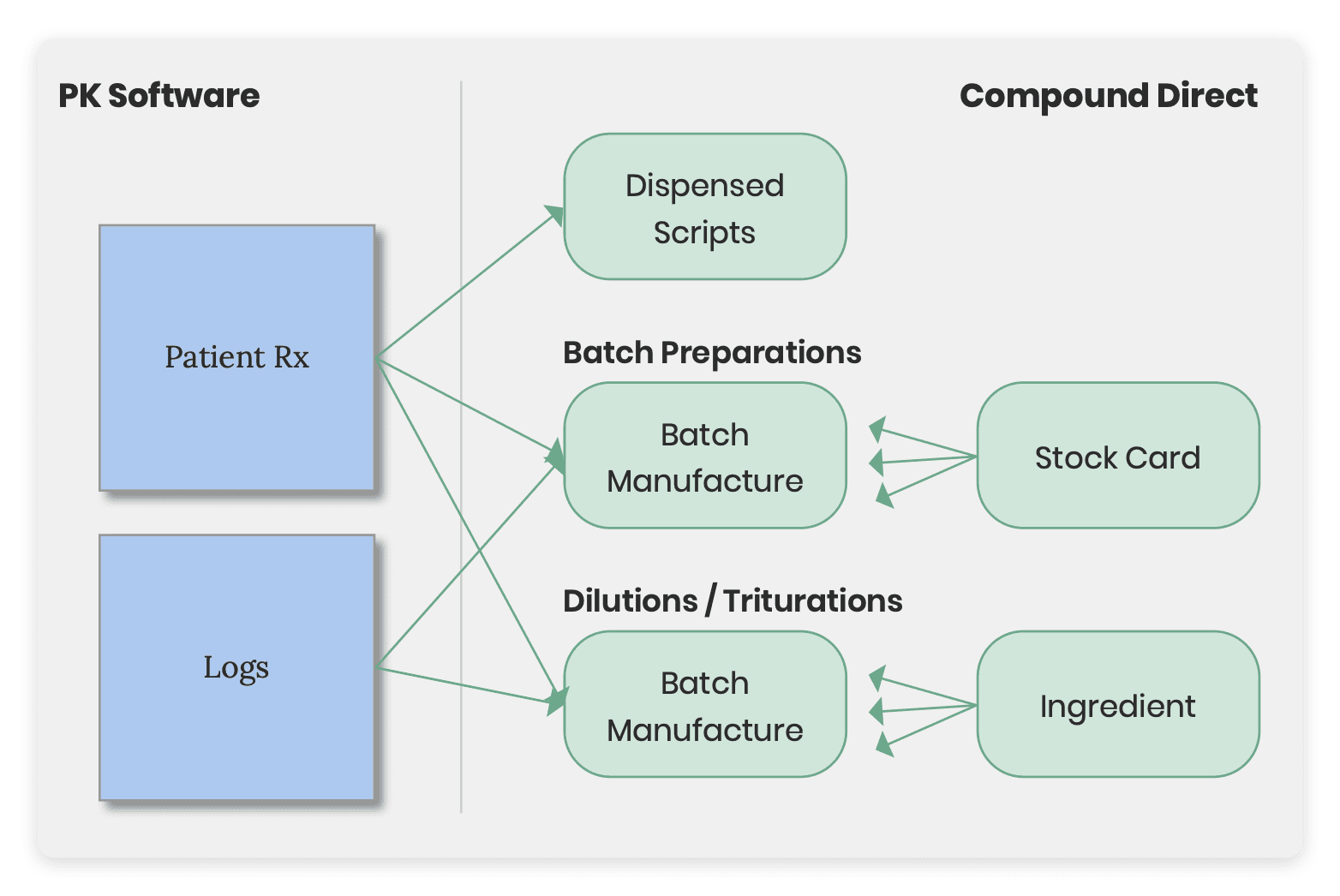
The most complex translation relates to scripts, batch, and dilutions. All logs for batch compounding and ingredient dilutions are translated into a separate batch record such that they can be individually allocated to a script. Scripts that are associated with a batch preparation record the amount they used from that batch and create a separate batch compounding record with the details of the ingredients weighed. New preparations are also made for recording details of a dilution.
In addition to the above, Inventory Adjustments, Formula Pricing, Sigs, Devices, Doctors, and Account Settings, are also imported into your workspace.
Conclusion
Compound Direct can transition 'The Compounder' software database into Compound Direct seamlessly. This means you can pick up where you left off the day prior in a powerful and easy to use compounding software that can scale with you and your team.
All names and medical data shown in software screenshots are fictional and for demonstration purposes only. These figures represent fictional persons; any resemblance to real individuals is purely coincidental. Use of existing fictional names is for illustrative purposes and does not imply affiliation or endorsement.