
E-Prescription Systems: Understanding eRx, IHI and RTPM in Compound Direct

E-Prescriptions in Compound Direct involve far more than simply importing digital scripts or scanning eScript tokens. Behind every electronic prescription is a network of connected systems working together to support accurate dispensing, patient safety, regulatory compliance, and secure communication between pharmacies, prescribers, and national healthcare infrastructure.
Through integration with eRx, Healthcare Identifiers (HI), and Real-Time Prescription Monitoring (RTPM) systems, Compound Direct supports the complete electronic prescribing workflow used across Australian pharmacy practice.
This blog will walk you through:
- eRx prescription importing, patient reconciliation, and Healthcare Identifier validation
- Prescription locking, repeat token generation, and electronic prescription conformance workflows
- RTPM integration, monitored medicine handling, and paper prescription submission to eRx
This guide also explains how these systems work together behind the scenes to support compliant, accurate, and efficient dispensing workflows in modern pharmacy practice.
Importing prescriptions via eRx
You may click the token from the MySL page or copy the eScript token and navigate to the Drafts page to import it. Click the ‘eRx’ button to begin the import.
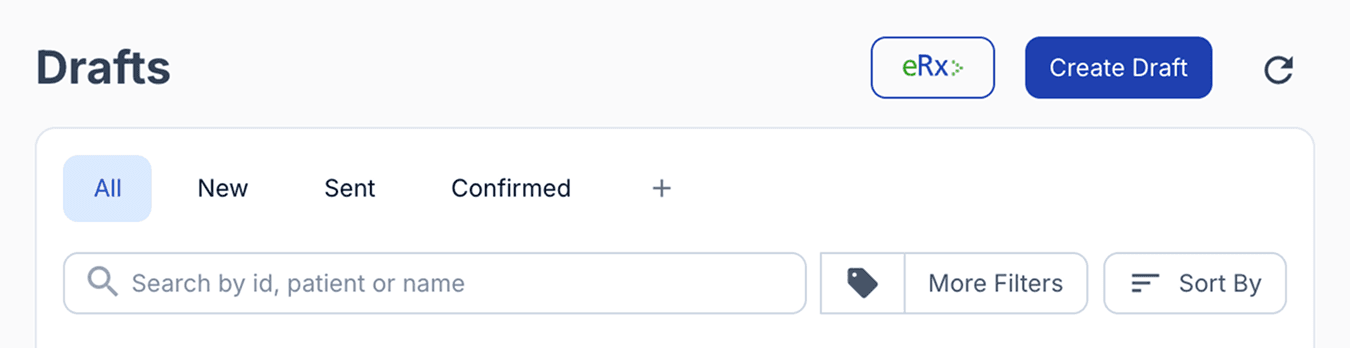
From the drafts dashboard
Simply paste the token into the Scan an eScript field and press Enter, or scan an available QR code to retrieve the prescription details.
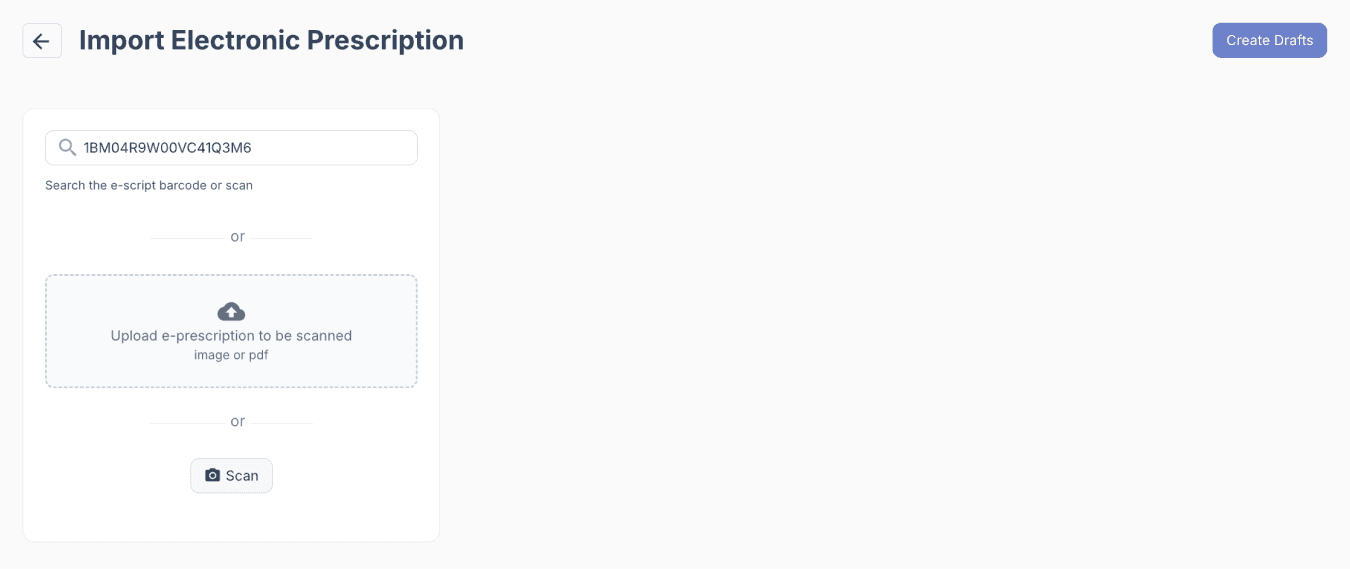
From the import e-prescription page
The purpose of this workflow is not only to import prescription data, but also to help reconcile the patient information from the token with the existing patient profile in the system, including key identifiers and demographic details where applicable.
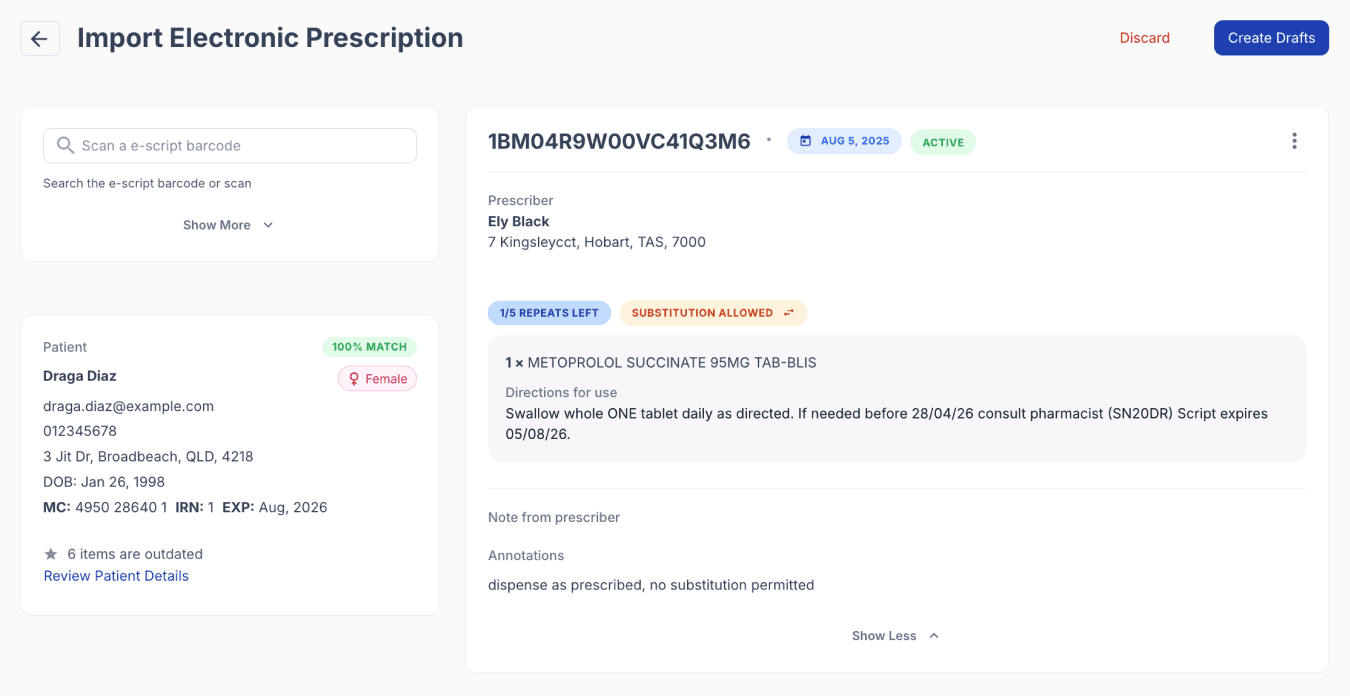
From the import e-prescription page
The primary purpose of this function is to guide users through importing prescription data while reconciling the patient details contained within the token against the existing patient profile in Compound Direct, helping ensure the correct patient record is identified and key information remains accurate and up to date.
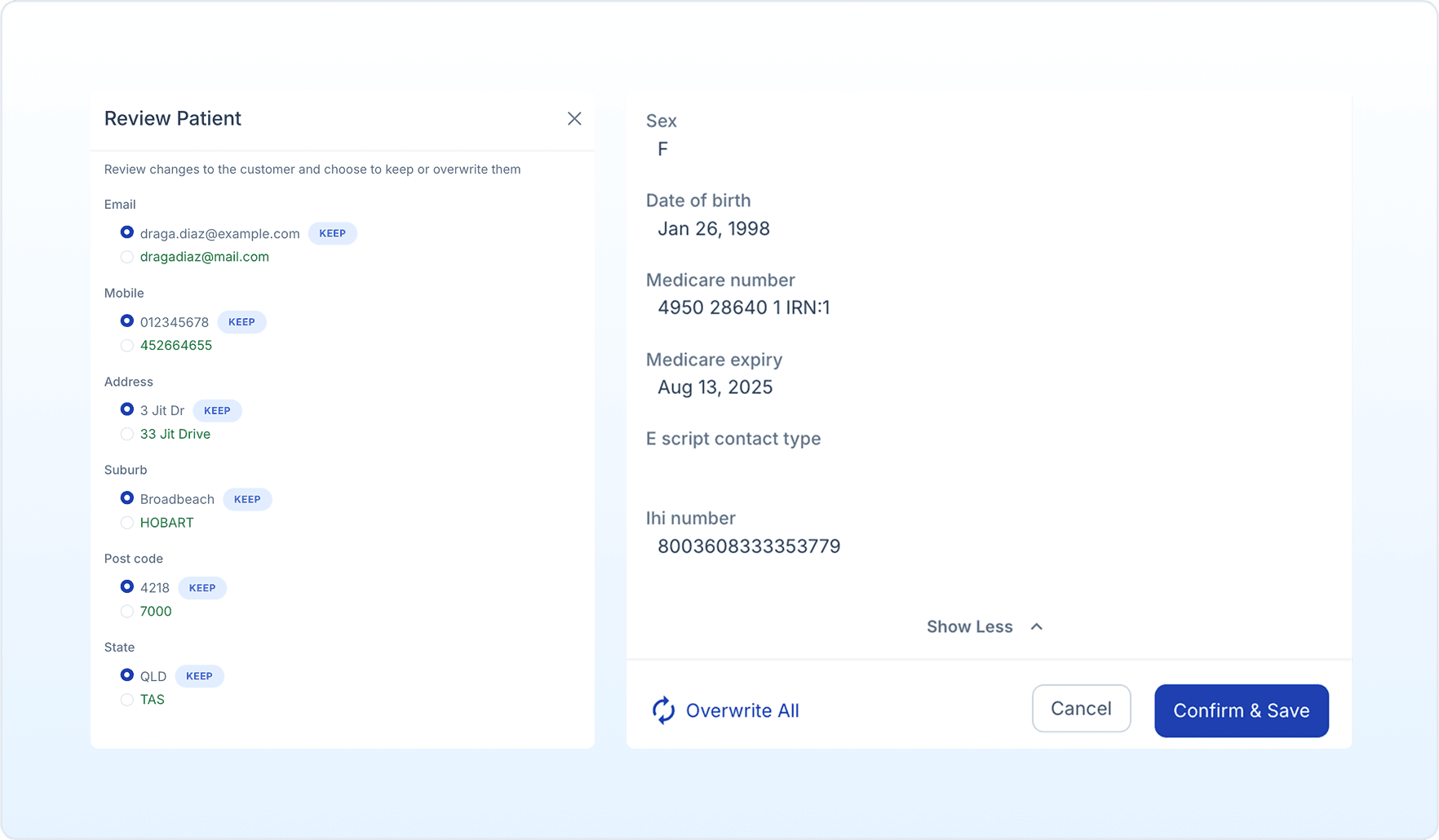
From the import e-prescription page
When a matching patient is identified, the system will highlight any differences between the existing patient record and the newly received information. This makes it easy to spot details that may be outdated, such as a Medicare number or expiry date, and review them before saving any updates.
During the merge process, users can choose which information to keep. For example, you may decide to update the Medicare expiry while keeping other existing patient information unchanged. Once reviewed, the selected changes can be confirmed and saved directly to the patient record.
How the merge behaves is determined by a preference available in the workspace settings for the eRX integration.

From your workspace settings
When the ‘prefer stored customer data’ option is enabled, the system prioritises the information already stored in your database during the merge process. If this setting is disabled, the system will instead favour the most recently received data and automatically use the latest available information to overwrite existing details.
If there is available information from the token (e.g., mobile number) that is not stored in the existing patient record, the system will fill in the gaps using the info from the token.
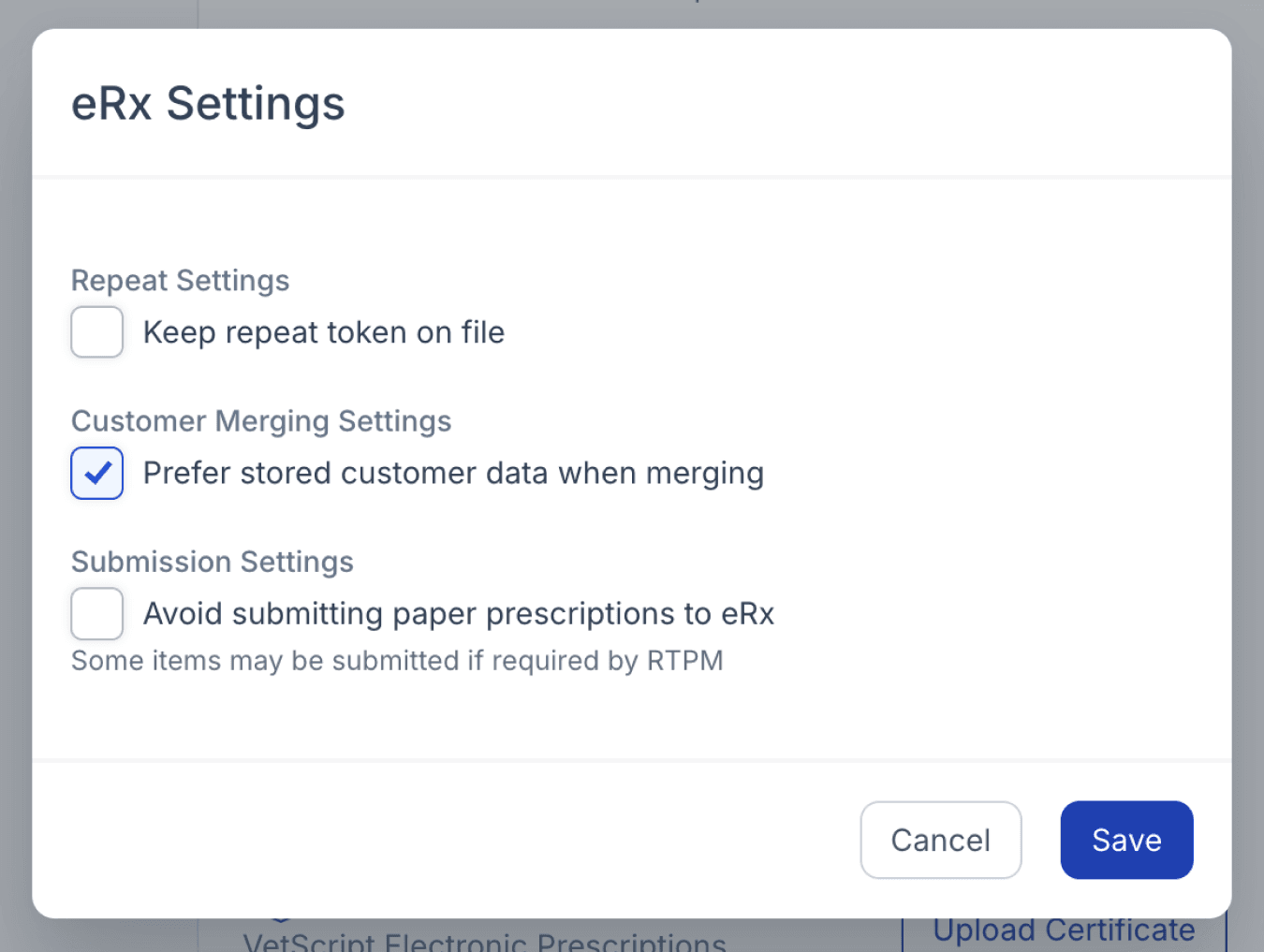
From your workspace settings page
Detecting matching patient records
In cases where multiple patients share similar identifying information, such as the same name, Compound Direct helps prevent misidentification by presenting possible matches for review.
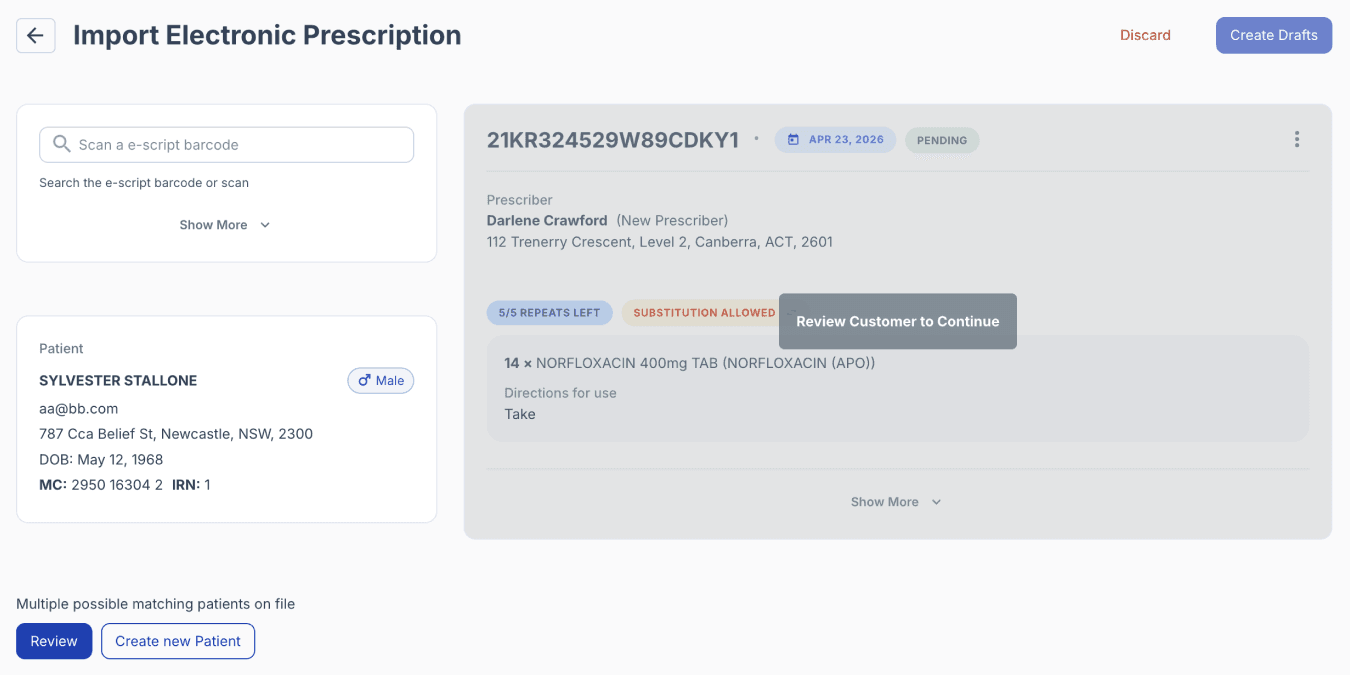
From import e-prescriptions page
Your team can then confirm exactly which patient the prescription belongs to before proceeding.
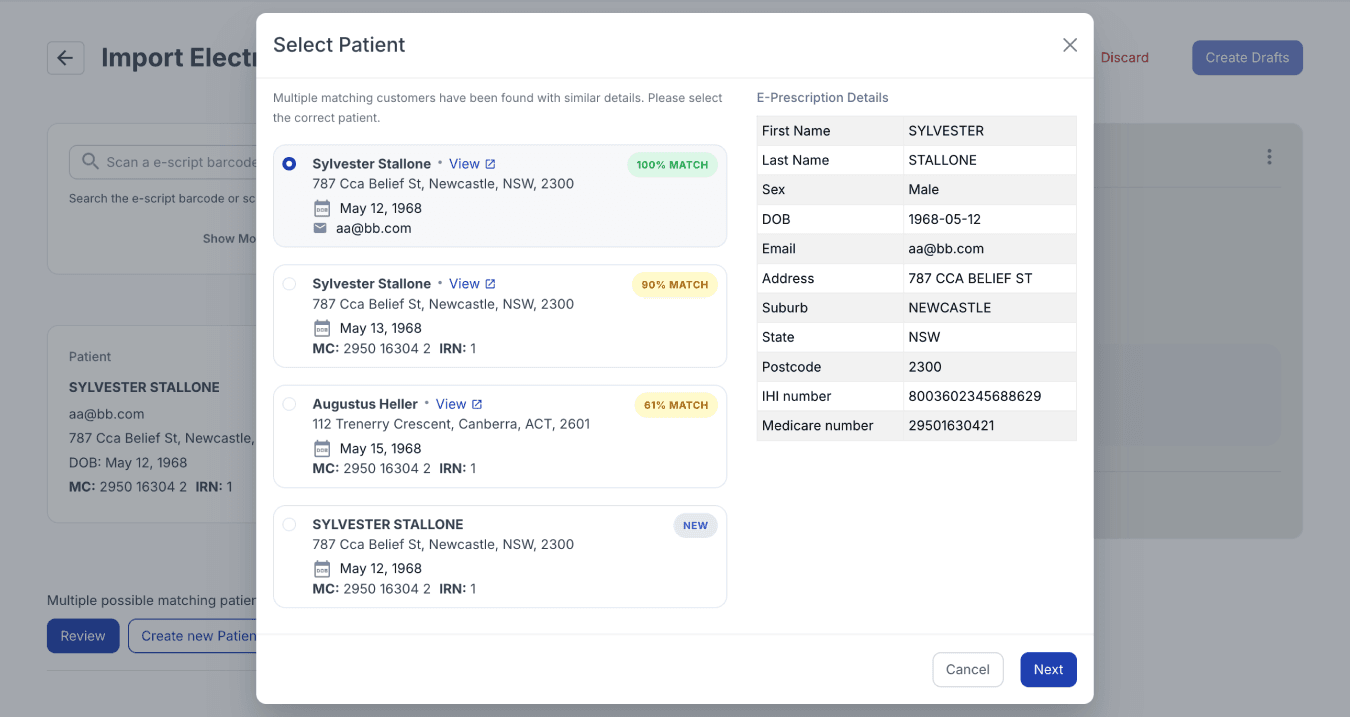
From import e-prescriptions page
To further improve matching accuracy, Compound Direct supports the use of the Australian Individual Healthcare Identifier (IHI), a unique identifier assigned across the Australian healthcare system. When available, this identifier allows the system to confidently distinguish between patients with similar names or demographic details, helping reduce manual verification and supporting safer dispensing workflows.
Healthcare identifiers
The Healthcare Identifier system is governed by its own conformance requirements, separate from the conformance requirements for electronic prescribing. In total, Compound Direct supports two distinct conformance profiles: one for handling Healthcare Identifiers correctly, and another for handling electronic prescriptions.
As part of Healthcare Identifier conformance, the system must provide functionality to validate Healthcare Identifier data whenever it is received.
On the customer record, this validation occurs automatically when processing electronic prescriptions or any other supported health data containing a Healthcare Identifier.
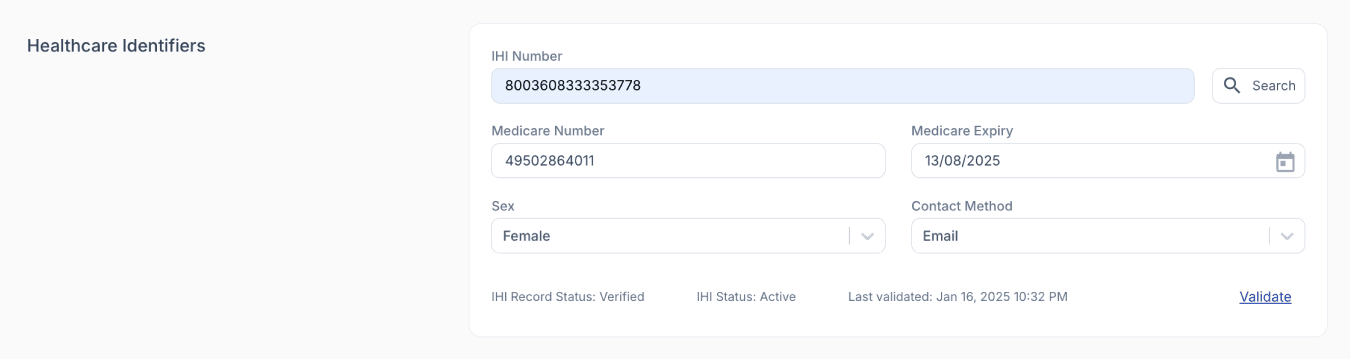
From the edit customer page
The healthcare identifier from an electronic prescription must match the patient demographics stored in the system before the prescription can be processed. This validation helps maintain accuracy and patient safety when handling electronic prescriptions.
Compound Direct also supports multiple methods for locating and validating patient records, including searches using Medicare details, DVA details, patient demographics, Healthcare Identifiers, and address information.
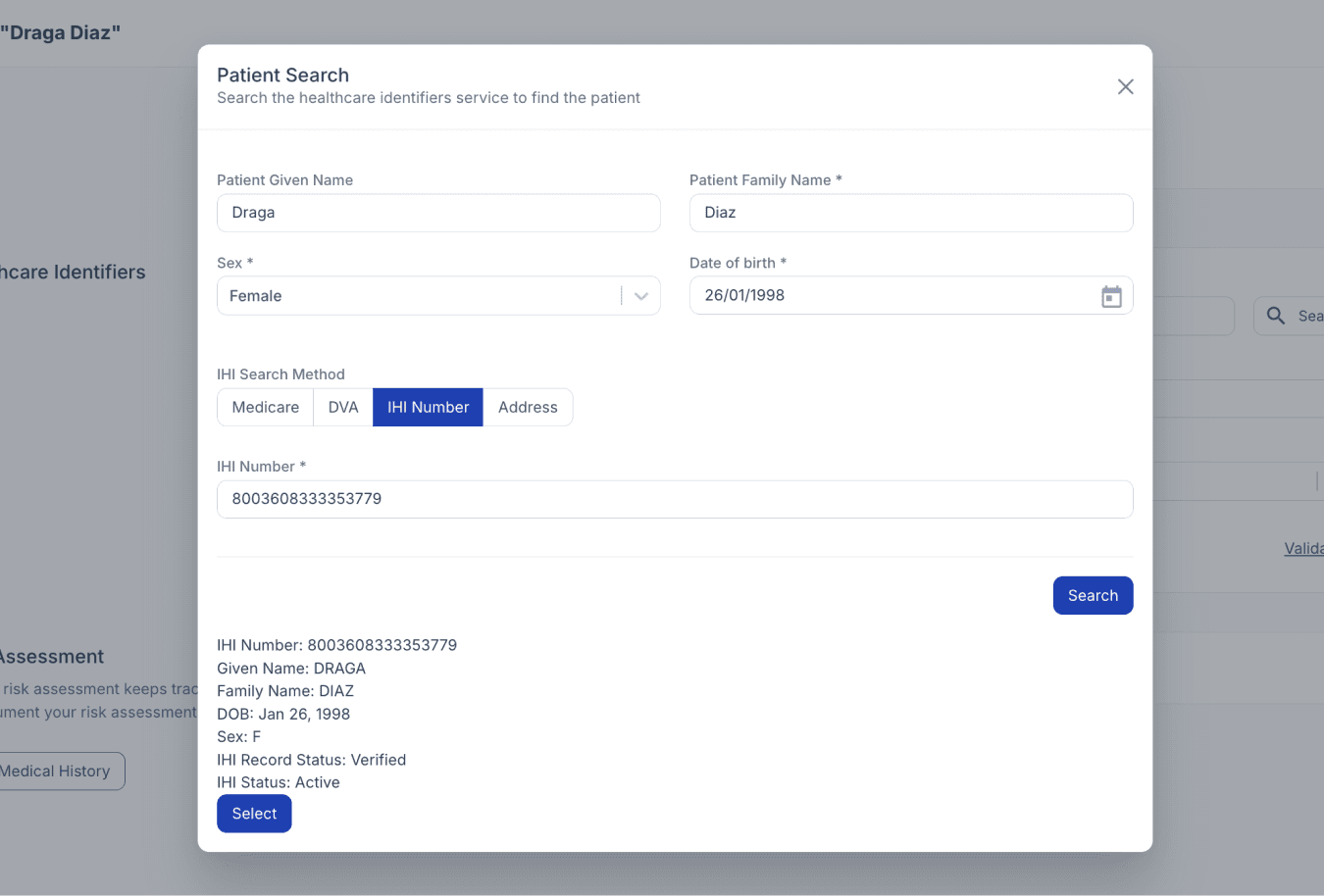
From the edit customer page
Australia’s Healthcare Identifiers (HI) Service is a critical part of electronic prescribing, ensuring prescriptions are linked to the correct patient, healthcare provider, and organisation. In Compound Direct, an IHI number is required to access a patient’s MySL.
Prescribers and pharmacists are also recognised as healthcare providers and have their own Healthcare Provider Identifier (HPI-I) records linked to their professional details. Similar to patient records, these are also entered and managed in Compound Direct.
There are three key identifiers used throughout the ePrescription workflow:
- IHI (Individual Healthcare Identifier) – a unique number assigned by the Australian Government to identify each patient. This must be recorded for electronic prescriptions to be created, transmitted, and dispensed correctly.
- HPI-I (Healthcare Provider Identifier – Individual) – identifies individual healthcare providers such as prescribers and pharmacists.
- HPI-O (Healthcare Provider Identifier – Organisation) – identifies the healthcare organisation, such as the pharmacy or clinic.
- HPI-O can be entered and validated under ‘Your Workspace’ settings under the ‘Integrations’ tab.

From your workspace settings page
To authenticate with the HI Service, each pharmacy must also maintain a valid NASH certificate, which is used to securely validate healthcare identifiers and communicate with government services.
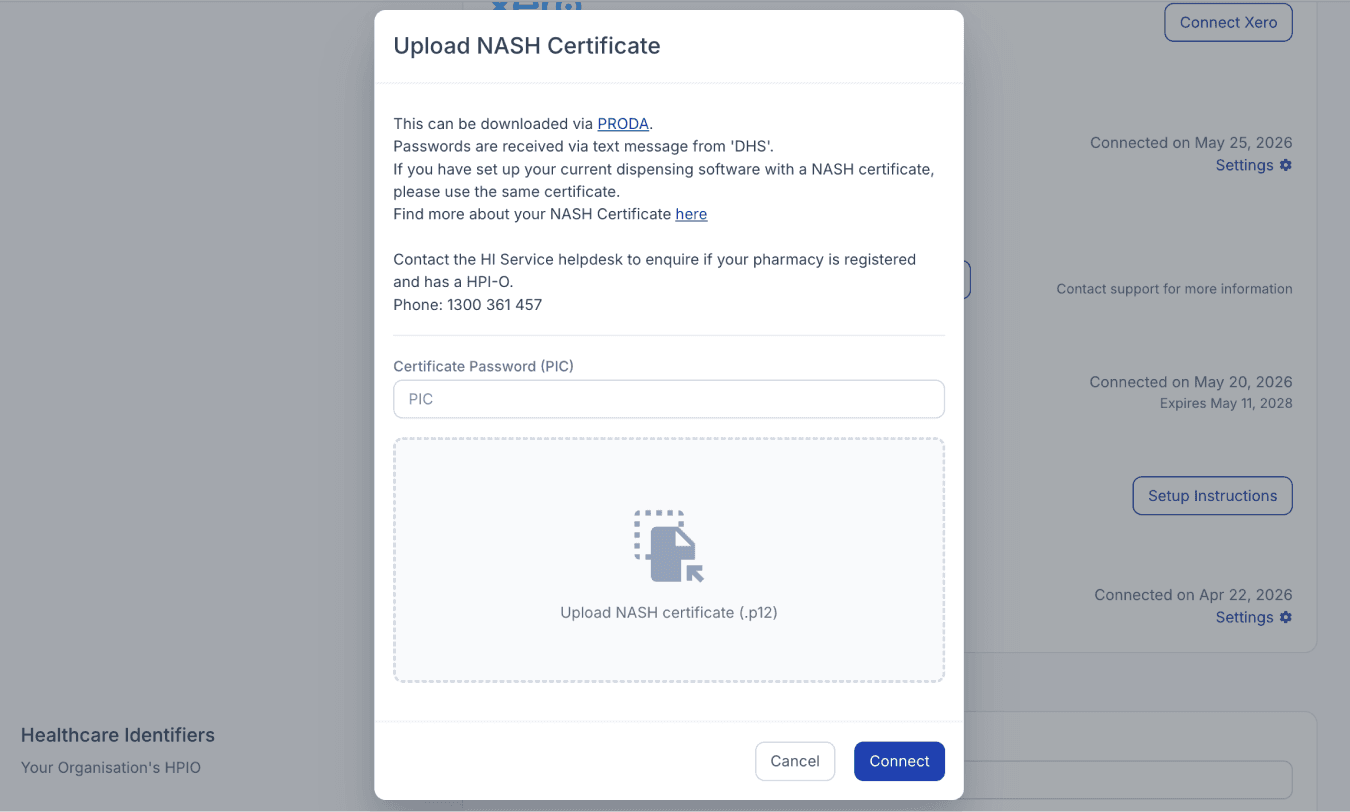
From your workspace settings
If this certificate expires or becomes invalid, identifiers such as the HPI-O can no longer be validated, preventing key ePrescription functions from being completed within Compound Direct.
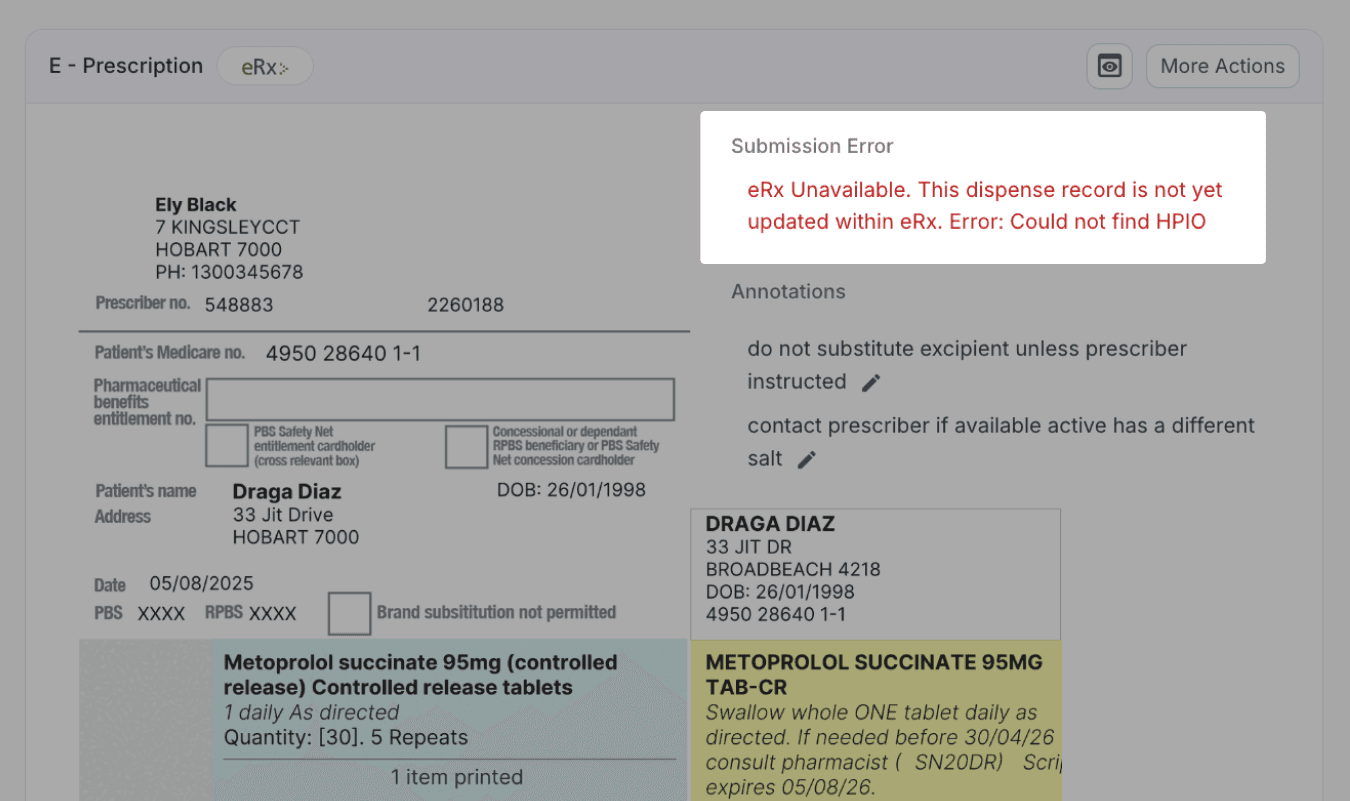
From the dispensed page
Dispensing e-prescriptions
When an electronic prescription is imported into Compound Direct, key prescription details are automatically populated into the Draft, including patient information, prescriber details, date prescribed, repeat information, and directions for use.
This reduces manual data entry and helps ensure the dispensing record accurately reflects the original prescription data.
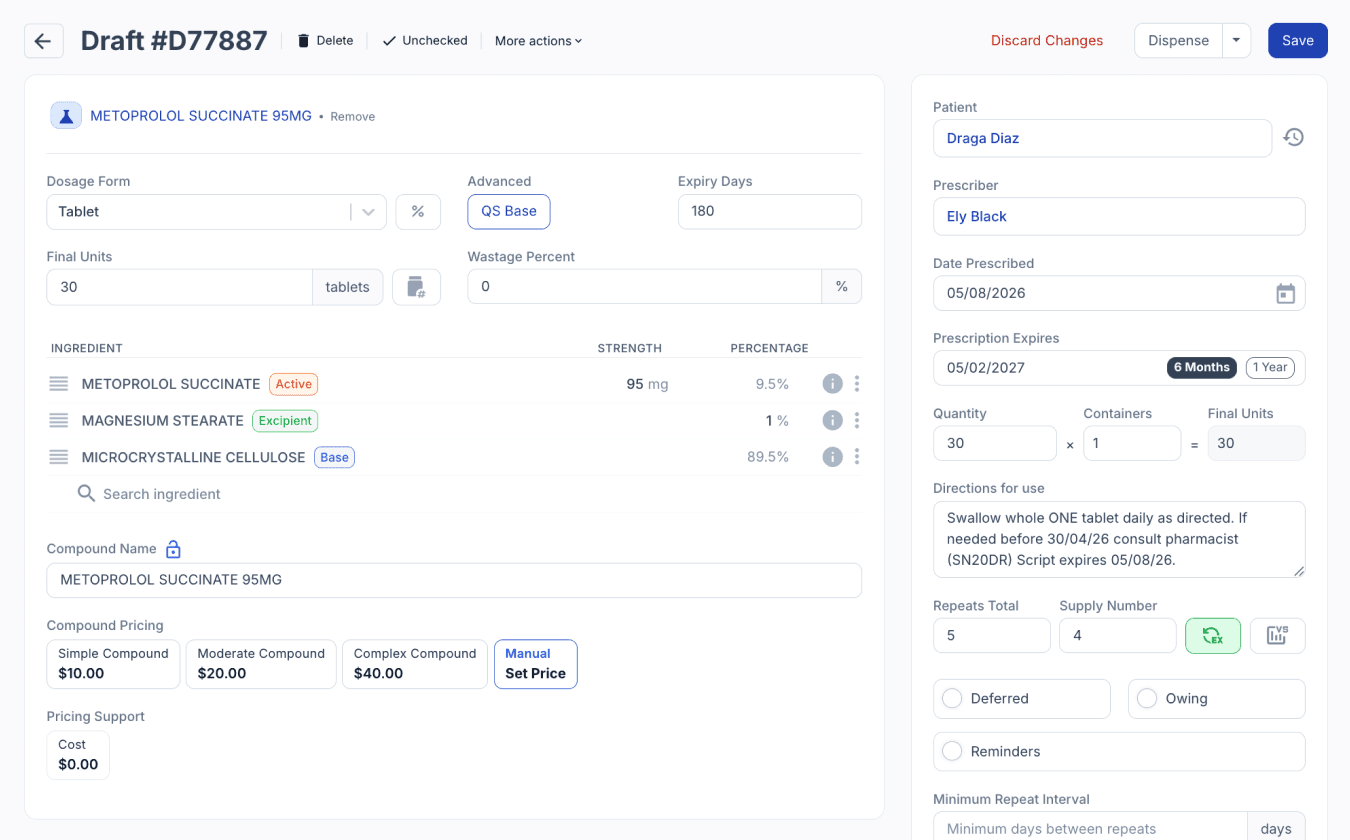
From the drafts page
Once the prescription is dispensed and submitted, the system needs to perform two separate actions.
First, it submits the dispense record, which contains the details of what medication was dispensed to the patient. Second, it creates and submits the repeat record. These are handled as two separate submissions to eRx: one for the current prescription and another for the repeat token.
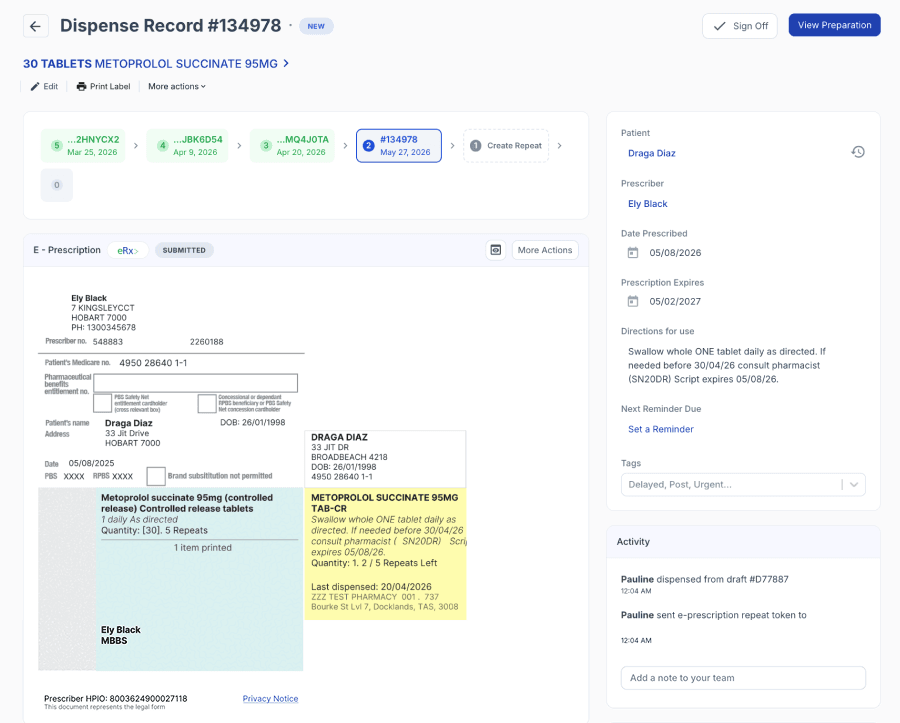
From the dispensed page
Electronic vs. Paper Prescriptions
Both paper and electronic prescriptions may contain an eRx barcode, however the legal source of truth differs depending on the prescribing method.
For Paper Prescriptions, the legally valid document remains the original physically signed paper script.
In contrast, under the Paperless / ETP2 (Electronic Transfer of Prescriptions - Part 2) electronic prescribing model, the legal prescription is the digital prescription data securely stored within the exchange.
When importing a paper prescription in Compound Direct, the system applies a watermark to the digital copy indicating that it does not supersede the original hard copy, clearly distinguishing it as a reference copy rather than the legal document.
Paper prescriptions may also contain up to three medications, with each item linked to its own barcode or all three linked to a single barcode. When scanned, Compound Direct can automatically interpret this data and generate multiple draft prescriptions.
E-prescription tools
Compound Direct provides a suite of ePrescription tools designed to support day-to-day pharmacy operations, including repeat token management, prescription reconciliation, patient communication preferences, and compliance-related settings.
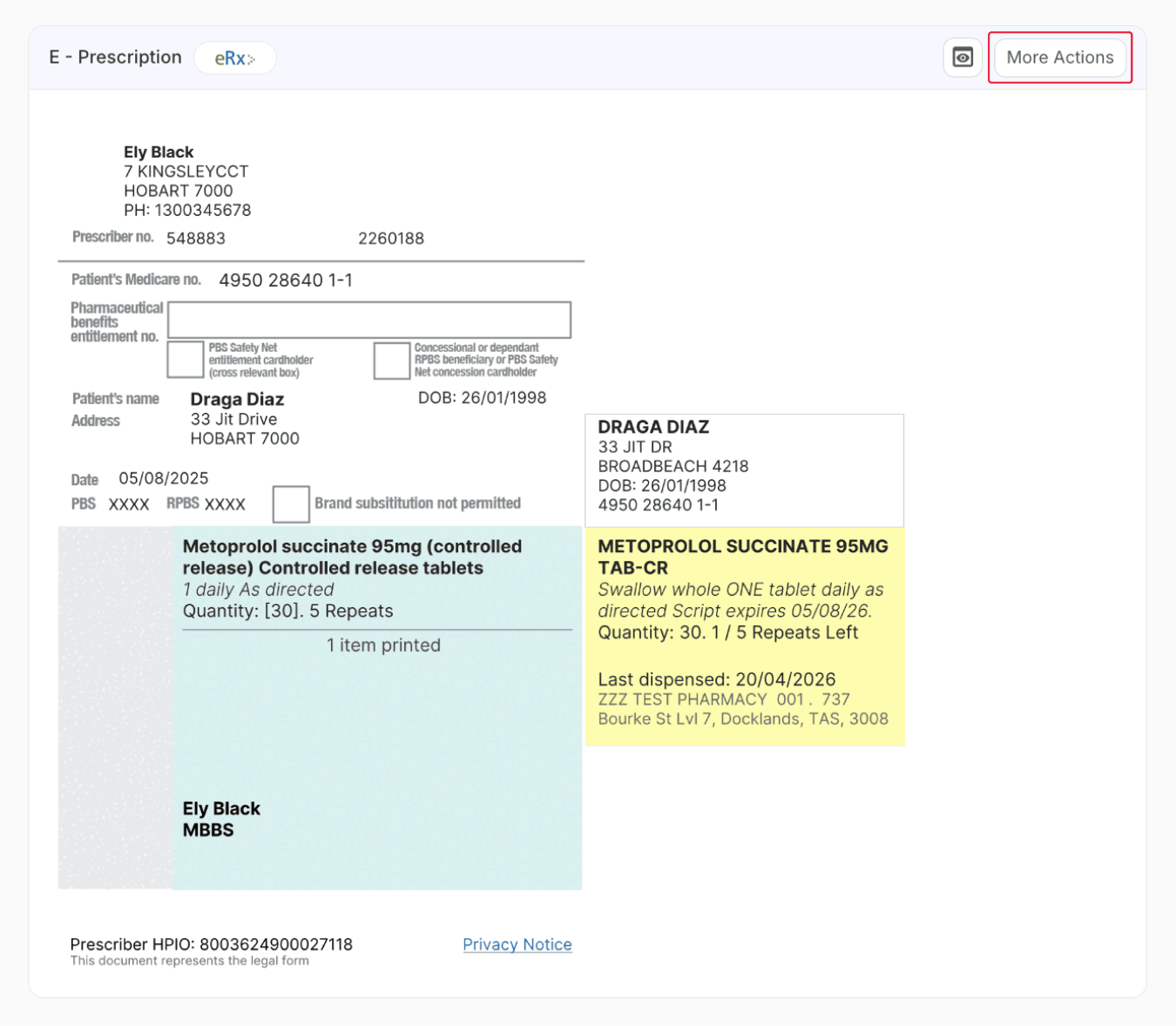
From the dispensed page
See E-Prescription tools in Compound Direct to learn how each option is used and how the system supports full conformance requirements across the ePrescription workflow.
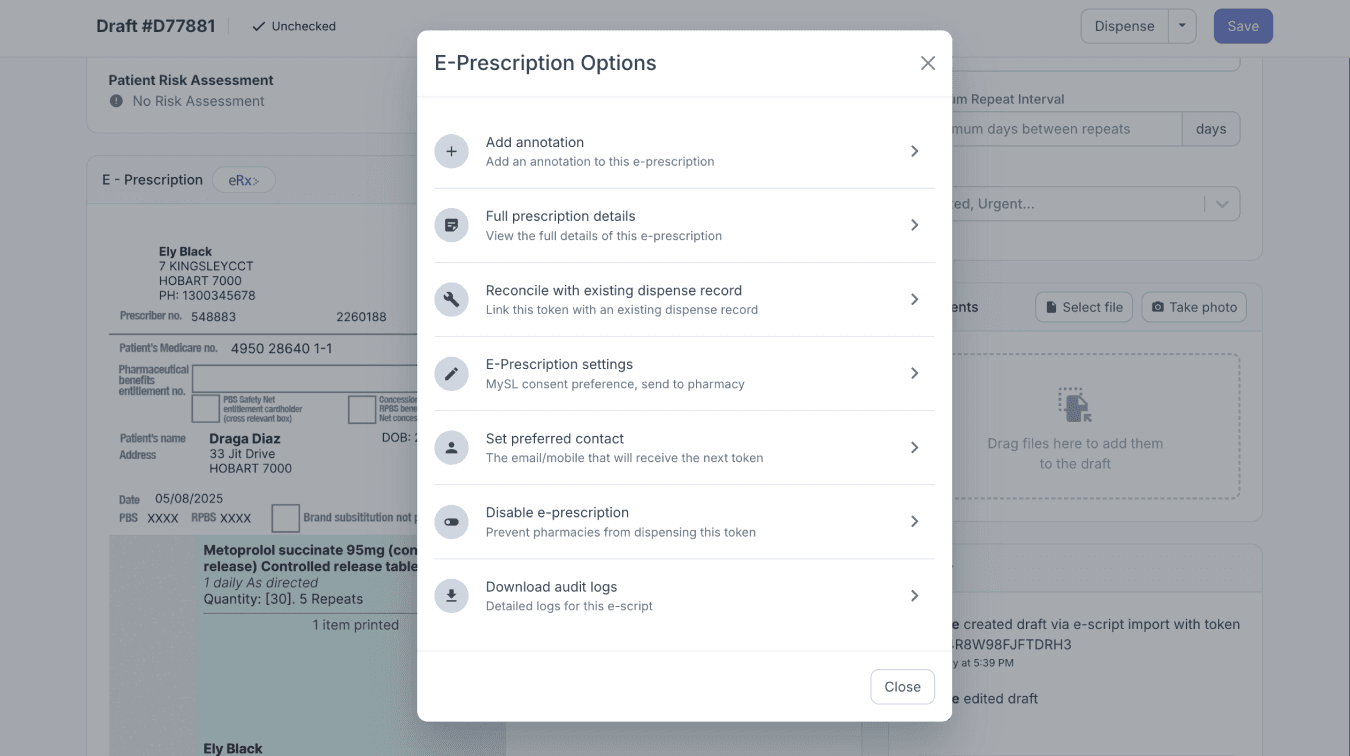
From the dispensed page
Prescription update process
When prescription details, such as directions for use, are amended, the system automatically resubmits the ePrescription. This automatically updates the dispense record and regenerates the repeat with the revised information, ensuring that both the dispense details and repeat token reflect the latest prescription details. When annotations are updated, the system also initiates a resubmission process to ensure the electronic prescription record remains accurate, up to date, and compliant.
The number of repeats itself cannot be changed, and it’s generally not recommended to amend repeats directly if the original prescription quantity was incorrect. Instead, the preferred approach is to use Variable Supply. This moves away from the standard repeat structure and instead allows dispensing to continue until the total prescribed quantity has been exhausted. For example, if the doctor intended a larger total quantity, the system can track the remaining balance rather than relying on a fixed repeat count.
When Variable Supply is enabled, an additional ‘Create Repeat’ or supply option becomes available, allowing another supply to be dispensed even when no official repeats remain. This allows the electronic prescription to continue without manually increasing repeat numbers.
See Variable Supply on our blog to learn how variable supply works.
When the repeat token is scanned again, the system creates another draft and automatically recognises the previous dispense. The previously dispensed formula is copied across into the new draft for convenience, even though formulation details are not technically submitted to eRx.
Prescription locking system
The locking system is an important part of how electronic prescriptions are managed within the eRx exchange. Since electronic prescriptions do not have a single physical paper copy, the same prescription could potentially be accessed by multiple pharmacies at the same time. To prevent this, eRx applies a temporary lock whenever a pharmacy scans or downloads a prescription.
When a prescription is locked, only that pharmacy can access and dispense it during the lock period. Other pharmacies, and even the original prescriber, cannot amend or retrieve the prescription until the lock expires. If another pharmacy attempts to access it during this time, the system will display a lock error instead of showing the prescription details.
The lock typically lasts for 15 minutes. In compounding workflows, prescriptions may remain in draft status for longer periods while pharmacies prepare quotes, contact patients, or wait for payment approval. Because of this, the system automatically attempts to refresh and reclaim the lock whenever the draft is reopened or viewed again. However, if you’re not actively viewing the draft, the script can be accessed and dispensed by another pharmacy.
If another pharmacy has already dispensed the prescription during that time, the draft can no longer be locked or dispensed. This ensures that only one pharmacy can actively dispense an electronic prescription at any given time and is an important part of electronic prescription conformance requirements.
Real-Time Prescription Monitoring (RTPM)
Real-Time Prescription Monitoring (RTPM) is an Australian system designed to track high-risk and controlled medicines by monitoring specific active ingredients flagged for additional oversight. In Compound Direct, monitored ingredients must be explicitly configured, including any compounded formulas, stock solutions, or derived preparations that contain them. Before dispensing, the system performs an RTPM pre-check against state-based monitoring databases such as QScript and SafeScript, providing pharmacists with additional clinical information to support safe dispensing decisions.
For monitored prescriptions, Compound Direct also supports the submission of dispensing data through eRx, helping ensure prescriptions are available to downstream RTPM systems. This includes compounded medicines, where accurate generic naming is essential because standard drug codes may not be available. Monitoring requirements vary between jurisdictions and medicine schedules, but the system is designed to support compliant workflows while maintaining dispensing efficiency.
To learn more about how RTPM works with eRx, how compounded medicines are identified and monitored, and how paper prescriptions are submitted into RTPM workflows, see our blog: RTPM in Compound Direct
Submitting paper prescriptions to eRx
Once a paper prescription has been dispensed, you can manually submit it to eRx by clicking on the ‘More Actions’ button and selecting ‘Submit to eRx’.
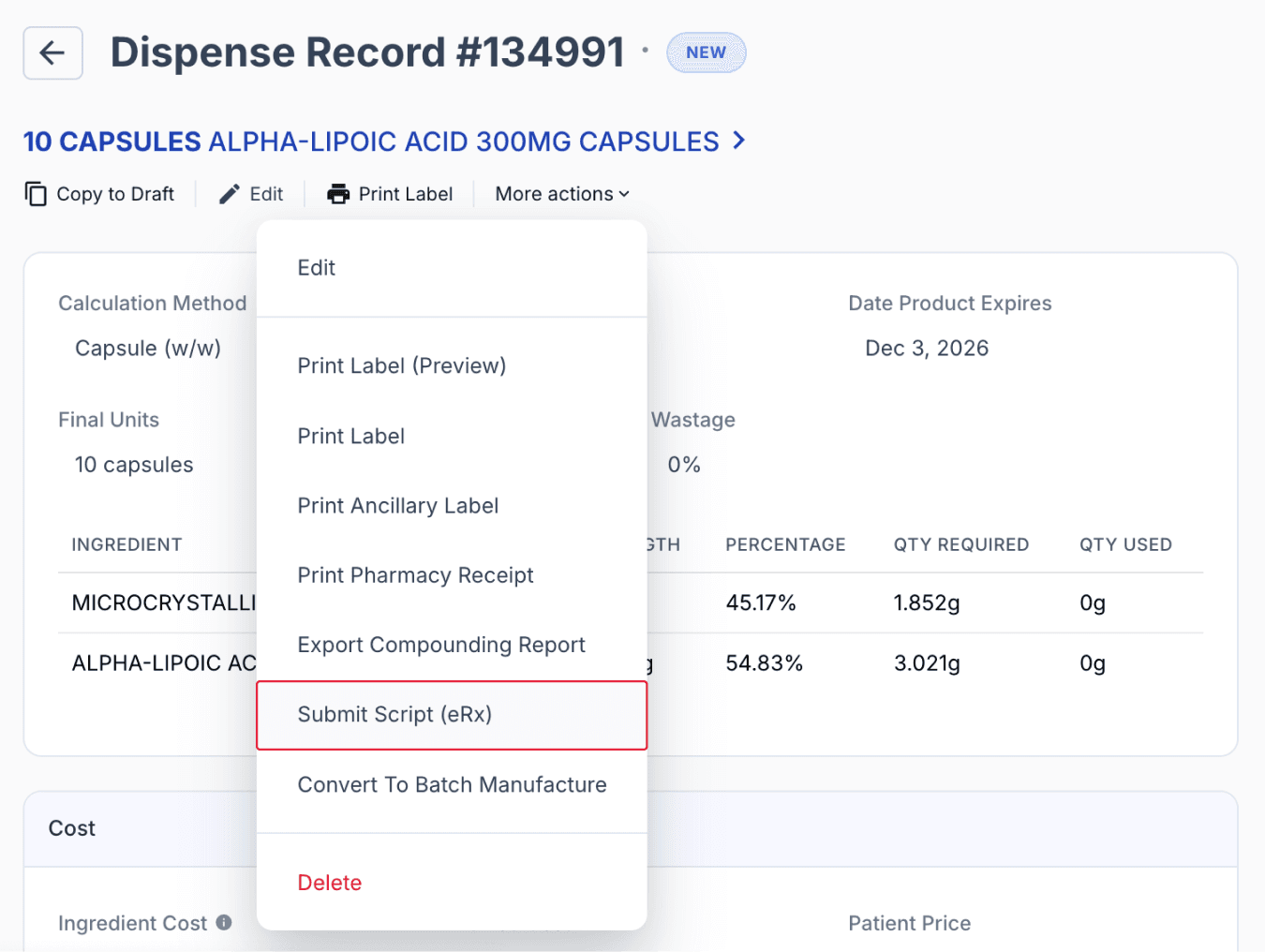
From the dispensed page
Once submitted to eRx, a repeat token can be generated and used to create subsequent repeats within the electronic prescription workflow. This also enables access to the available ePrescription Tools, supporting conformance requirements and allowing repeats to be managed using the same processes as standard electronic prescriptions.
Similar to e-prescriptions, when creating repeats or editing patient details, the system attempts to match patients using available demographic data. In some cases, partial or inconsistent data may still resolve to an existing record if other identifiers, such as script history or internal references, are present.
Summary
E-Prescriptions in Compound Direct extends beyond simply importing eScripts, supporting the full Australian ePrescription ecosystem through integration with eRx, MySL, Healthcare Identifiers, and Real-Time Prescription Monitoring (RTPM). The system helps pharmacies import and reconcile prescription data, validate patient and provider identifiers, manage repeat tokens, and maintain compliance with national conformance requirements.
Features such as patient matching, Healthcare Identifier validation, prescription locking, repeat management, and RTPM integration work together to improve patient safety, reduce manual data entry, and support accurate dispensing workflows. Compound Direct also supports the submission of paper prescriptions to eRx, enabling repeat token generation and access to electronic prescription tools while maintaining compliance with Australian pharmacy regulations.
All names and medical data shown in software screenshots are fictional and for demonstration purposes only. These figures represent fictional persons; any resemblance to real individuals is purely coincidental. Use of existing fictional names is for illustrative purposes and does not imply affiliation or endorsement.