
Balance Brick Setup
The Compound Direct Balance Brick is a small, pre-configured device that connects directly to your pharmacy balance and streams live weight data into Compound Direct. By using the Balance Brick, your pharmacy can display real-time weight measurements within the software, reduce manual entry, and support more accurate verification during compounding.
Balances can be connected to Compound Direct through a Balance Brick. The device communicates with the balance using a serial connection and securely transmits weight data to Compound Direct through PrintNode websocket services. It also supports remote management and software updates through Compound Direct’s managed Salt infrastructure.
Whether you are setting up a Balance Brick for the first time, connecting a supported balance, or confirming that live weight data is flowing correctly, this guide walks you through each stage of the process.
This guide will help you:
- Connect and power the Balance Brick correctly.
- Link your balance to Compound Direct through the Balance Brick.
- Troubleshoot common balance connection and visibility issues.
Connecting a balance brick
- Plug the power pack into a wall outlet.
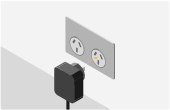
- Connect the power cable to the balance brick.
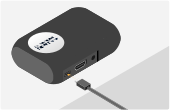
- Connect the data cable to the balance brick.
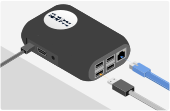
- Connect the data cable to your balance.

Troubleshooting a balance brick
Quick Checks
-
Try pressing
printon the balance -
Restart the balance & balance brick.
-
Check all cables and connections
-
Check that the balance brick has power (you need to wait at least 1 minute after plugging the power in)
-
Restart your Router (if the balance brick is connected via WiFi)
Why isn't my balance showing up?
- Balances only exist for 45 seconds after printing.
- This means that a balance needs to be continuously printing in order to be visible.
- Adjust your balance to print on regular short intervals or expect that a balance might not be visible until print is pressed.
- If your balance is set to
print on stable, then the weight might not be available if it is measuring 0g.